Color Screen Multi-channel Weather Station User Manual
Note: Snowy icon will appear in place of rainy and stormy icons when the
outdoor temperature is below 0 °C /32°F.
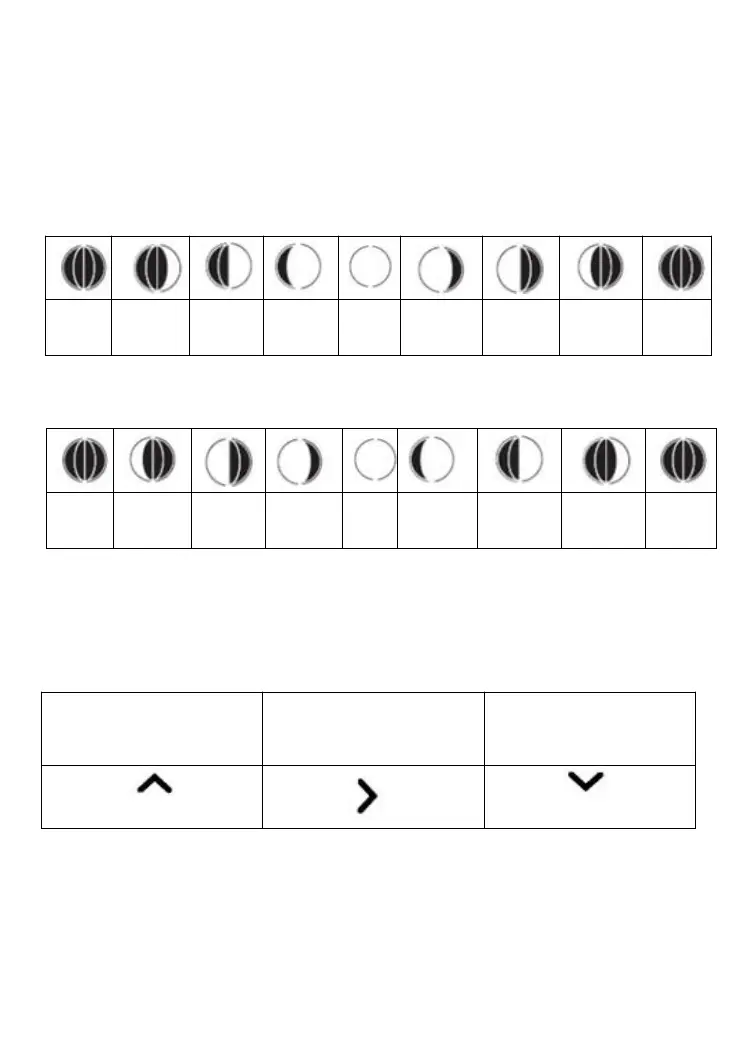
4.8.2 Moon phase
The following moon phases are displayed based on the calendar date.
Note: Above icons are for Northern Hemisphere areas. For Southern
Hemisphere the icons are as below:
4.8.3 Temperature/Humidity Trend Arrows
The temperature (2°F/1°C) and humidity (3%) trend indicators update every
30 minutes. The trend reflects changes over the past 3 hours. E.G.: At 3:00
— compares to 12:00 data; at 3:30 — compares to 12:30.
Temperature or Humidity
increased in past 3 hours
Temperature or Humidity
did not change in past 3
hours
Temperature or
Humidity decreased in
past 3 hours
4.8.4 Pressure Tendency Arrows
The forecast trend indicators update every 30 minutes. The trend reflects
changes in pressure (1 hPa) over the past 3 hours.E.G.: At 3:00 —
compares to 12:00 data; at 3:30 — compares to 12:30.



 To Next Page