Color Screen Multi-channel Weather Station User Manual
3.2 Thermo-Hygrometer Sensor Set Up
Note: To avoid operating problems, please take note of battery polarity
before/when inserting any Alkaline Batteries (permanent damaged could be
introduced by inserting the battery in wrong direction). Do not use
rechargeable batteries. We recommend fresh alkaline batteries for outdoor
temperature range between -20°Cand 60°C and fresh lithium batteries for
outdoor temperature range between -40°C and 60°C.
1. Move the transmitter(s) about 2 to 3m away from the display console
(if the transmitters are too close, they may not be received by the
display console). With multiple transmitters, make sure all transmitters
are powered up and displaying different channels on the display.
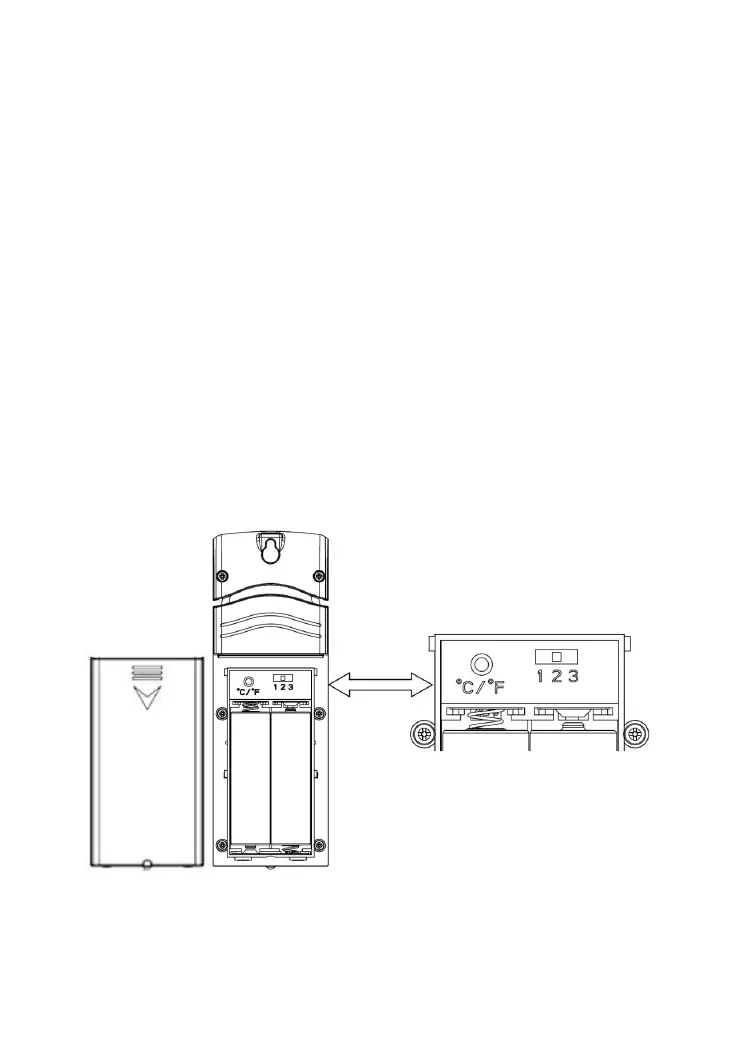
2. Remove the battery door on the back of the thermo-hygrometer sensor
by sliding down the battery door.
Figure 4
3. BEFORE inserting the batteries, locate the slide switches on the inside
cover of the lid of the transmitter(Figure 4).



 To Next Page