10
.
.
.
.
.
.
.
.
.
.
.
.
.
.
.
.
.
.
.
.
.
.
.
.
.
.
.
.
.
.
.
.
.
.
.
.
.
.
.
.
.
.
.
.
.
.
.
.
.
.
.
.
.
.
.
.
.
.
.
.
.
.
.
.
.
.
.
.
.
.
.
.
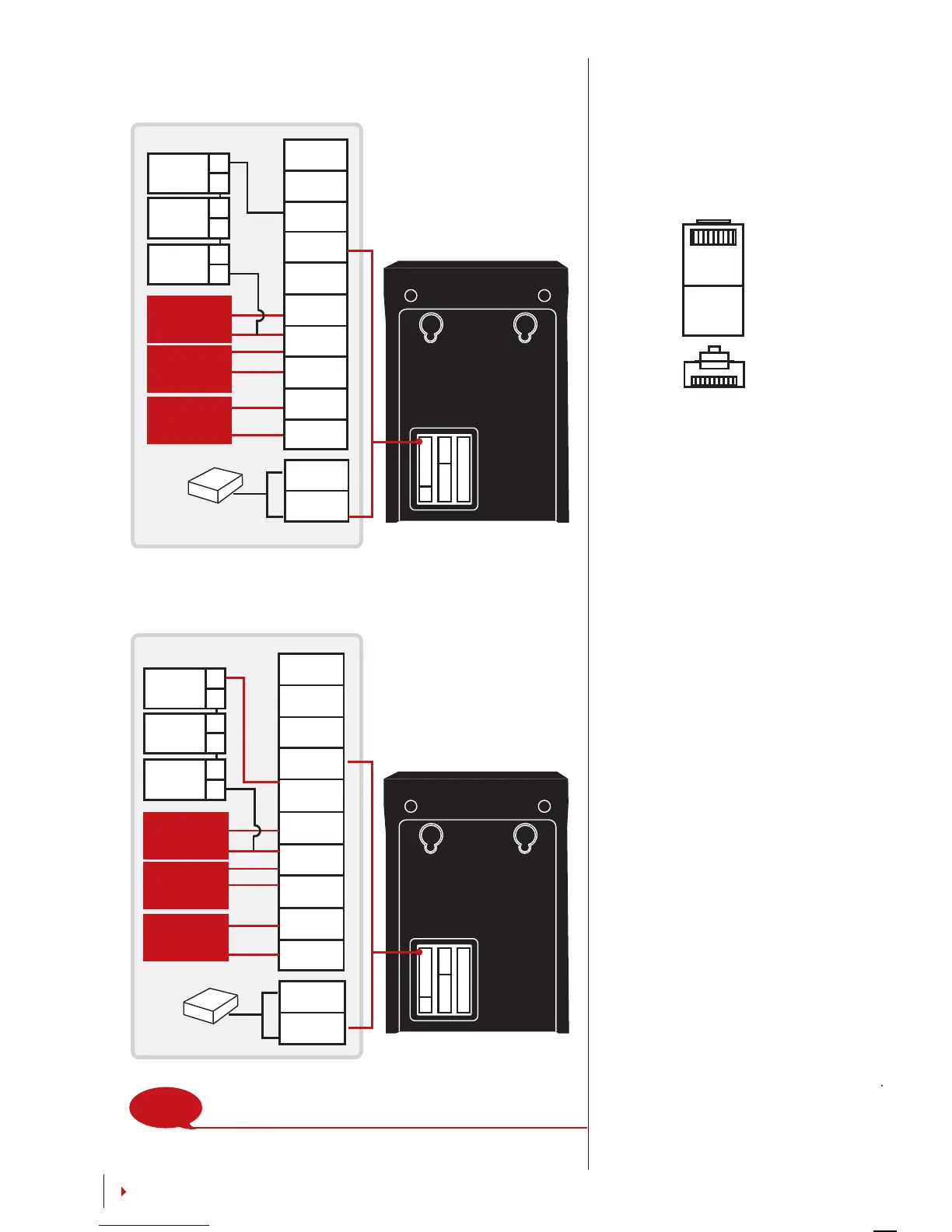
ALM+
ALM-
NC
COM
NO
BUT
GND
SEN
BEL+
BEL-
GND
+12V
DC12V Power Supply
Release
button
Door
sensor
Doorbell
+
-
2
3
A
C
EM lock
(NC)
Emergency
break glass
(NC)
Key switch
(NC)
ALM+
ALM-
NC
COM
NO
BUT
GND
SEN
BEL+
BEL-
GND
+12V
Release
button
Door
sensor
Doorbell
+
-
1
3
B
D
EM lock
(NO)
Emergency
break glass
(NO)
Key switch
(NO)
NOTE
Please refer to AdapTec AC Installer Manual if you are
using AdapTec AC.
DC12V Power Supply
1 8
TOP
FRONT
1 8
CONTENTS
For NC (normally closed) door lock system
For NO (normally open) door lock system
USB PORT
Linking with USB flash disk
for remote data
transfer.
TCP/IP PORT
Connect with CAT 5 cable
for LAN connection, one
end to this port and an-
other end to the compu-
ter’s TCP/IP Port.
TCP/IP for Single Connec-
tion
– Linking the terminal to
a single computer using TCP/IP
requires Ethernet 10/100Base-
T Crossover Cable. The cable
can be used to cascade hubs
or to connect Ethernet stations
back-to-back without a hub. It
works with both 10Base-T and
100Base-TX


 To Next Page