6
CONTENTS
Power On/O Button
There is no power button available. Restart the device using the reset button shown on the
bottom of the terminal.
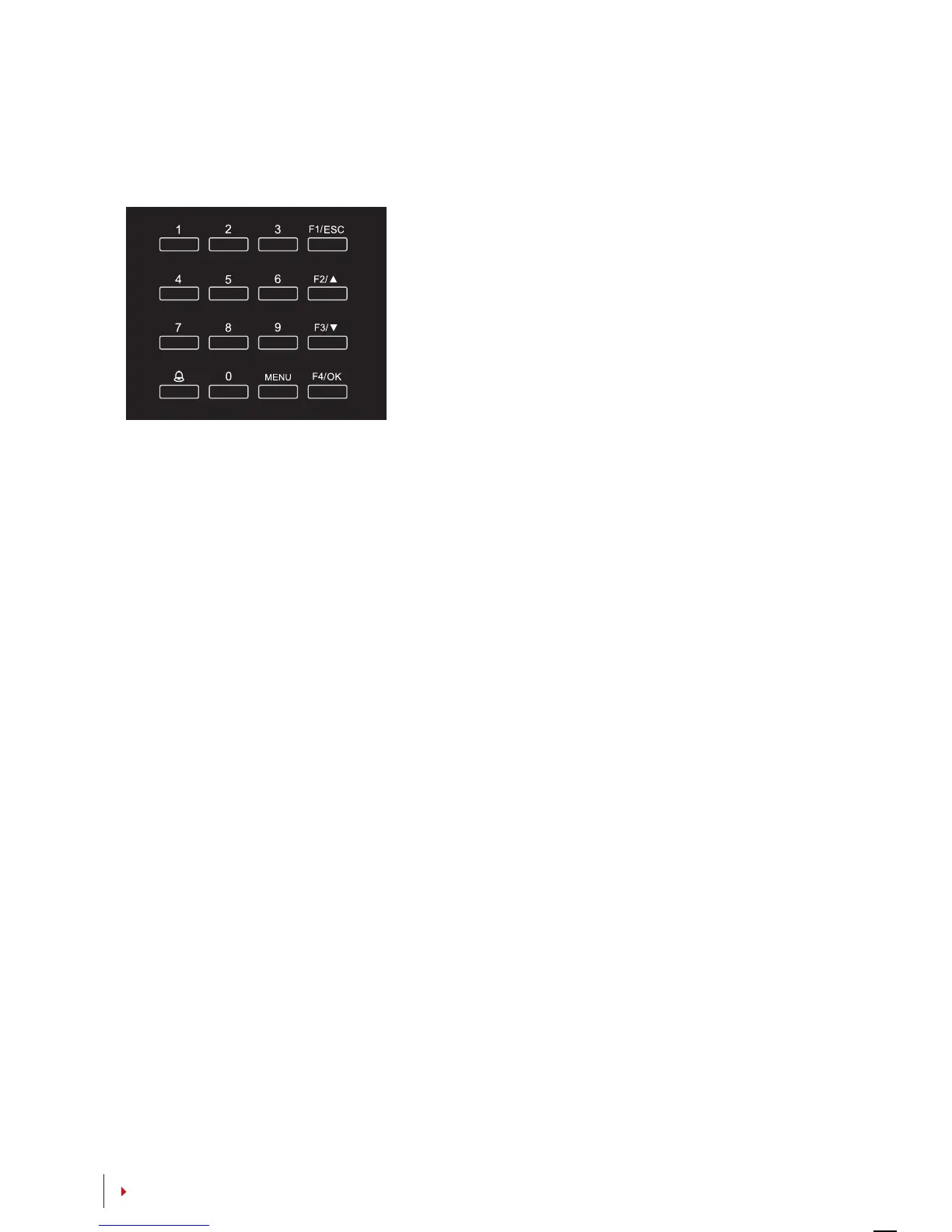
Keypad
You can insert inputs into the terminals through
the keypad. It contains numbers from 0-9, an OK
button, an ESC/Cancel button, a Scroll up/down
button, a doorbell button and a Menu button.
Battery
The terminals operate using power supply from a standard power outlet.
Mini UPS: Mini UPS 12V can also be used to provide power supply to turn on the ter-
minals. Refer to
accessory.fingertec.com for more information about accessories.
Date/Time
The terminals displays the date and time at the home screen. Choose the date and
time format based on your preference. Press Menu > Options > Systems Options >
Date/Time > set your time and save.
To change the date format: Press Menu > Options > Systems Options > Fmt > Deter-
mine the date format based on your preference.
Voice Control
Voice Control lets you control the level of volume emitted by the terminal.
TURN ON/OFF
The system lets you turn on/off the voice based on your preference. Press Menu >
Options > System Option > Adv Option > Voice > Y/N.
ADJUST VOLUME
The default volume of the terminal’s voice is 67. The volume can go as high as 100
and as low as 0. To sustain the performance of the speaker, it’s recommended to stay
at range 60-70. To adjust the volume Press Menu > Options > System Option > Adv
Option > Adj VOL (%) > adjust accordingly .


 To Next Page