5
support@fingertec.com
w
13-01-01 MON
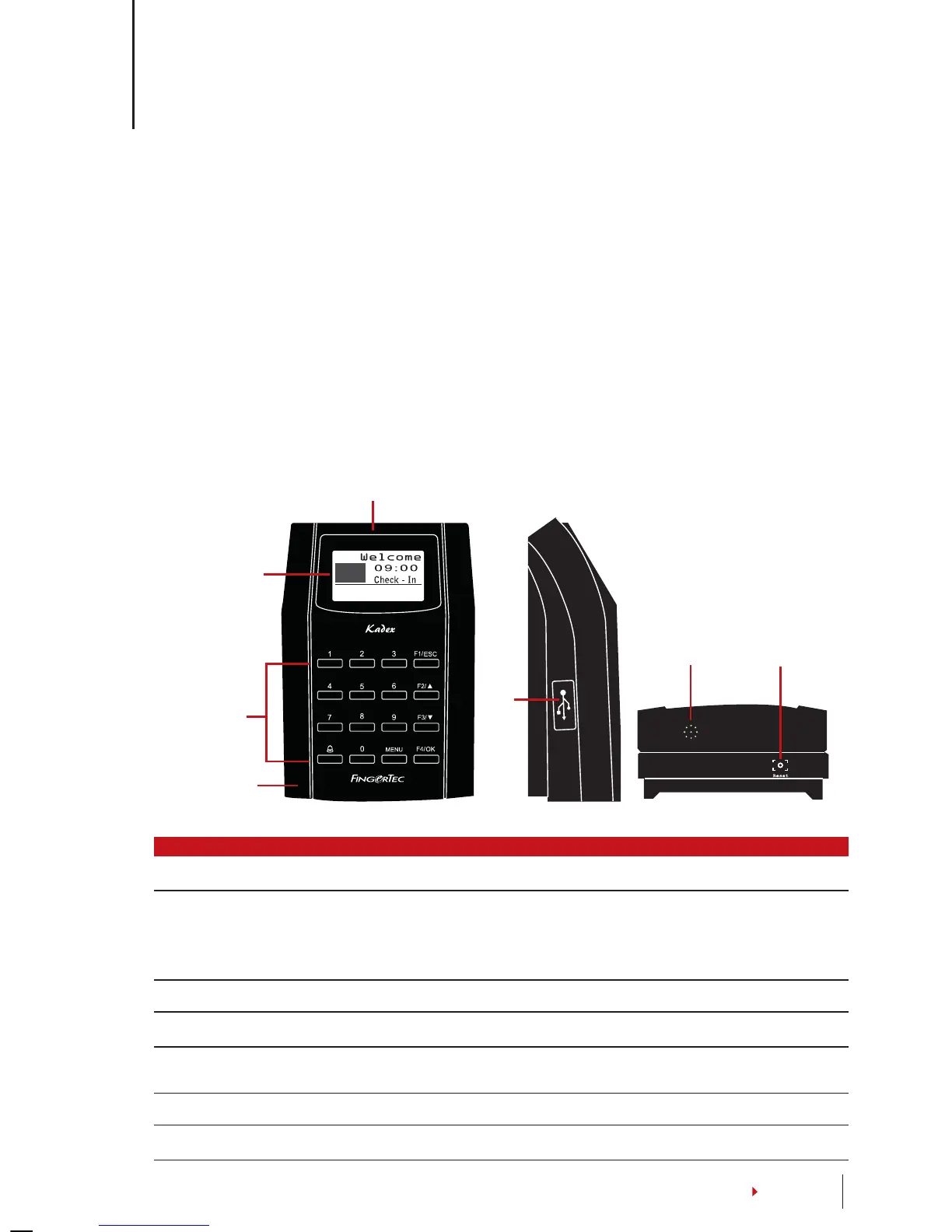
L.E.D Display
LCD Screen
Keypad
Card Induction
Area
USB
Port
Reset Button
Speaker
CONTENTS
2 • BASICS
Introduction to Products
The terminal for time attendance and door access system supports RFID card ID, 5-digit
password or combination of both. It works with security alarm system to alert users in
cases of break in and when the duress function in the terminal is used. The terminal can
integrate with a fire alarm system to unlock all doors when the fire alarm is triggered.
The terminal communicates with a computer via TCP/IP and it allows data transfer to be
done with USB flash disk to eliminate extra wiring.
The terminal complies with international standard of CE & FCC, our testament to safety
& quality.
Overview
ITEM FUNCTION
LCD Screen Displaying status of terminal, day, date and time.
LED Display Green LED – The terminal is working fine and it is in standby mode.
Red LED – There is an error at the terminal that requires checking.
For first time use, the terminals need to be charged fully to avoid
having the red light blinking.
Keypad To input instructions into the terminal and to allow configuration.
RFID Card Induction Area Area that reads RFID cards.
USB Port To upload/download users information, password and transaction
logs via USB flash disk.
Speaker For terminal voice emission.
Reset Button To restart the terminal as and when required.


 To Next Page