Step 3: Fios TV One Mini
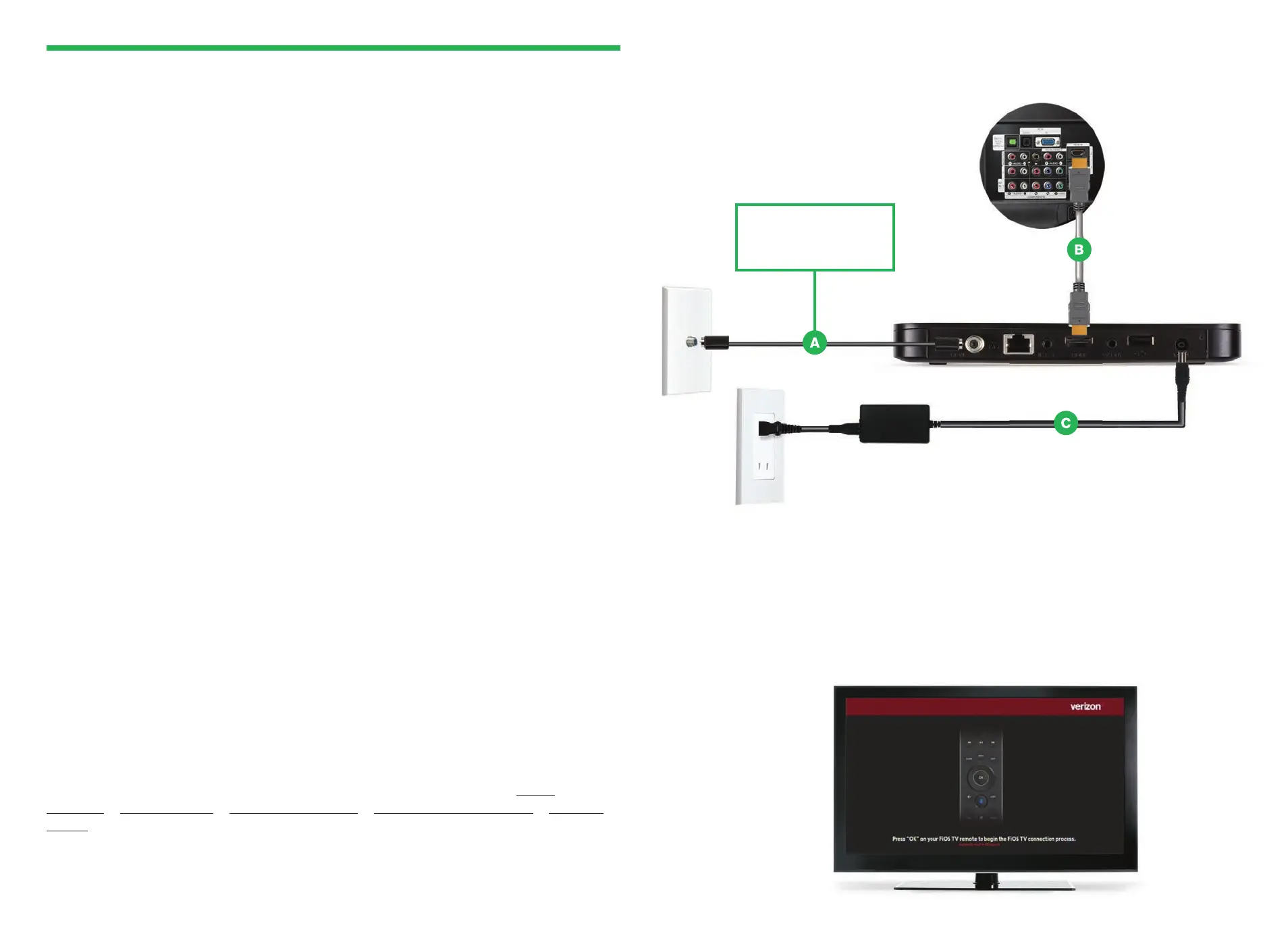
Step 3A: Make the connections
A. Connect to Fios TV via a Wired or a Wi-Fi connection
Wired: Connect the coax cable from your Fios TV One Mini to a coax outlet.
Wi-Fi: Do NOT connect the coax cable; your Fios Wi-Fi will sync automatically.
B. Connect the HDMI cable
*
from your Fios TV One Mini to your TV.
Note: If your TV is not HDMI compatible, use composite cables and the
provided adapter.
C. Connect the power cord from your Fios TV One Mini to an electrical outlet.
Optional: Do not
connect a coax cable
for a Wi-Fi connection.
Model 4100
Back of TV
Step 3B: Complete activation and remote setup
Turn on your television and Fios TV One Mini. Using the Fios TV Voice Remote,
follow the on-screen instructions to complete activation and remote setup.
Note: If you have any issues with the Fios TV Voice Remote functioning properly
after setup is complete, you may need to pair it manually by going to Menu >
Settings > Voice Control > Fios Voice Remote > Program Voice Remote > Manual
Setup and following the prompts.
*The HDMI cables included with your equipment are 4K compatible.



 To Next Page