9
®
L1-13 AUX#1 OPEN or programmed message.
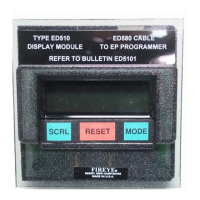
Press the Scroll key and the screen displays:
E300 TERM #21-22
L1-13 AUX#2 OPEN
or programmed message.
To change the message, press and hold the Reset key for one (1) second. When the Reset key is
released, the screen displays:
MDFY TERM #21-22
L1-13 AUX#2 OPEN
Press the Scroll key to display the available messages for the particular group being modified. See
attached List of available messages for each group.
When the messages displayed is appropriate for the terminals, press and hold the Reset key for one
(1) second. When the Reset key is released, the screen displays:
E300 TERM #21-22
LOW WATER
or programmed message.
Press the Mode key to exit the E300 Message Sub-menu.
AVAILABLE E300 MESSAGES
The following messages are available for each of the four E300 terminal groups:
USER PROGRAMMED E300 MESSAGES
In addition to selecting the lockout alarm messages for the E300 Expansion Module from a menu
selection via the ED510 display, the user can also program any message (up to 40 characters in
length) for the individual terminals of the E300 using a dumb terminal (or PC with communication
software) and the appropriate interface cables. Refer to bulletin E-3001 for complete details.
GROUP 1 — RECYCLE
E340 OP CNTL OPEN HIGH WATER
DAMPER POSITION END SWITCH OPEN BLOWER MOTOR INTLK
COMBUSTION AIR END SWITCH OPEN HIGH STACK TEMPERATURE
LOW WATER CONTROL PANEL SWITCH OPEN
HIGH GAS PRESSURE
LOW GAS PRESSURE
GROUP 2 — OIL SELECT
LOW OIL PRESSURE HIGH OIL TEMPERATURE
HIGH OIL PRESSURE LOW ATOMIZING MEDIA
LOW OIL TEMPERATURE
GROUP 3 — GAS SELECT
HIGH GAS PRESSURE
LOW GAS PRESSURE
GROUP 4 — NON-RECYCLE
E340 SAFETY INTLK OPEN HIGH TEMPERATURE
HIGH WATER AIR FLOW OPEN
LOW WATER OIL GUN END SWITCH OPEN
HIGH PRESSURE HIGH STACK TEMPERATURE
BLOWER MOTOR INTLK
I.D. FAN INTLK
F.D. FAN INTLK


 To Next Page