EasyManua.ls Logo

Firgelli FA-SYNC-4 - User Manual

Firgelli FA-SYNC-4
4 pages
Print Icon
To Next Page IconTo Next Page
Loading...
FA-SYNC-4 Synchronous Control Board User Manual
The Firgelli Automation FA-SYNC-4 Synchronous Control Board allows you to move between
two and four actuators in step with the same speed irrespective of load. Unsynchronized
actuators can lead to bending loads which is likely to be disastrous for both the load and the
actuator. Common applications include, but are not limited to: wine cellar trapdoors, RV roof
lifts, tonneau covers, and table lifts.
This board only works with a select few actuators with inbuilt feedback sensors. Actuators must
be of the same type, stroke length, and force. Using different actuators will not work.
Compatible actuators: Bullet 36 Cal, Bullet 50 Cal, Optical Series 200lb, and Optical Series 400lb
Not compatible: Bullet Mini, Bullet 23 Cal, Optical Series 35lb, and all other types of actuator
Question and Answer IconNeed help?

Do you have a question about the Firgelli FA-SYNC-4 and is the answer not in the manual?

Summary

Introduction to the FA-SYNC-4 Synchronous Control Board

Compatible Actuators

Lists actuators compatible with the FA-SYNC-4 control board.

Connecting the FA-SYNC-4

User Input Connections

Connects user input via toggle switch or remote control.

Power Input Requirements

Specifies 12V/24V input, 20A minimum, and warns about polarity.

Actuator Connections

Details connecting actuators to terminal blocks on the board.

Calibrating the FA-SYNC-4

DIP Switch Settings

Configures DIP switches based on the number of actuators connected.

Calibration Procedure

Step-by-step process for synchronizing actuators to the board.

Operation and Troubleshooting

Operating the FA-SYNC-4

Instructions for moving actuators and setting memory locations.

LED Display Status

Explains the meaning of different LED indicator light states.

Troubleshooting Common Issues

Guides on resolving wiring, synchronization, and connection problems.

Overview

The Firgelli Automation FA-SYNC-4 Synchronous Control Board is a device designed to synchronize the movement of two to four linear actuators, ensuring they operate at the same speed regardless of the load distribution. This synchronization is crucial to prevent bending loads that could damage both the load and the actuators.

Function Description:

The primary function of the FA-SYNC-4 is to control multiple linear actuators (between two and four) to move in perfect unison. It achieves this by utilizing feedback sensors built into compatible actuators, allowing the board to monitor and adjust their speeds to maintain synchronization. This prevents issues like uneven movement, which can lead to stress and damage in applications such as wine cellar trapdoors, RV roof lifts, tonneau covers, and table lifts. The board also offers the ability to store a "memory" position, allowing users to recall a specific actuator position with a quick button press.

Important Technical Specifications:

  • Actuator Compatibility: The FA-SYNC-4 is compatible with specific Firgelli Automation actuators that have inbuilt feedback sensors. These include:
    • Bullet 36 Cal
    • Bullet 50 Cal
    • Optical Series 200lb
    • Optical Series 400lb
  • Incompatible Actuators: The board is not compatible with:
    • Bullet Mini
    • Bullet 23 Cal
    • Optical Series 35lb
    • All other types of actuators not explicitly listed as compatible.
  • Actuator Requirements: For proper operation, all connected actuators must be of the same type, stroke length, and force. Using different actuators will not work.
  • Power Input: The control board requires a 12V/24V power input. When all four actuators are connected, it needs at least 12V at 20 amps. Firgelli recommends using their AC to DC Power Supply 12V 30A.
  • Polarity Warning: Reversing the polarity of the input voltage will permanently damage the unit.
  • Sensor Signal Monitoring: The board monitors sensor signals from the actuators. If a sensor signal is lost for 2 seconds, the FA-SYNC-4 will fail to synchronize.

Usage Features:

Connectivity:

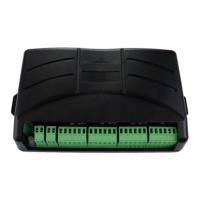
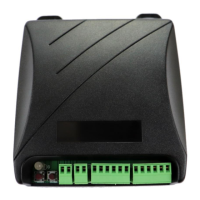
  • User Input: The leftmost, two-pin, green terminal block plug (labeled A & B) is for user input. Users can connect either a toggle switch or Firgelli's 2 Channel Remote Control Board. Only one input method should be connected at a time.
  • Power Input: The next two-pin, green terminal block plug (labeled VIN & GND) is for the 12V/24V power input.
  • Actuator Connections: The remaining six-pin, green terminal block plugs are for connecting the actuators. If fewer than four actuators are used, the unused terminal blocks on the right side of the board should be left disconnected.
  • Wiring: Wire colors are subject to change, so users should confirm the color by inspecting the sticker on the actuator. A detailed table provides wiring connections for compatible actuators:
    • FA-SYNC-4 Board | Bullet 36 & Bullet 50 Cal | Optical Series 200lb and 400lb
    • M+ | M+ (Red wire) | M+ (Red wire)
    • M- | M- (Black wire) | M- (Black wire)
    • 5V | VCC +5V (Yellow wire) | +5V (Blue wire)
    • GND | GND (White wire) | GND (Yellow wire)
    • H1 | Data 1 (Brown wire) | Output (Green wire)
    • H2 | Data 2 (Green wire) | Not connected

Calibration:

Calibration is a critical step to ensure the board functions correctly with the specific actuators being used.

  1. Access DIP Switches and Buttons: Remove the black plastic slide at the top of the control board to reveal two momentary push buttons (Memory Height Button and HOME Button) and two DIP switches.
  2. Set DIP Switches:
    • For two actuators: Set DIP switches "1" and "2" to "ON".
    • For three actuators: Set DIP switch "1" to "OFF" and "2" to "ON".
    • For four actuators: Set DIP switches "1" and "2" to "OFF".
  3. Preparation: Ensure all wires are connected, and the actuators are placed on a table, not connected to any load or application. Confirm all wiring connections.
  4. Initiate Retraction: Press and quickly release the right-most momentary switch labeled "HOME". The relays will click, and the actuators will begin retracting. If they extend instead, reverse the M+ and M- connections.
  5. Full Retraction: Once all actuators are fully retracted, the relays will click several times.
  6. Initiate Extension: Press and hold the "HOME" button until the actuators begin extending.
  7. Full Extension and Retraction Cycle: The actuators will fully extend, pause, and then fully retract.
  8. Calibration Complete: Once retracted again, the relays will click several times, indicating that the FA-SYNC-4 board is calibrated. The calibration settings are stored even if power is disconnected.

Operation:

  • Synchronous Movement: After calibration, using the toggle switch or remote control board will move the actuators in and out synchronously, even with uneven loads.
  • Memory Position:
    1. Move actuators to the desired position.
    2. Remove the black plastic slide.
    3. Press and hold the left-most momentary button (Memory Height Button) for several seconds until the relays click. Release the button.
    4. To recall this position, move the actuators to a different position, then quickly press and release the same momentary button.
    5. To override the stored position, repeat the steps.

LED Display Status:

  • Green light: Standby mode.
  • Flashing green light: Actuators in motion.
  • Flashing orange light: Calibrating the board.
  • Flashing red light: Signals that the user is attempting to extend or retract the actuator, but it is already fully extended or retracted, respectively.

Maintenance Features:

Troubleshooting:

  • Wiring and Power: Always check wiring for loose connections or short circuits. Verify that the power source is a reliable 12V supply capable of delivering at least 20A.
  • Sensor Signal Loss: If the FA-SYNC-4 fails to synchronize, it may be due to a lost sensor signal from one or more actuators (bad connection or sensor circuitry failure). The sensing time for this issue is 2 seconds.
  • Out-of-Sync Movement: If actuators begin to move out of sync or stop moving despite commands, check the wiring and then repeat the calibration sequence.

Firgelli FA-SYNC-4 Specifications

General IconGeneral
BrandFirgelli
ModelFA-SYNC-4
CategoryControl Unit
LanguageEnglish

Related product manuals