@ 12V DC Battery Charger Port - Plug the 120 Volt
AC charger into this port to charge the generator
battery.
® DC Circuit Breaker- The circuit protector may be reset
by pushing the button of the protector.
t) Parallel Operation Outlets - These outlets are used
for connecting two FIRMAN inverter generators for
parallel operation. A FIRMAN parallel kit(optional
equipment) is required for parallel operation.
«i) 12V DC outlet -8. 3 Amp of DC current may be drawn
from this receptacle.
Use this outlet to charge 12V automotive type
batteries ONLY. See 12V DC outlet (Battery
Charger) section.
Cll Ground Terminal -Consult an electrician for local
grounding regulations.
if, Outlet Cover- Protect the receptacles from dust
and debris.
«ll Recoil Stater
ii) LPG Hose Quick Connect Inlet
@I Fuel Selector Switch - Used to select and turn on
gas or LPG fuel source.
G Choke Button
@, LPG Regulator Solenoid Port
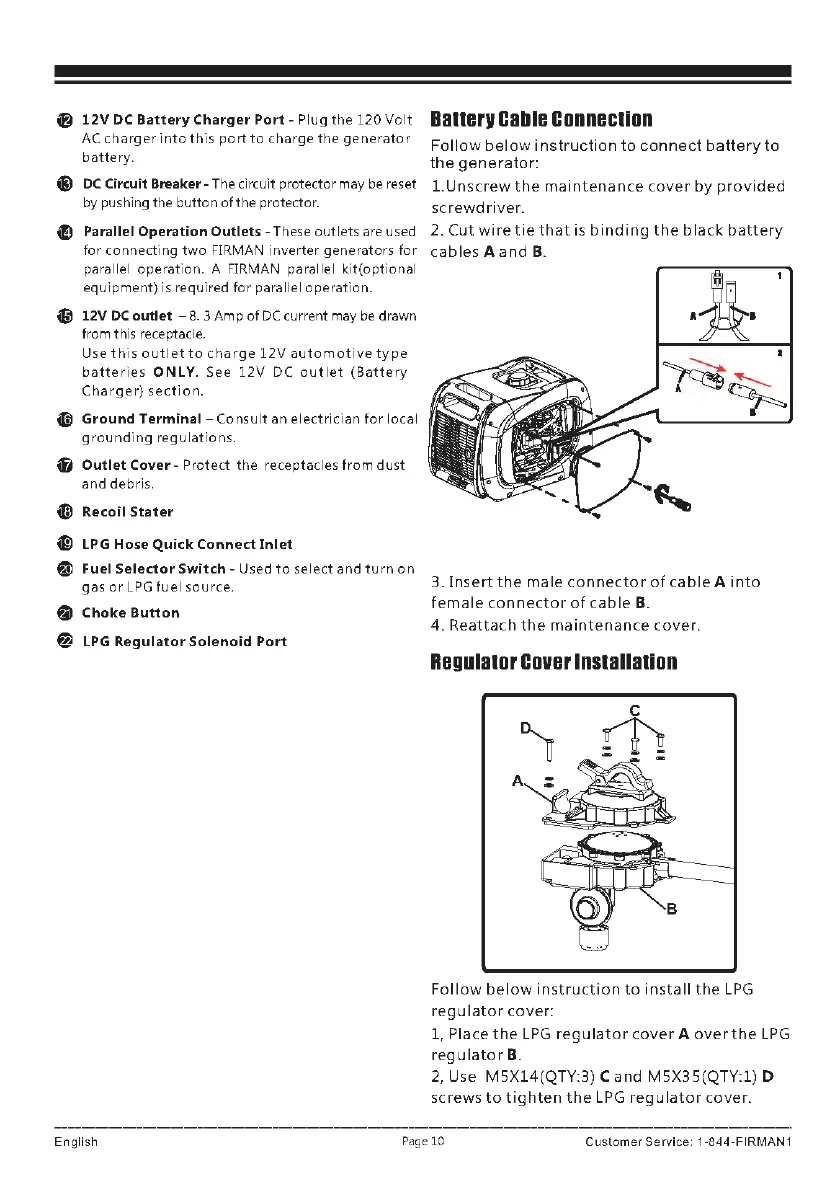
Banerv Cable conneclion
Follow below instruction to connect battery to
the generator:
1.Unscrew the maintenance cover by provided
screwdriver.
2. Cut wire tie that is binding the black battery
cables
A and B.
3. Insert the male connector of cable A into
female connector of cable
B.
4. Reattach the maintenance cover.
RegulalDr Cover lnslallalion
Follow below instruction to install the LPG
regulator cover:
1, Place the LPG regulator cover
A over the LPG
reg u la tor
B.
2, Use MSX14(QTY:3) C and MSX3S(QTY:l) D
screws to tighten the LPG regulator cover.
English
Page 10 Customer Service 1-844-FIRMAN1


 To Next Page