Page 8
PROGRAM FUNCTIONS
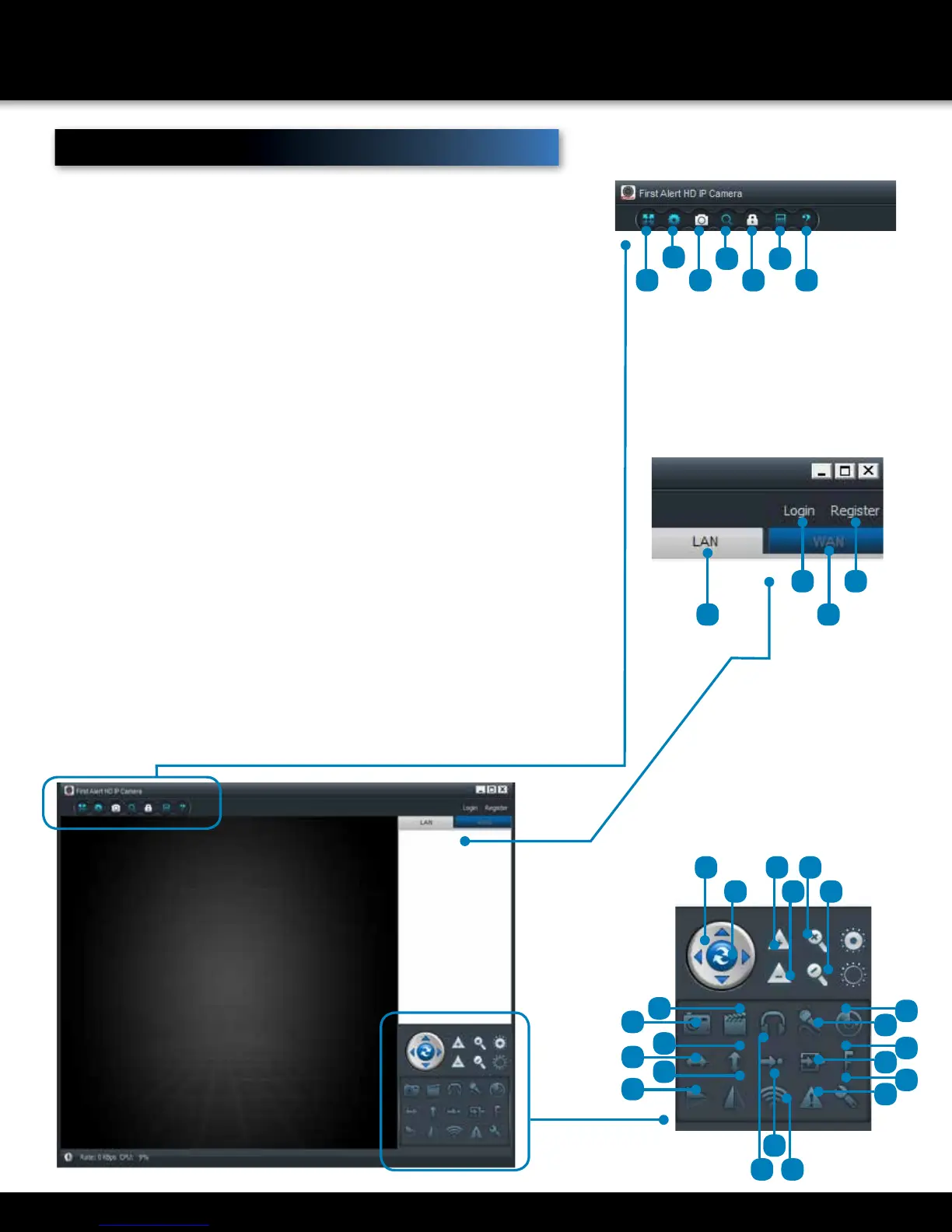
MENUS
1. Full Screen: Brings the camera
into Full Screen.
2. Settings: Opens the settings.
dialogue windows to make various
changes to the DWIP-720.
3. Device Management: Set device
settings (WAN only).
4. Playback : Allows the recorded
files to be searched by Time/Day.
Select the “specified time” box
and enter the start/end time of
recorded video. Click Playback
to start search.
5. Change Password: Allows the
login password to be changed.
6. Log: recent log history of the
software (WAN only).
7. Help: www.firstalert.com
8. LAN: LAN set up.
9. WAN: WAN set up (registering
required).
10. Login: Login to account for
remote viewing.
11. Register: Account set up for
remote viewing.
12. Toggles PTZ Cruise Mode:
ON/OFF.
13. Optics Zoom In: No function.
14. Optics Zoom Out: No function.
Zoom In: Zoom in.
15. Zoom in:
16. Zoom out.
17. Pan/tilt Controls:
18. Capture: Takes a quick snapshot
picture of the live video.
19. Record: Starts manual recording.
20. Listen: allows to listen with the 2
way audio feature.
21. Talk: Allows the user to talk into a
pc connected microphone to the
camera.
22. Motion Detection Area: Manual
set of the area to be set for motion
detection.
23. Horizontal Pan (ON/OFF): Camera
will go into horizontal Pan Mode.
24. Vertical Pan (ON/OFF): Camera
will go into vertical Pan Mode.
25. Go to Preset Position: allows the
user to go to any preset position.
26. Set Preset Position: allows the
user to set a preset position (see
page 5 for alarm block setup).
27. Set PTZ Speed: allows the user to
set the speed of the PTZ control.
28. Vertical flip: flips the screen in the
vertical orientation.
29. Mirror: Mirrors the screen.
30. Set Up WiFi: allows the user to
set the WIFI option on the camera
(Must setup with Ethernet cable
first).
31. Alarm Log: Shows the log file of
the camera.
32. Settings: Opens the settings
dialogue window.
1 3 5 7
10
22
19
27
32
24
29
21
26
31
20 30
25
9
2
4 6
8
www.firstalert.com
Menus
11
18
23
28
1317 15
1412 16



 To Next Page