2Ð1
SECTION 2
Installing The Control
¥ÊÊ¥ÊÊ¥ÊÊ¥ÊÊ¥ÊÊ¥ÊÊ¥ÊÊ¥ÊÊ¥ÊÊ¥ÊÊ¥ÊÊ¥ÊÊ¥ÊÊ¥ÊÊ¥ÊÊ¥ÊÊ¥ÊÊ¥ÊÊ¥ÊÊ¥ÊÊ¥ÊÊ¥ÊÊ¥ÊÊ¥ÊÊ¥ÊÊ¥ÊÊ¥ÊÊ¥ÊÊ¥ÊÊ¥ÊÊ¥ÊÊ¥ÊÊ¥ÊÊ¥ÊÊ¥ÊÊ¥ÊÊ¥ÊÊ¥ÊÊ¥ÊÊ¥ÊÊ¥ÊÊ¥ÊÊ¥ÊÊ¥
In This Section
◆ Mounting the Cabinet
◆ Installing the Lock
◆ Installing the Control's Circuit Board Alone, or (if used), with a 4204, 4219 or 4229 Module
◆ Installing the Control and RF Receiver Circuit Boards Together in the Cabinet
◆ Standard Phone Line Connections
◆ Wiring The AC Transformer
◆ Installing The Back-Up Battery
◆ Earth Ground Connections
¥ÊÊ¥ÊÊ¥ÊÊ¥ÊÊ¥ÊÊ¥ÊÊ¥ÊÊ¥ÊÊ¥ÊÊ¥ÊÊ¥ÊÊ¥ÊÊ¥ÊÊ¥ÊÊ¥ÊÊ¥ÊÊ¥ÊÊ¥ÊÊ¥ÊÊ¥ÊÊ¥ÊÊ¥ÊÊ¥ÊÊ¥ÊÊ¥ÊÊ¥ÊÊ¥ÊÊ¥ÊÊ¥ÊÊ¥ÊÊ¥ÊÊ¥ÊÊ¥ÊÊ¥ÊÊ¥ÊÊ¥ÊÊ¥ÊÊ¥ÊÊ¥ÊÊ¥ÊÊ¥ÊÊ¥ÊÊ¥ÊÊ¥
Mounting the Cabinet
Mount the control cabinet to a sturdy wall using fasteners or anchors (not supplied), in a clean,
dry area which is not readily accessible to the general public. Four mounting holes are provided
at the back of the cabinet.
If an RF Receiver is being used and you intend to mount its PC board within the cabinet, note
the following:
¥ Do not mount the cabinet on or near metal objects. This will decrease RF range and/or block
RF transmissions from wireless transmitters.
¥ Do not locate the cabinet in an area of high RF interference (revealed by frequent or pro-
longed lighting of the LED in the receiver after it is operational). Random flicker is OK.
Installing the Lock (if used)
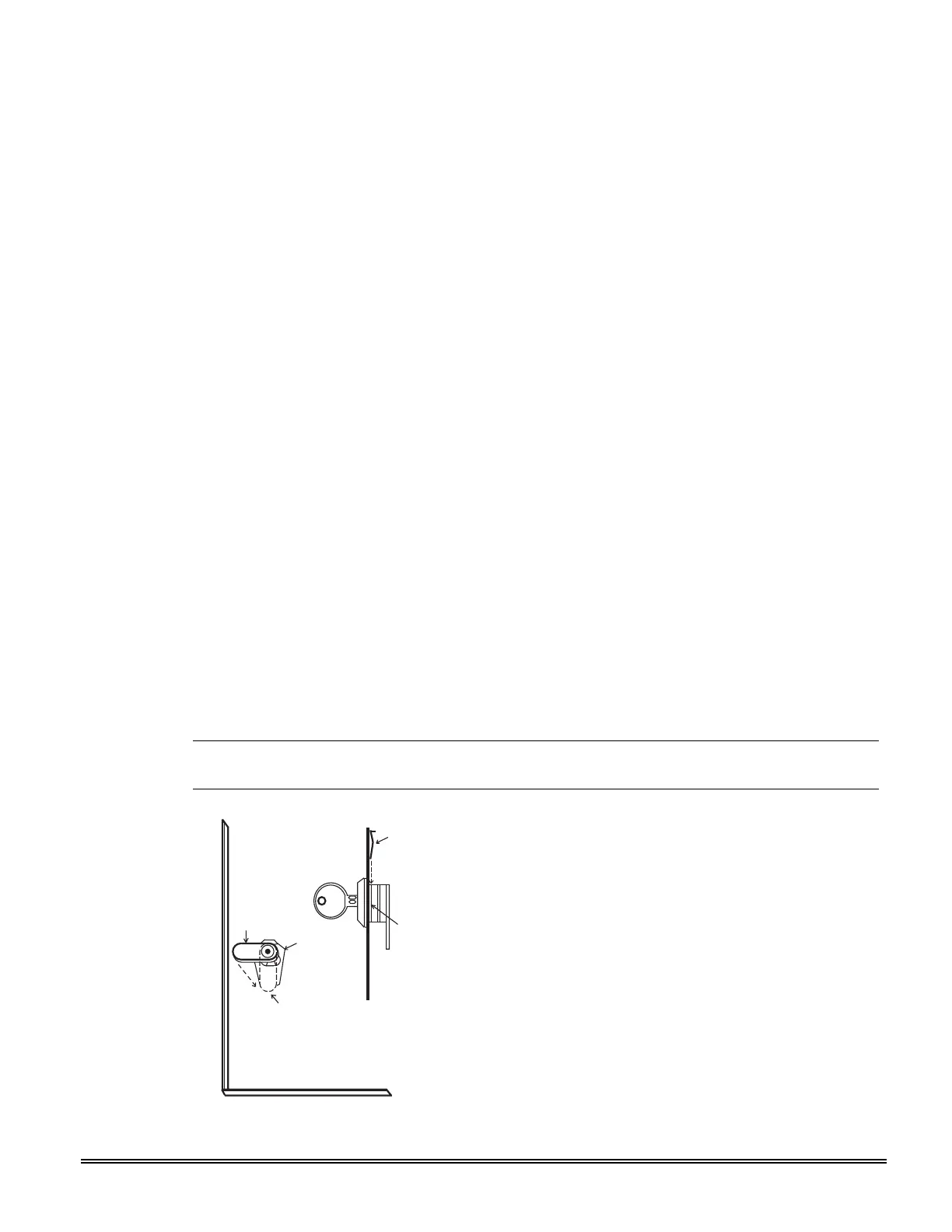
Use an Ademco No. N6277 Cam Lock and No. N6277Ð1 Push-On Clip (Retainer Clip).
Note: The cabinet can be closed and secured
without
a lock by using 2 screws in the cover's
edge.
CABINET DOOR BOTTOM
RETAINER
CLIP
RETAINER CLIP
(NOTE POSITION)
RETAINER
SLOTS
LOCKED
UNLOCKED
Figure 2Ð1. Installing the Lock
1. Remove the cabinet door. It is easily
removable for servicing and is easily re-
installed.
2. Remove the lock knockout from the control
cabinet door. Insert the key into the lock.
Position the lock in the hole, making
certain that the latch will make contact
with the latch bracket when the door is
closed.
3. Hold the lock steady, and insert the
retainer clip into the retainer slots.
Position the clip as illustrated in order to
permit easy removal.





 To Next Page