For magnetic stripe transactions
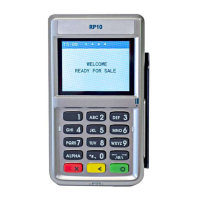
Find the card reader slot on the right side of the RP10. Slide
the magnetic card from the top of the device to the bottom
with the face of the card facing outward (right).
For smart card transactions
Find the card reader slot at the front of the RP10 and insert
the card completely with the front of the card facing up.
Please note that First Data equipment and/or software may not be compatible
with another processor’s systems.
© 2009–2019 Fiserv, Inc. or its afliates. Fiserv is a registered trademark.
Other products referenced in this material may be trademarks or
registered trademarks of their respective companies. 603578 2019-10


 To Previous Page