13
1
5
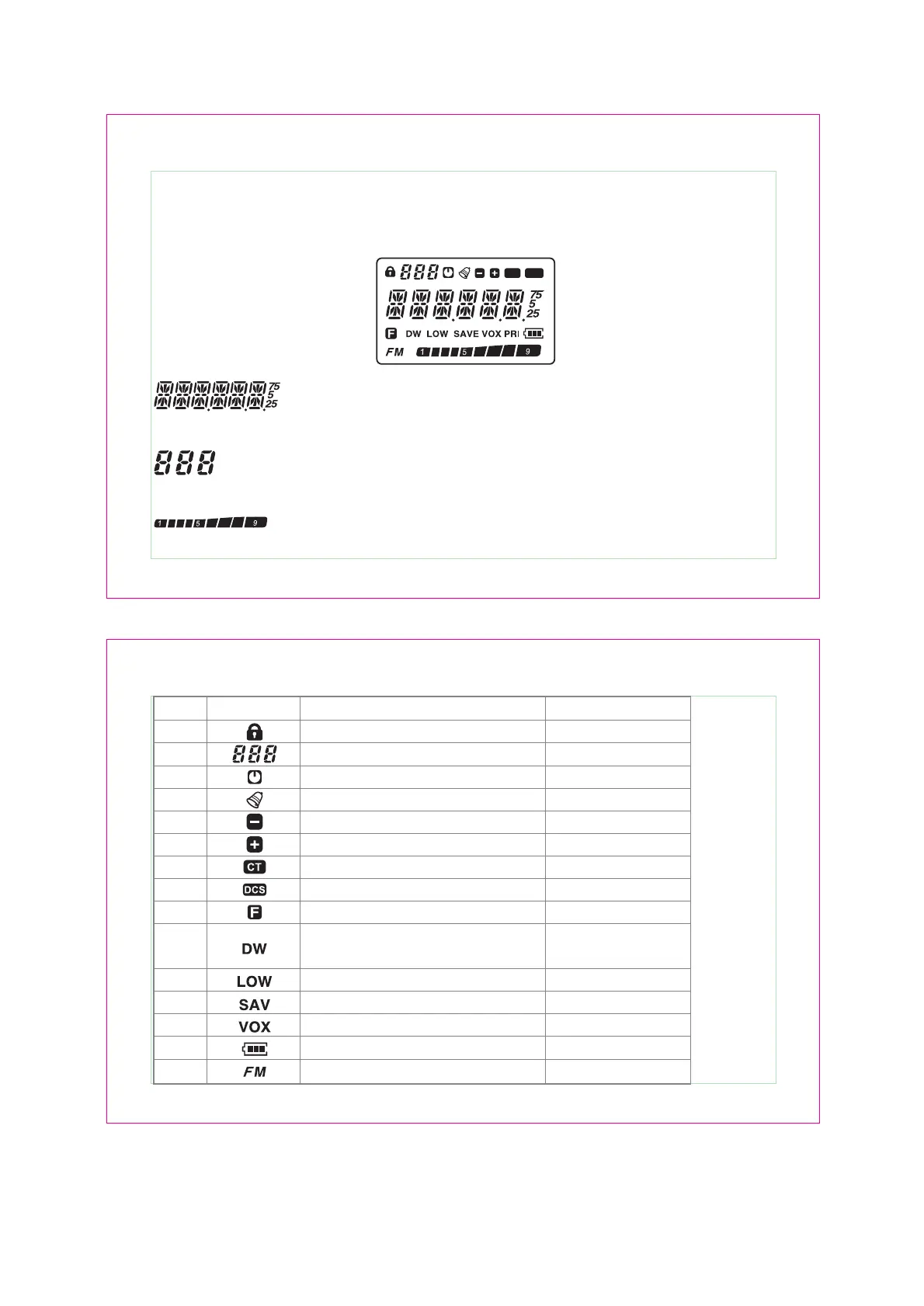
Shows the working frequency, channel numbers and menu etc.
Shows the memory channel numbers or menu numbers.
Shows the transmit/received signal strength.
1
5
CT DCS
LCD DISPLAY
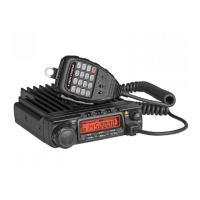
You can see various icons displaying on the screen while transceiver is working. The following table can
help you identification the icon which display on LCD.
14
ICON FUNCTION
OPERATION
2
Keypad locked
Memory channel numbers
Auto power OFF
Keypad tone
Duplex
Duplex
CTCSS
DCS
Function select
Monitor signal while receiving FM RADIO
(optional function)
Middle/low power
Power save function
VOX activated
Battery power display
FM RADIO working (optional function)
1
3
4
5
6
7
8
9
10
11
12
13
14
15
[F] (hold 2 sec.)
[V / M]
MENU 01
MENU 06
Press twice [F] , [5]
[F] , [5]
[F] , [6]
[F] , [6]
[F]
[F], [2]
Use MENU 04
Use MENU 24
---
[F] , [8]
MENU 09


 To Next Page