EasyManua.ls Logo

Firstcom FR-488 - User Manual

Firstcom FR-488
44 pages
Print Icon
To Next Page IconTo Next Page
Loading...
488
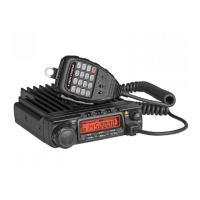
FM MOB ILE TRANS CEIVER
200 Programmed Channel
CTCSS/DCS/2TONE/5TONE
DTMF-ANI/5TONE-ANI
Compander
Three Colors LCD Display
USERS MANUAL

Table of Contents

Questions and Answers

  • J
    Jeremy HarrisJul 30, 2025
    What to do if PTT key is pressed but transmission does not occur on Firstcom FR-488?
    • J
      Joshua MarquezJul 30, 2025
      If the PTT key is pressed on your Firstcom Transceiver, but no transmission occurs, it could be due to a poor microphone or antenna connection. Ensure that both the microphone and antenna are properly connected.
  • T
    thomasleahAug 3, 2025
    Why no sound comes from speaker of Firstcom Transceiver?
    • E
      emma75Aug 4, 2025
      If no sound is coming from the speaker of your Firstcom Transceiver, the squelch might be muted, or tone or CTCSS/DCS squelch may be active. Try decreasing the squelch level, or turn off CTCSS or DCS squelch.
  • F
    floresstephenAug 7, 2025
    How to unlock key and dial on Firstcom FR-488 Transceiver?
    • A
      angelashermanAug 7, 2025
      If the keys and dial on your Firstcom Transceiver do not function, the key-lock function might be activated. To resolve this, cancel the key-lock function.
  • J
    Jeffrey BellAug 11, 2025
    Why rotating dial will not change memory channel on Firstcom FR-488?
    • C
      Craig SanchezAug 11, 2025
      If the rotating dial on your Firstcom Transceiver will not change the memory channel, the transceiver may be in CALL mode. Press the VFO or memory mode to resolve this.
  • M
    martinwandaAug 15, 2025
    How to fix dim display on Firstcom FR-488 Transceiver?
    • O
      ortegameganAug 16, 2025
      If the display on your Firstcom Transceiver is too dim, please make the dimmer setting "LAMP-H".
  • D
    David CampbellAug 20, 2025
    What to do if power is on, nothing appears on display of Firstcom Transceiver?
    • J
      Jose WardAug 20, 2025
      If the power is on but nothing appears on the display of your Firstcom Transceiver, it is possible that the + and - polarities of the power connection are reversed. Connect the red lead to the plus terminal and the black lead to the minus terminal of the DC power supply.
  • J
    John SmithAug 25, 2025
    What to do if fuse is blown on Firstcom Transceiver?
    • S
      Susan GrayAug 26, 2025
      Check and solve the problem resulting in the blown fuse, and then replace the fuse in your Firstcom Transceiver with a new one.

Summary

Precautions

Safety Guidelines

Observe precautions to prevent fire, personal injury, or transceiver damage.

Initial Installation

Mobile Installation

Instructions for installing the transceiver inside a vehicle.

DC Power Cable Connection

Connects the transceiver to the vehicle's 12V DC power supply.

Fixed Station Operation

Guidelines for using the transceiver with a separate 13.8V DC power supply.

Antenna Connection

Instructions for connecting an efficient antenna for optimal performance.

PC Connecting

Connecting the transceiver to a PC for programming.

Working Mode (Amateur;Professional Transceiver)

Setting the Working Mode

How to set the radio as Amateur or Professional Transceiver mode.

Basic Operations

Power Control

How to turn the transceiver on and off.

Mode Switching (VFO;Channel)

Toggling between frequency and memory channel modes.

Frequency and Channel Adjustment

How to change frequency or channel using the selector knob.

Transmitting Operations

How to transmit using the PTT key and microphone.

General Setting

Long-distance Anti-theft Alarm

Alarm Functionality and Operation

Describes the anti-theft alarm function and how it operates.

Programming Software Installation and Start

Install USB Cable Driver Programme

Steps to install the USB to COM port driver for programming.

Start Programming Software

Connecting the transceiver and starting the programming software.

Maintenance

Trouble Shooting

Common problems and their solutions for the transceiver.

Firstcom FR-488 Specifications

General IconGeneral
Frequency Range400-470MHz
Number of Channels16
RF Output Power5W
Operating Voltage7.4V DC
Antenna Impedance50Ω
ModulationFM
BatteryLi-ion

Related product manuals