27
9
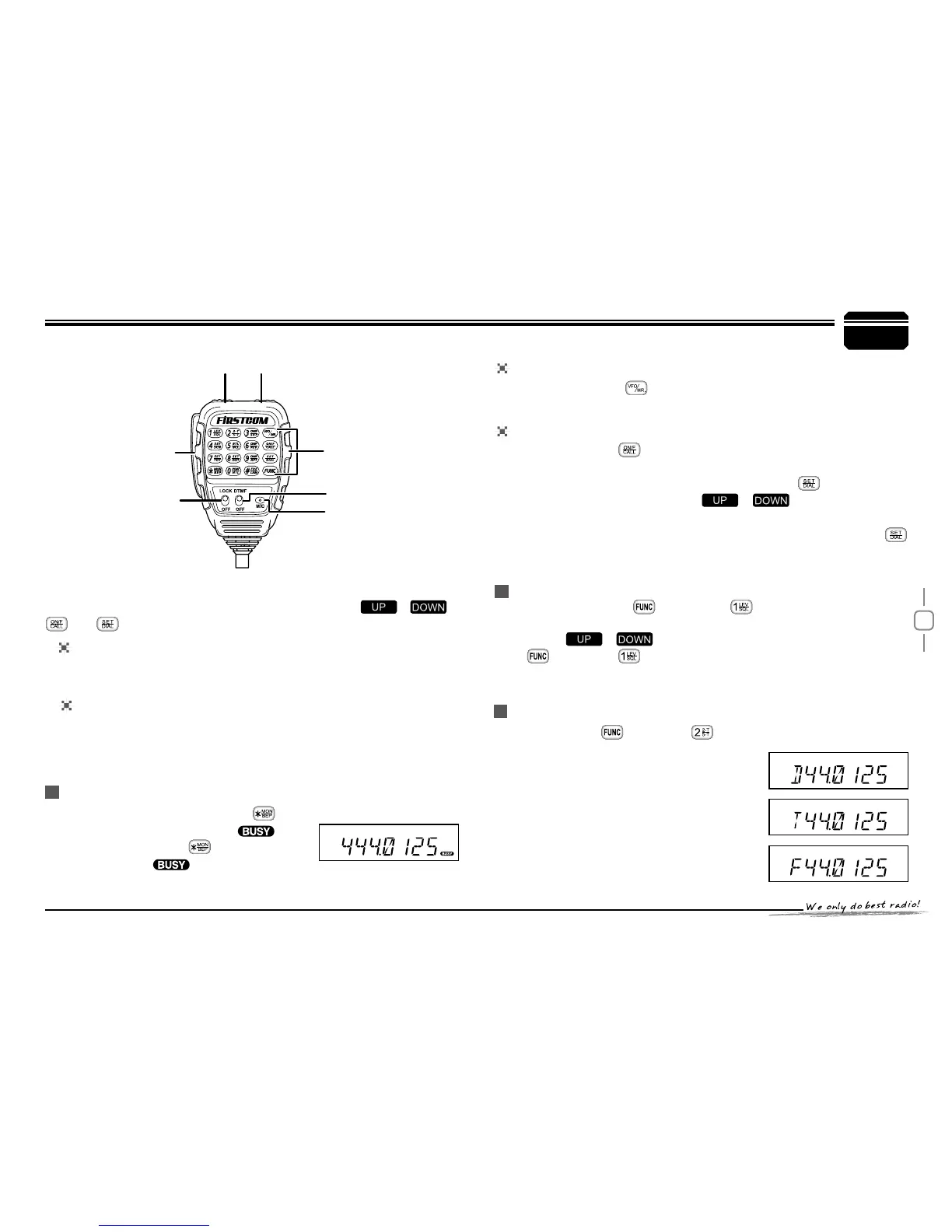
You can operate the transceiver by keypad or input desired frequency
or channel through the QHM-03 microphone (Note:In professional
transceiver mode,other keys are invalid except PTT,[
/ ],
and ).
Keypad Lock
Pull down the slide switch to lock position,The lamp is turned off and
all of keypads is not work except PTT switch.
Transmitting DTMF By Microphone KeyPAD
Switches between VFO and channel mode
In standby,press key to switch between channel mode and
Frequency mode (VFO).
Short Calling
In standby,press to transmit the selected DTMF/2TONE/5TONE
in current channel.
Transmitting DTMF Code:In standby,press
,LCD displays
DTMF data and group.Press [
/ ] key to select the
desired transmitting DTMF group,then Press PTT to transmit.
If no DTMF data in current group,LCD displays "EMPTY",press
key again and input desired DTMF code by keypad,press PTT to
transmit and store DTMF data.
Squelch Level
In standby,press
1.
,then press ,LCD displays "SQL" and
current squelch level.
Press
2.
/ to adjust the desired squelch level.(press
,then press ,turn selector knob also can adjust the desired
squelch level.
Press number key to conrm and exit.
3.
Optional signaling
In standby,press ,then press to add
optional signaling,repeat above operation to
set DTMF,2TONE or 5TONE signaling.
W h e n f i r s t b i t of E x a b y t e i n
frequency displays "D",it indicates
DTMF function enable.
W h e n f i r s t b i t of E x a b y t e i n
frequency displays "T",it indicates
2Tone function enable.
Microphone Operation
Slide DTMF key to DTMF position, press and hold the [PTT] key,
transmitting the desired DTMF signaling by the numeric key directly.
(Note:Slide DTMF key to DTMF position,the keyboard is invalid in
standby ).
Function Setup By Microphone Keypad
Squelch off:In standby, press key,
the squelch is disabled when
icon
ashed in LCD, Press
again to enable
squelch and the
icon disappears.
PTT
DOWNUP
Lock
Speaker
Numeric Keys
DTMF ON/OFF


 To Next Page