EasyManua.ls Logo

Fisher & Paykel DW60FC4X2 - Wi-Fi Connection & Remote Mode; Wi-Fi Setup and Remote Operation

Fisher & Paykel DW60FC4X2
40 pages
Print Icon
To Next Page IconTo Next Page
To Previous Page IconTo Previous Page
Loading...
16
WI-FI CONNECTION & REMOTE MODE
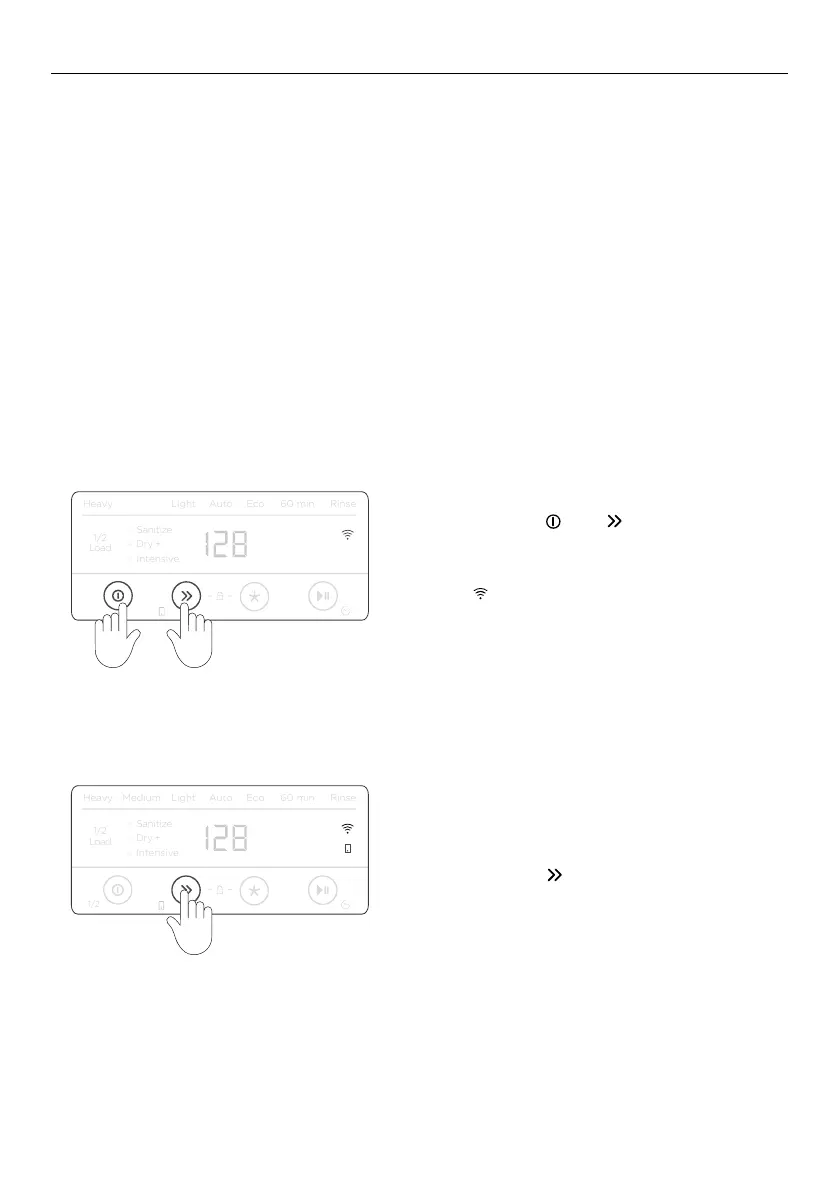
Ensure there is no wash in progress.
Press and hold
and together for
4 seconds.
When
flashes, follow the prompts in the
app to complete set-up.
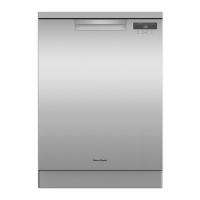
Ensure your Dishwasher is connected to your
Wi-Fi network.
Press and hold
for 4 seconds.
Heavy
Medium
Light
Auto
Eco
60 min
Rinse
Sanitize
Dry +
Load
1/2
1/2
Heavy
Medium
Light
Auto
Eco
60 min
Rinse
Sanitize
Dry +
Load
1/2
1/2
Heavy
Medium
Light
Auto
Eco
60 min
Rinse
Sanitize
Dry +
Load
1/2
1/2
Heavy
Medium
Light
Auto
Eco
60 min
Rinse
Sanitize
Dry +
Load
1/2
1/2
Heavy
Medium
Light
Auto
Eco
60 min
Rinse
Sanitize
Dry +
Load
1/2
1/2
Intensive
Intensive
Intensive
Intensive
Intensive
Heavy
Medium
Light
Auto
Eco
60 min
Rinse
Sanitize
Dry +
Load
1/2
1/2
Heavy
Medium
Light
Auto
Eco
60 min
Rinse
Sanitize
Dry +
Load
1/2
1/2
Heavy
Medium
Light
Auto
Eco
60 min
Rinse
Sanitize
Dry +
Load
1/2
1/2
Heavy
Medium
Light
Auto
Eco
60 min
Rinse
Sanitize
Dry +
Load
1/2
1/2
Heavy
Medium
Light
Auto
Eco
60 min
Rinse
Sanitize
Dry +
Load
1/2
1/2
Intensive
Intensive
Intensive
Intensive
Intensive
Your appliance may be connected to your home wireless network and operated remotely
using the app.
Getting started
z
Ensure your home Wi-Fi network is turned on.
z
You will be given step by step guidance on both your appliance and mobile device.
z
It may take up to 10 minutes to connect your appliance.
z
For further guidance and troubleshooting, please refer to the app.
On your mobile device:
1 Download the app from www.fisherpaykel.com/connect
2 Register and create an account.
3 Add your appliance and set up the Wi-Fi connection.
Connecting to your home Wi-Fi
Enabling remote mode


Related product manuals