2
Welcome
Thank you for making Fishman a part of your acoustic experience. We
are proud to offer you the nest acoustic ampli cation products avail-
able; high-quality professional-grade tools to empower you to sound your
very best. We are con dent that Platinum Pro EQ will both enhance and
inspire your music making.
Quick Start
Power – Install a fresh 9V battery (not included) or connect a Fishman
power adaptor.
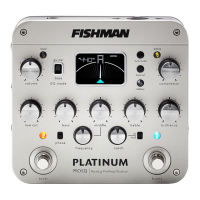
Set the controls – Volume at minimum and all other controls as
shown. When using Platinum Pro EQ with bass instruments, set the EQ
Mode to bass. Set EQ Mode to guitar for all other instruments.
Plug in – Use standard ¼-inch and XLR shielded instrument cables.
Set trim – Play hard and adjust the input trim (on the right side) so the
level LED ashes only occasionally.
Tune up – Step on the tuner footswitch to tune with the output muted.
Kill feedback – If feedback starts, change the position of the phase
switch. If feedback persists, set the notch switch to in and slowly rotate
the notch knob to “dial out” the feedback.




 To Next Page