6
Front Panel Controls
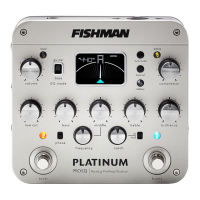
Volume & Level
The volume control affects the overall output level coming from the 1/4”
output; the XLR D.I. output is always at a xed level to prevent unwanted
gain changes at the F.O.H. mixer. For the cleanest signal, set the volume
as high as possible without clipping the next device in the signal chain.
The level LED monitors distortion at many points in the signal chain. If it
lights frequently, reduce the input trim control on the right side of the
device.
Compressor
As you turn this knob clockwise, your overall playing dynamics become in-
creasingly limited, making softer notes louder and controlling loud spikes
in your playing. This can be helpful in performances where you desire a
more even level to your playing.
The compressor control adjusts the threshold of
the automatic leveling circuit that follows the
preamp section. The compression ratio, attack
time, and release time are xed.
The active LED monitors the strength of the compressor circuit:
• The LED lights green when the signal reaches compression threshold.
• The LED lights yellow when the signal over threshold is being reduced
as much as 6dB.
more
dynamics
less
dynamics




 To Next Page