SYSTEM OPERATION - PROGRAM OR EDIT A SEQUENCE
..................................................................................................................................................................................................................................
5. Select, the mode for the Lights, there are 3 choices, Full light, Perimeter Light or just the Centre of the
Light that illuminates.
6. Select the “LED” mode of the Light, there are 4 selections, which will have the LEDs flash rapidly or
slowly etc. per your preference and ease of visibility.
7. Select if sound (Beep) is required.
8. Select “Save” to save your program, a drop down menu will appear to enable you to name the program
as required.
9. Select clear to remove all data. A drop down menu will appear to query if you are sure as all data inputs
will be cleared and cannot be recovered.
11. Select “Apply to All” if you require the Lights to have all of the same parameters.
12. Select the sensitivity of ‘Impact” as required, “soft hit or a firm hit”.
13. Select the “Delay” interval between Lights coming on in succession.
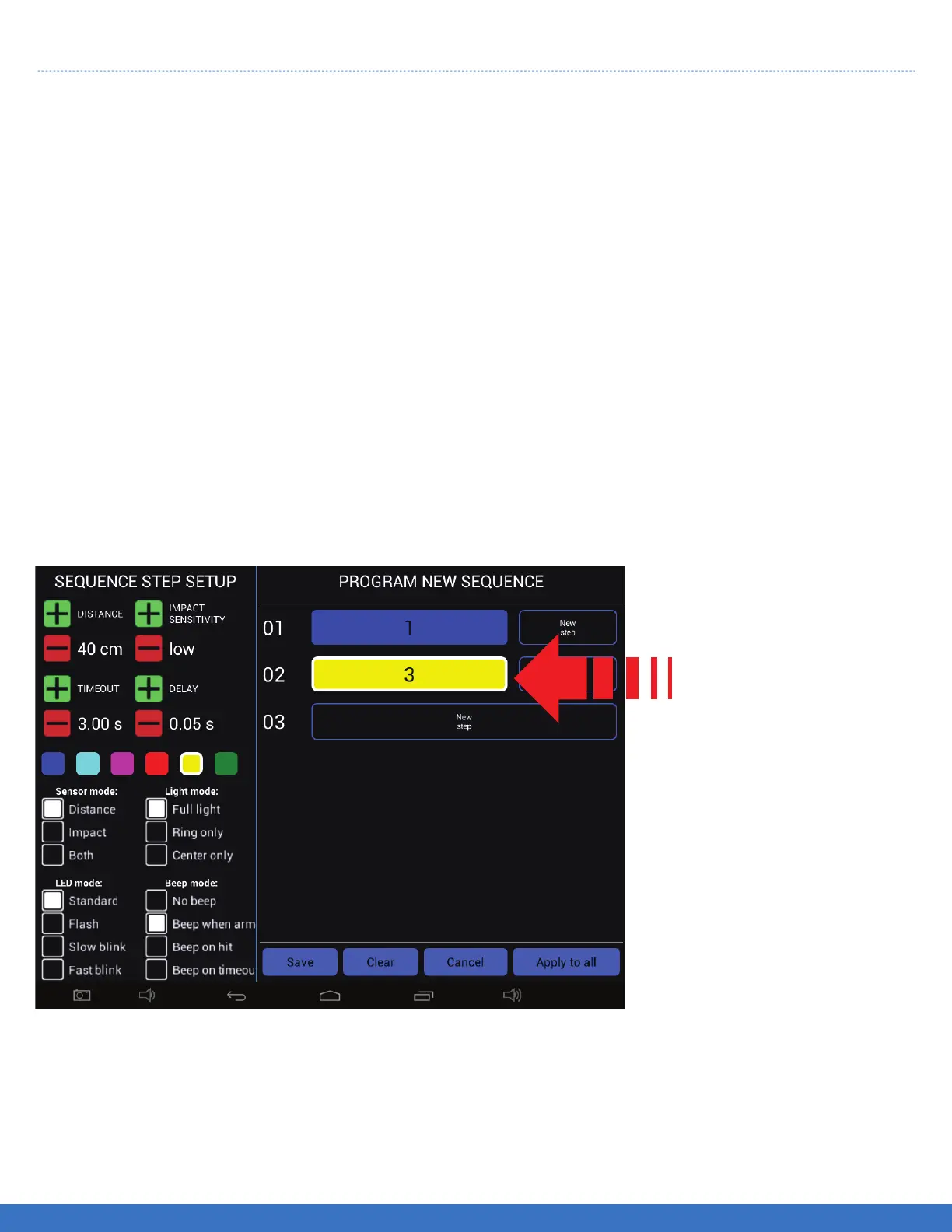
Repeat the process as per
the previous step for all
subsequent Lights required
for the Routine. In this
example, Light #3 is shown
as the second Light in the
sequence with a YELLOW
colour selected.
PLEASE NOTE: Depending on the Tablet Controller that you have, you may have to scroll up/down
within the “Sequence Step Setup” to view all of the options.
SYSTEM OPERATION - PROGRAM OR EDIT A SEQUENCE
27


 To Next Page