13MP Camera / 13MP kamera
Battery Cover / Pil Kapağı
Lanyard buckle / Kordon tokası
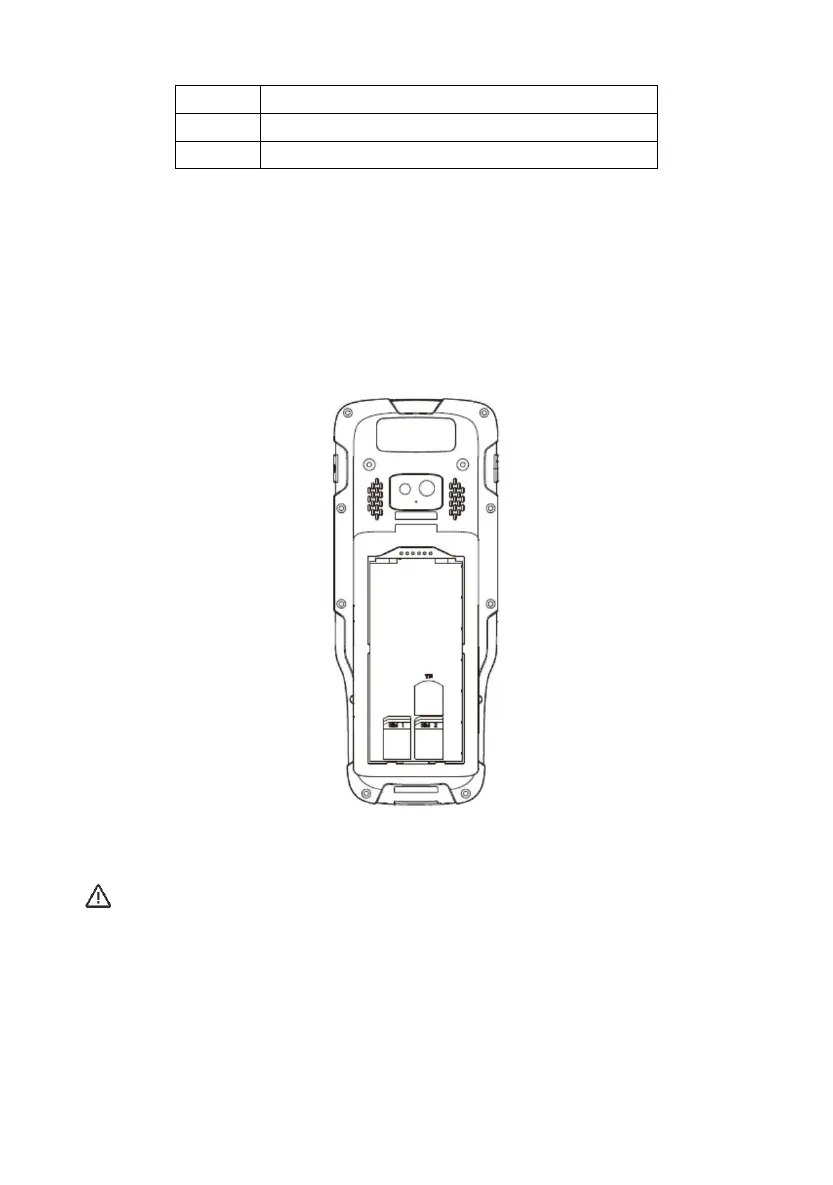
1.3.2 Installation of SIM card and SD Card / SIM kart ve SD Kart kurulumu
To install the SIM card, you need to open the battery cover, remove the battery, and open
the SIM card slot.
SIM kartı yüklemek için öncelikle pil kapağını açmalı, pilinizi çıkarmalı ve SIM kart yuvasını
açmalısınız.
Figure 1.3.2 Installation of SIM card and SD Card
Şekil 1.3.2 SIM kart ve SD Kart kurulumu
Note / NOT:
Please mind card-gap direction before insert sim card and SD card.
This is a dual sim cards device, only 1 CDMA2000 SIM card is valid at same time.
SIM kartı ve SD kartı yerleştirirken kart boşluğunun yönüne dikkat edin. Bu çift SIM kartlı bir
cihazdır ve aynı anda yalnızca 1 CDMA2000 SIM kartı geçerlidir.
Restart Device
Cihazı Yeniden Başlat


 To Next Page