14
4. Device operating instructions
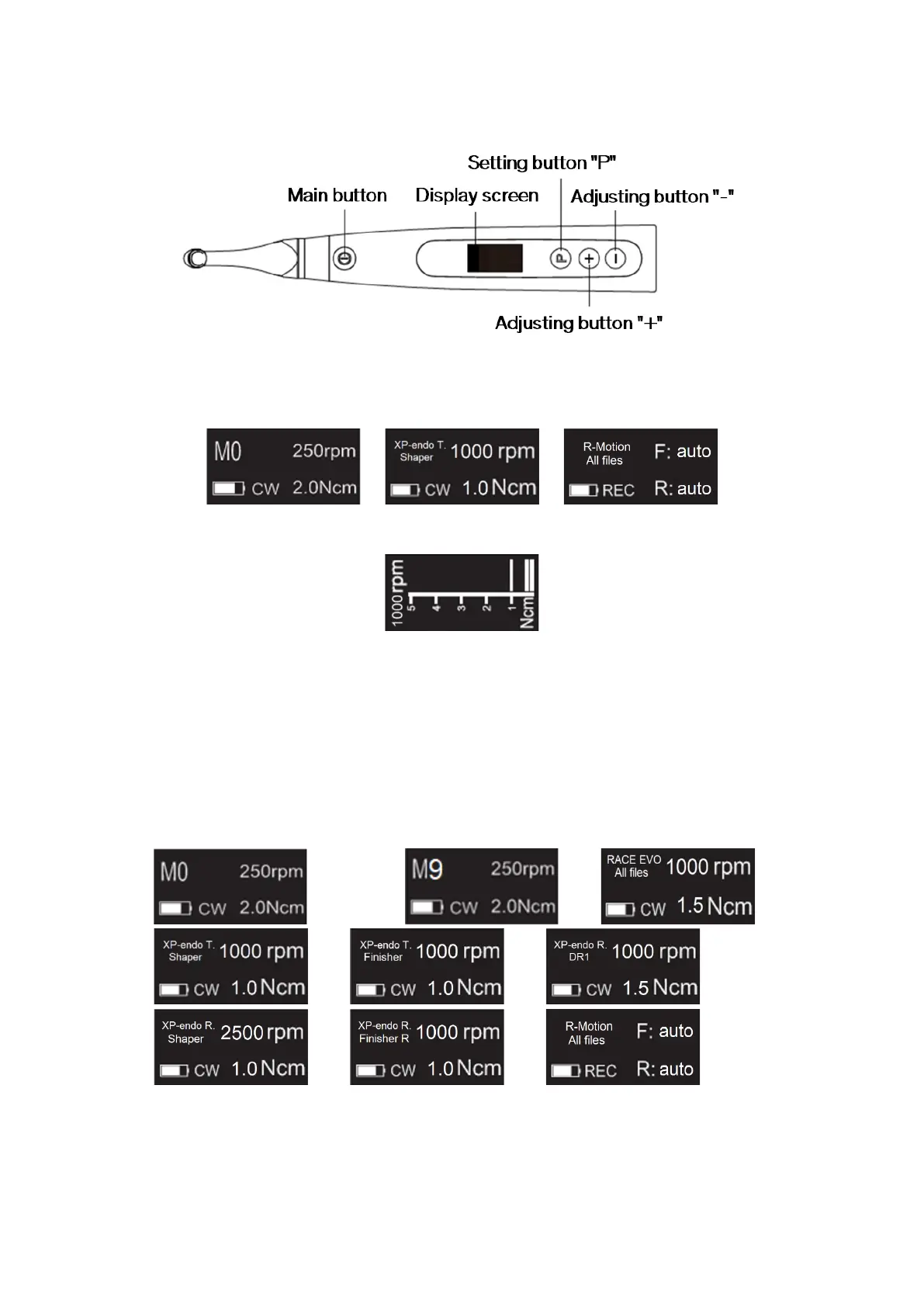
4.1 Setting interface and button description
4.2 Power ON and power OFF the device
1. To power ON the device, press the Main button. The device enters in stand-by state.
The display shows the stand-by interface of the last program used. For example:
or or …
2. To start the motor from the stand-by state, press the Main button.
The display shows the working interface according to the program used. For example:
3. To stop the motor, press the Main button again. The device goes back in stand-by state.
4. To power OFF the device, hold down the Setting button “P”, and press the Main button.
In stand-by state, the device will automatically shut down after 5 minutes.
4.3 Select User Programs
The device contains 10 memorized User Programs (M0-M9) and 7 preset FKG File Systems
available directly from the stand-by state.
1. To select a program from the stand-by state, press the Adjusting button “+”/”-“.
… ←→ ←→ … ←→ ←→ ←→
←→ ←→ ←→
←→ ←→ ←→ …
2. To select a specific FKG File System, refer to Chapter 4.5.



 To Next Page