17
4.4.4 User Programs parameters availability table
User Program
Set
Working
Speed
Set
Torque
Limit
Set
Apical
Action
Set Auto
Start
Set Auto
Stop
Set Flash
Bar
Position
Apical
Slow
Set
Forward
Angle
Set
Reverse
Angle
CW
CCW
REC
ATR
EAL
4.5 Select FKG File Systems
To help the user set the file parameters according to FKG recommendation, the most popular
FKG File Systems are already preset in the device.
1. To select a preset FKG File System from the stand-by state, long press the Setting button
“P”.
2. To select the desired FKG File System, press the Adjusting button “+”/“-” and press the
Setting button “P” to confirm.
3. To select a file, press the Adjusting button “+”/“-” and press the Main button to confirm.
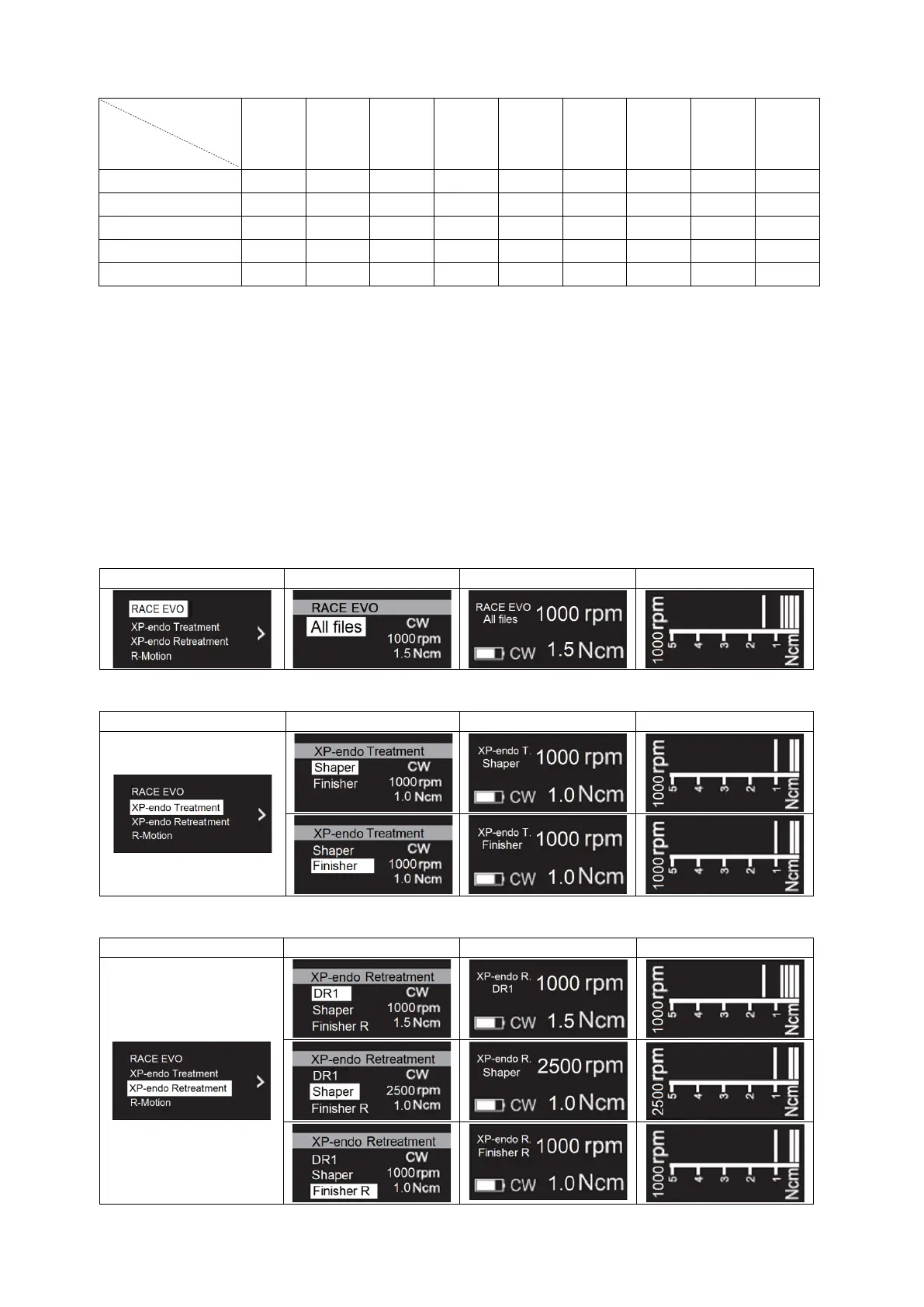
4.5.1 FKG File Systems list
RACE
®
EVO
XP-endo
®
Treatment
XP-endo
®
Retreatment


 To Next Page