14 www.ama.pt
DESCRIPTION
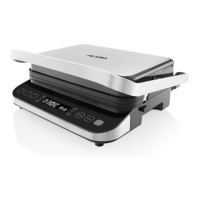
1. Lower tray
2. Upper tray
3. Handle
4. Plates
5. Plate release buon
6. Soaker tray
7. Control panel
8. Cooking with lower and upper plate
9. Cooking with upper plate
10. Cooking with lower plate
11. Increase cooking temperature
12. Decrease cooking temperature
13. Display - temperature indicator
14. Display - me indicator
15. Increase cooking me
16. Decrease cooking me
17. CANCEL/Standby
18. START/Begin
19. Operaon indicator
IMPORTANT WARNINGS
Be careful when handling the appliance
while cooking. Open and close the
appliance using only the handle. Do not
touch the upper tray during or immediately
aer cooking, as it may be hot.
The use of oven mis when handling the
appliance is recommended to avoid burns.
Never use metal utensils on the plates, as
they can damage the non-sck coang.
Always allow the appliance to cool down for
30 minutes before cleaning it.
OPERATION
Before rst use
Take the appliance out of the packaging
and remove all packing material, except the
appliance’s rang plate.
Remove the plates by pressing the plate
release buon.
Before using the appliance for the rst
me, wash the plates with warm water and
a neutral cleaning product. Then dry the
plates very well.
Insert the plates, making sure they are put
correctly in place.
The plate has two sides, one threaded and
one smooth; choose the desired side when
inserng the plate.
Make sure that the soaker tray is inserted
correctly in the back of the appliance.
Usage
Plug the appliance in; the appliance will
beep; all indicators will light up and then
go o. The word ‘OFF’ will appear on the
display.
Select the cooking funcon (lower and
upper plate, upper plate, lower plate) by
pressing the corresponding buon; the
default me and temperature appear on
the display.
Adjust the temperature and cooking me
by pressing the corresponding temperature
and me increase or decrease buons;
the appliance beeps when the buons are
pressed.
Press the START buon to start preheang;
the word ‘PRE’ will appear on the display
in the me display area, the temperature
indicator in the temperature display area,
and the operaon indicator will turn blue.


 To Next Page