25
www.FlameBoss.com
CONNECT MODES (AVAILABLE IN FIRMWARE VERSIONS 4.0 AND ABOVE)
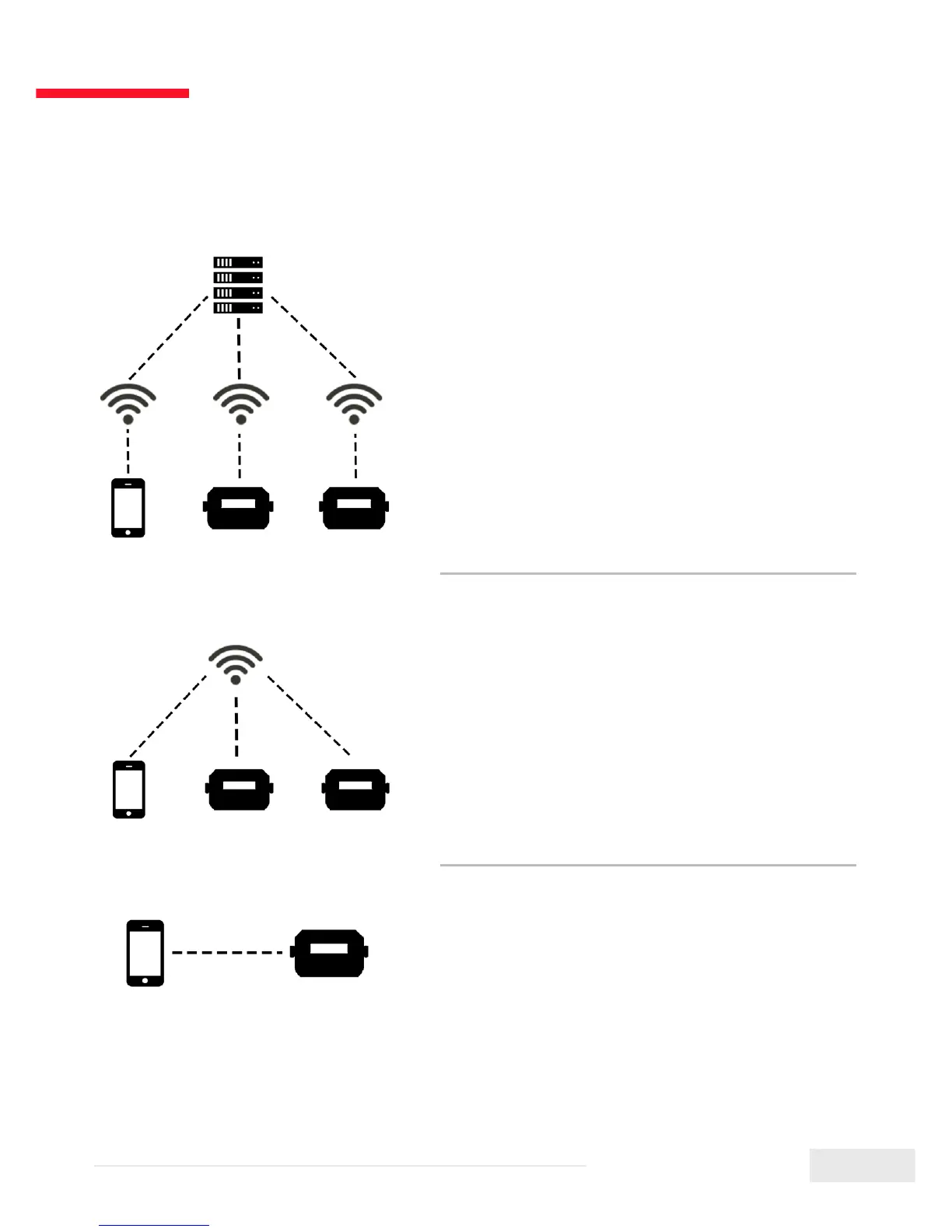
Cloud Connect:
Your phone will connect to our server over the
internet and you can view and manage any of
your connected controllers. This mode has the
most functionallity including cook history and
cook notes. If both your phone and controller
have internet access, use this mode.
Local Connect:
Your phone will detect any controllers on your
local WiFi network. You can then connect to
your controllers to view and manage them.
History and Account pages are disabled for
this mode. If you have a router with no internet
access, use this mode.
Direct Connect:
Your phone will connect directly to your
controller so you can view and manage it.
Using this mode requires the controller to be in
Access Point mode. History and Account pages
are disabled for this mode. If you don’t have a
router, use this mode.
To change modes, press the Mode link at
the top of the Account tab.


 To Next Page