Camera
Kite
User
Manual
57
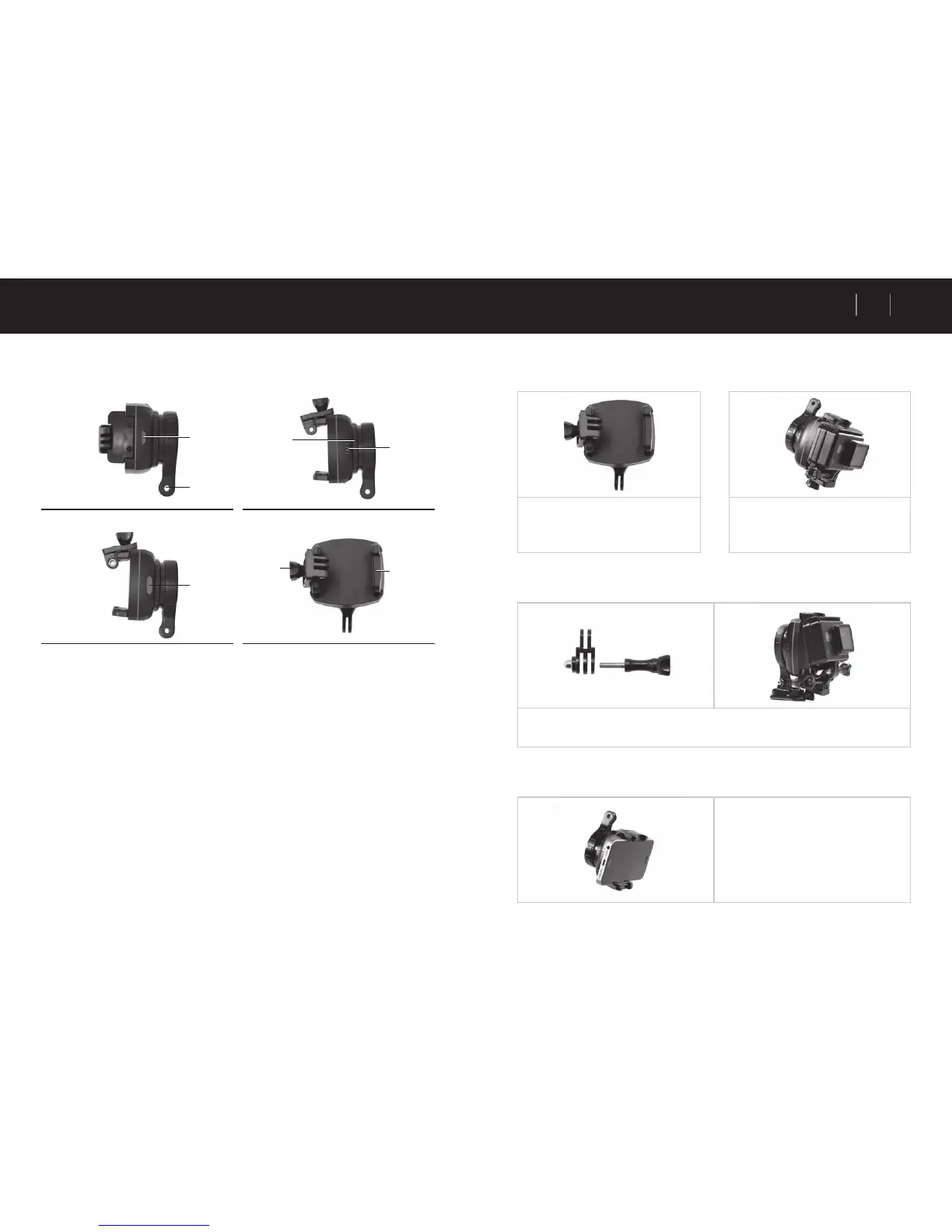
Stabiliser Description
Top View Side View
Side view Front View
1. Power on / off button 5. LED indicator light
2. Charging port cover 6. Pull handle
3. Kite-mount attachment arm 7. Camera-mount + Thumb screw
4. Brushless motor
Getting Started
Charging the battery
1. Open the charging port cover.
2. Plug in the included micro USB charging cable into the charging port.
3. Plug the other end of USB cable into a computer USB port or any USB adaptor with output less
than 1A.
4. While charging, the LED indicator light will be RED in colour.
5. When the battery RED LED indicator is no longer visual, the battery is fully charged.
6. Unplug the charging cable and close the charging port with its cover.
Tips for battery and charger
Please fully charge the battery before use
1.
4.
7.
3.
2.
5.
6.
Camera Kite Stabiliser Manual
Mounting the Camera / Smartphone
1. Pull the side clip handles open on
both sides
2. Install the action camera within its
protection case on the camera-mount
piece and secure it with the thumb
screw.
3. If you would wish to take landscape shots then install the ‘short connection mount’ in-
between the camera-mount piece and the camera.
4. If you want to use a smartphone instead,
pull open the side clip handles and slide
in the smartphone.



 To Next Page