17
NORDIC S4
6. Troubleshooting
Type of fault Remedial action
Cold draughts Check which supply temperature has been selected. See control panel.
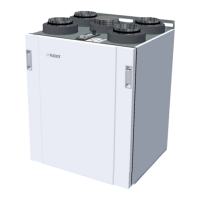
Check that the rotor rotates. The rotor belt can be tightened by moving the rotor motor bracket*
Check that heating comes on.
1HZH[WUDFWȴOWHUQHHGHG
Fans not working Check that power is connected to the unit.
Check that the overheating thermostat has not cut out.
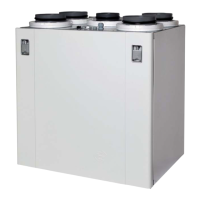
Restart the overheating thermostat by pressing the button**. It also has to be reset in the app or on the control
panel.
/RZDLUȵRZUDWH Check what speed the unit is set to.
&KHFNWKDWWKHȴOWHUVDUHWLJKW
Check the intake grille.
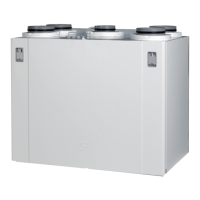
Reset button
The thermostat (F10) has to be reset manually by
pressing the reset button.
(left model)
**
To tighten the rotor belt, move the rotor motor bracket to the
free holes in the rotor box.
*


 To Next Page