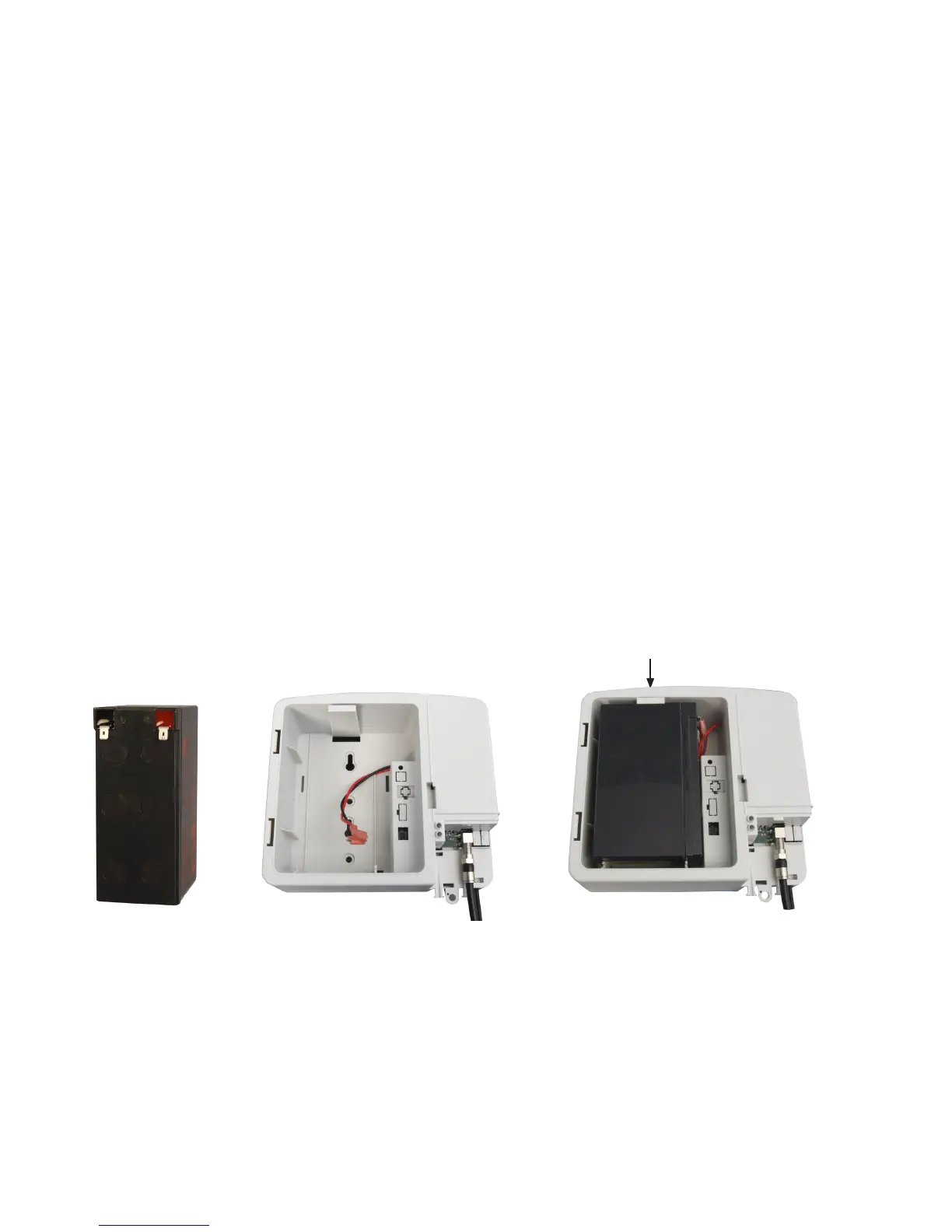
Fig. 2-4, Battery
Terminals
Fig. 2-6, Completed
Installation
2.0 Installation, continued
2.2 Battery Installation / Replacement Procedure
1. (Failed Battery Replacement) For units with Alpha part number 010-344-20-001 (note that
the nal three digits in bold are the key indicator), disconnect the AC line cord from the
AC power outlet before beginning battery replacement.
2. (Battery Replacement / Failed Battery Replacement) Disconnect the wire harness to the
battery.
3. Connect the wire harness to the charged battery (a fully charged battery reads about
13Vdc).
4. Install the battery in the cradle as shown in Fig. 2-6. The locking tab secures it in place.
5. Replace the battery compartment door. To replace the front cover, align the hinges with
the hinge sockets and press them in with the door perpendicular with the main housing.
Rotate the door closed until the closure door latches.
6. Plug the FPR1207-F into an AC power outlet. The Green LED should light.
7. Verify the unit is functioning properly by unplugging the unit. The alarm should sound for
one second and the Green LED should ash. The unit will be running on standby battery
power.
8. Re-plug the FPR1207-F into an AC power outlet. The unit is ready to be placed into
service.
Fig. 2-5, Battery Compartment,
FPR1207-F
The unit will not yet be on unless Battery Emergency Use button is pushed.
Locking tab
010-344-B1-001 Rev. A (2/2014)
12


 To Next Page