18
Parental Menu Options
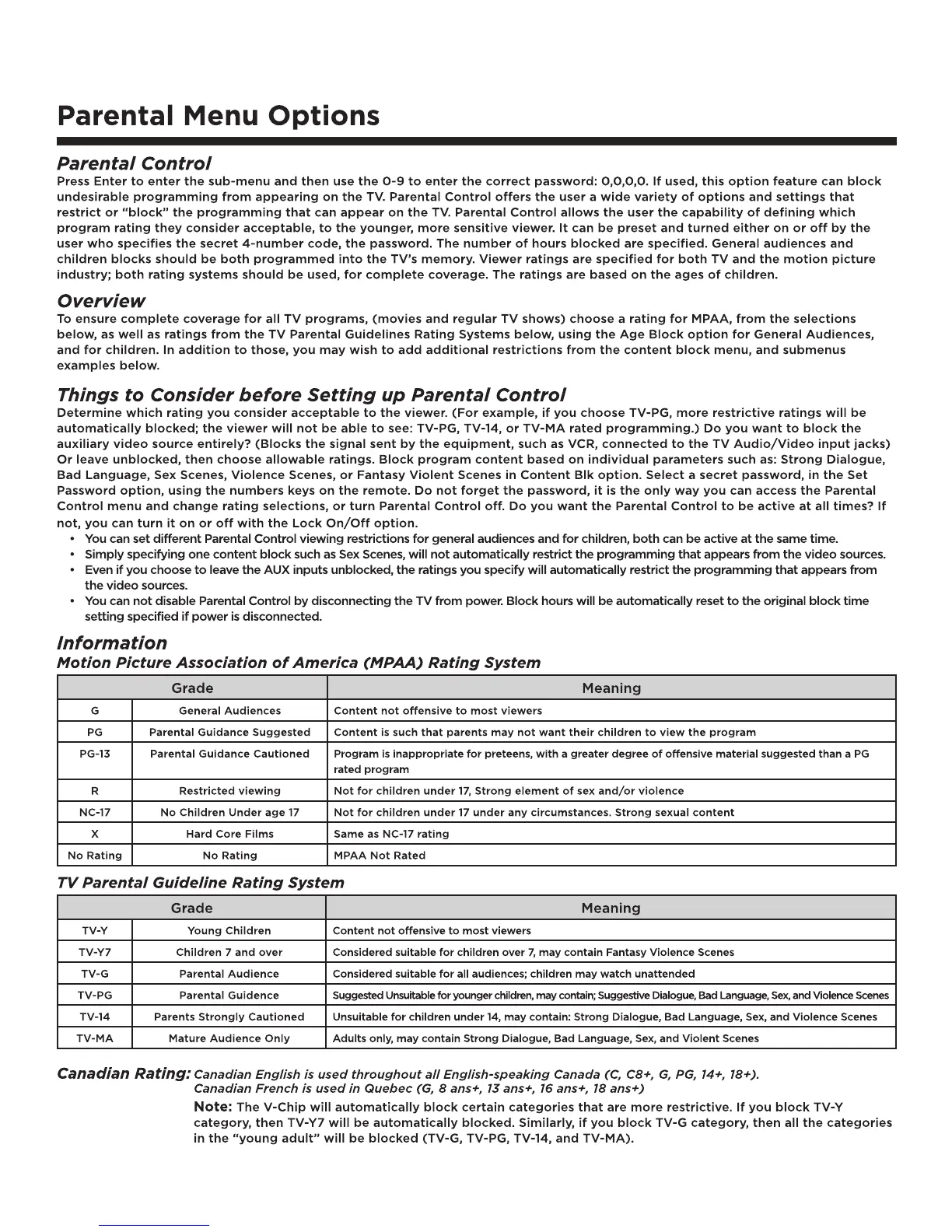
Parental Control
Press Enter to enter the sub-menu and then use the 0-9 to enter the correct password: 0,0,0,0. If used, this option feature can block
undesirable programming from appearing on the TV. Parental Control offers the user a wide variety of options and settings that
restrict or “block” the programming that can appear on the TV. Parental Control allows the user the capability of defining which
program rating they consider acceptable, to the younger, more sensitive viewer. It can be preset and turned either on or off by the
user who specifies the secret 4-number code, the password. The number of hours blocked are specified. General audiences and
children blocks should be both programmed into the TV’s memory. Viewer ratings are specified for both TV and the motion picture
industry; both rating systems should be used, for complete coverage. The ratings are based on the ages of children.
Overview
To ensure complete coverage for all TV programs, (movies and regular TV shows) choose a rating for MPAA, from the selections
below, as well as ratings from the TV Parental Guidelines Rating Systems below, using the Age Block option for General Audiences,
and for children. In addition to those, you may wish to add additional restrictions from the content block menu, and submenus
examples below.
Things to Consider before Setting up Parental Control
Determine which rating you consider acceptable to the viewer. (For example, if you choose TV-PG, more restrictive ratings will be
automatically blocked; the viewer will not be able to see: TV-PG, TV-14, or TV-MA rated programming.) Do you want to block the
auxiliary video source entirely? (Blocks the signal sent by the equipment, such as VCR, connected to the TV Audio/Video input jacks)
Or leave unblocked, then choose allowable ratings. Block program content based on individual parameters such as: Strong Dialogue,
Bad Language, Sex Scenes, Violence Scenes, or Fantasy Violent Scenes in Content Blk option. Select a secret password, in the Set
Password option, using the numbers keys on the remote. Do not forget the password, it is the only way you can access the Parental
Control menu and change rating selections, or turn Parental Control off. Do you want the Parental Control to be active at all times? If
not, you can turn it on or off with the Lock On/Off option.
• YoucansetdifferentParentalControlviewingrestrictionsforgeneralaudiencesandforchildren,bothcanbeactiveatthesametime.
• SimplyspecifyingonecontentblocksuchasSexScenes,willnotautomaticallyrestricttheprogrammingthatappearsfromthevideosources.
• EvenifyouchoosetoleavetheAUXinputsunblocked,theratingsyouspecifywillautomaticallyrestricttheprogrammingthatappearsfrom
the video sources.
• YoucannotdisableParentalControlbydisconnectingtheTVfrompower.Blockhourswillbeautomaticallyresettotheoriginalblocktime
setting specified if power is disconnected.
Information
Motion Picture Association of America (MPAA) Rating System
Grade Meaning
G General Audiences Content not offensive to most viewers
PG Parental Guidance Suggested Content is such that parents may not want their children to view the program
PG-13 Parental Guidance Cautioned Program is inappropriate for preteens, with a greater degree of offensive material suggested than a PG
rated program
R Restricted viewing Not for children under 17, Strong element of sex and/or violence
NC-17 NoChildrenUnderage17 Not for children under 17 under any circumstances. Strong sexual content
X Hard Core Films Same as NC-17 rating
No Rating No Rating MPAA Not Rated
TV Parental Guideline Rating System
Grade Meaning
TV-Y YoungChildren Content not offensive to most viewers
TV-Y7 Children 7 and over Considered suitable for children over 7, may contain Fantasy Violence Scenes
TV-G Parental Audience Considered suitable for all audiences; children may watch unattended
TV-PG Parental Guidence SuggestedUnsuitableforyoungerchildren,maycontain;SuggestiveDialogue,BadLanguage,Sex,andViolenceScenes
TV-14 Parents Strongly Cautioned Unsuitableforchildrenunder14,maycontain:StrongDialogue,BadLanguage,Sex,andViolenceScenes
TV-MA Mature Audience Only Adults only, may contain Strong Dialogue, Bad Language, Sex, and Violent Scenes
Canadian Rating: Canadian English is used throughout all English-speaking Canada (C, C8+, G, PG, 14+, 18+).
Canadian French is used in Quebec (G, 8 ans+, 13 ans+, 16 ans+, 18 ans+)
Note: TheV-Chipwillautomaticallyblockcertaincategoriesthataremorerestrictive.IfyoublockTV-Y
category,thenTV-Y7willbeautomaticallyblocked.Similarly,ifyoublockTV-Gcategory,thenallthecategories
in the “young adult” will be blocked (TV-G, TV-PG, TV-14, and TV-MA).


 To Next Page
 Loading...