The Datapaq Furnace Tracker is a comprehensive system designed for monitoring and analyzing temperature profiles of products within various types of industrial furnaces. It provides process temperature monitoring instrumentation, ensuring consistent quality of product, efficient furnace performance, and maximum efficiency. The system helps identify problems, fine-tune processes, and reduce running costs.
Function Description:
The Datapaq Furnace Tracker system is used to measure and record temperature data during furnace processes. It comprises a data logger, thermal barriers, thermocouple probes, and Insight™ software. The system can operate in two primary modes:
- Without Telemetry: The data logger is placed in the furnace within a thermal barrier, records temperature data, and is then retrieved. The data is downloaded to a PC and analyzed using Insight software.
- Using Telemetry: The data logger, equipped with a radio transmitter, sends real-time temperature data to a PC via a receiver. This allows for immediate monitoring and analysis of the temperature profile during the furnace run.
The system supports various applications, including:
- Furnace Surveying: Conducts and analyzes wizard-driven temperature uniformity surveys to assess the accuracy and uniformity of heating within a furnace.
- CAB Surveyor: Monitors furnace performance by running a standard instrumented survey jig to gather and analyze temperature data.
- Statistical Process Control (SPC): Allows for easy analysis of profile results over time, highlighting trends in performance and potential problems.
System Components:
A typical Datapaq Furnace Tracker system includes:
- Data Logger: Records temperature data. Available with a communications lead and charger. Loggers with a radio-telemetry option include an internal transmitter.
- Receiver: (Radio-telemetry option only) Receives real-time data from the logger.
- Thermal Barrier: Protects the data logger from the hostile environment of an industrial furnace.
- Thermocouple Probes: Measure temperatures at various points within the furnace and on the product.
- Insight™ Furnace Tracker Software: Used for setting up the logger, downloading data, and analyzing temperature profiles.
- User Documentation: Includes the Datapaq Furnace Tracker User Manual, data logger specific user manual, and the TM21 Radio-telemetry System User Manual (if applicable).
Important Technical Specifications:
Thermal Barriers:
Thermal barriers provide thermal and mechanical protection for the data logger. They are constructed with microporous insulation covered by Mullite fiber cloth for primary thermal protection. Heatsinks, filled with a non-toxic, non-flammable phase-changing material, offer secondary protection for extended high-temperature operations. The phase-changing material absorbs heat and maintains a temperature of 58°C/136°F until it changes from solid to liquid. Heatsinks also feature a temperature-sensitive label to indicate the maximum temperature experienced by the data logger, with a warning if it exceeds 77°C/170°F.
Two main series of thermal barriers are available:
- TB4000 Series (Standard Range):
- For environments free from carbon.
- Maximum temperature: 800°C/1,472°F.
- Adjustable lid to compensate for insulation shrinkage.
- Provision for renewal of Mullite fiber for clamping thermocouple cables.
- Examples:
- Temp Range: 200-500°C (392-932°F)
- Duration: 6-1.5 hrs
- Dimensions: 125mm H x 248mm W x 504mm L (4.9 in H x 9.8 in W x 19.8 in L)
- Weight: 12.0 kg (26.3 lb)
- Logger: TP6100, TP3000, DP5x60, DQ1860
- Heatsink: 1 x TB1001
- Temp Range: 200-800°C (392-1,472°F)
- Duration: 15.5-2 hrs
- Dimensions: 170mm H x 297mm W x 526mm L (6.7 in H x 11.7 in W x 20.7 in L)
- Weight: 20.0 kg (44.1 lb)
- Logger: TP6100, TP3000, DP5x60, DQ1860
- Heatsink: 1 x TB1066 (TP6100/TP3000), 1 x TB1069 (DP5x60/DQ1860)
- Temp Range: 200-800°C (392-1,472°F)
- Duration: 3.3-0.7 hrs
- Dimensions: 100mm H x 247mm W x 509mm L (3.9 in H x 9.7 in W x 20.0 in L)
- Weight: 11.7 kg (25.8 lb)
- Logger: DP5x60, DQ1860
- Heatsink: 1 x TB1001
- Temp Range: 200-800°C (392-1,472°F)
- Duration: 24-6 hrs
- Dimensions: 250mm H x 357mm W x 543mm L (9.8 in H x 14.1 in W x 21.4 in L)
- Weight: 31.0 kg (68.4 lb)
- Logger: TP6100, TP3000, DP5x60, DQ1860
- Heatsink: 1 x TB1066 (TP6100/TP3000), 1 x TB1069 (DP5x60/DQ1860)
- Temp Range: 200-800°C (392-1,472°F)
- Duration: 8-2 hrs
- Dimensions: 150mm H x 275mm W x 504mm L (5.9 in H x 10.8 in W x 19.8 in L)
- Weight: 15.0 kg (33.1 lb)
- Logger: TP6100, TP3000, DP5x60, DQ1860
- Heatsink: 2 x TB1001
- TB4900 Series (Severe Environments):
- For environments where carbon is present.
- Maximum temperature: 1,000°C/1,832°F in normal combustion atmospheres.
- Recommended for applications with rapid temperature changes (e.g., gas quench) due to Datapaq Floating Plate™ technology, which minimizes distortion of the barrier's base and lid.
- Features 310 stainless steel (including catches), round edges, and a replaceable thermocouple wear-strip.
- Examples:
- Temp Range: 200-1,000°C (392-1,832°F)
- Duration: 6-0.8 hrs
- Dimensions: 129mm H x 248mm W x 534mm L (5.1 in H x 9.8 in W x 21.0 in L)
- Weight: 13.8 kg (30.3 lb)
- Logger: TP6100, TP3000, DP5x60, DQ1860
- Heatsink: 1 x TB1001
- Temp Range: 200-1,000°C (392-1,832°F)
- Duration: 14.5-1.75 hrs
- Dimensions: 174mm H x 296mm W x 531mm L (6.9 in H x 11.7 in W x 20.9 in L)
- Weight: 21.0 kg (46.3 lb)
- Logger: TP6100, TP3000, DP5x60, DQ1860
- Heatsink: 1 x TB1066 (TP6100/TP3000), 1 x TB1069 (DP5x60/DQ1860)
- Temp Range: 200-1,000°C (392-1,832°F)
- Duration: 3.3-0.7 hrs
- Dimensions: 104mm H x 247mm W x 529mm L (4.1 in H x 9.7 in W x 20.8 in L)
- Weight: 12.6 kg (27.8 lb)
- Logger: DP5x60, DQ1860
- Heatsink: 1 x TB1001
- Temp Range: 200-1,000°C (392-1,832°F)
- Duration: 24-4.5 hrs
- Dimensions: 254mm H x 358mm W x 563mm L (10.0 in H x 14.1 in W x 22.2 in L)
- Weight: 32.0 kg (70.6 lb)
- Logger: TP6100, TP3000, DP5x60, DQ1860
- Heatsink: 1 x TB1066 (TP6100/TP3000), 1 x TB1069 (DP5x60/DQ1860)
- Temp Range: 200-1,000°C (392-1,832°F)
- Duration: 27-7.5 hrs
- Dimensions: 304mm H x 406mm W x 613mm L (12.0 in H x 16.0 in W x 24.1 in L)
- Weight: 44.0 kg (97.0 lb)
- Logger: TP6100, TP3000, DP5x60, DQ1860
- Heatsink: 1 x TB1066 (TP6100/TP3000), 1 x TB1069 (DP5x60/DQ1860)
- Temp Range: 200-1,000°C (392-1,832°F)
- Duration: 18-2.5 hrs
- Dimensions: 217mm H x 291mm W x 522mm L (8.5 in H x 11.5 in W x 20.6 in L)
- Weight: 26.0 kg (57.3 lb)
- Logger: TP6100, TP3000, DP5x60, DQ1860
- Heatsink: 1 x TB1066 (TP6100/TP3000), 1 x TB1069 (DP5x60/DQ1860)
- Temp Range: 200-1,000°C (392-1,832°F)
- Duration: 27-7.5 hrs
- Dimensions: 154mm H x 275mm W x 529mm L (6.1 in H x 10.8 in W x 20.8 in L)
- Weight: 17.4 kg (38.3 lb)
- Logger: TP6200, TP3300
- Heatsink: 1 x TB1066, 1 x TB9840
- Temp Range: 200-1,000°C (392-1,832°F)
- Duration: 8-1.25 hrs
- Dimensions: 154mm H x 275mm W x 529mm L (6.1 in H x 10.8 in W x 20.8 in L)
- Weight: 17.4 kg (38.3 lb)
- Logger: TP6100, TP3000, DP5x60, DQ1860
- Heatsink: 2 x TB1001
Thermocouple Probes:
Thermocouple probes utilize the Seebeck effect to produce an electromotive force (e.m.f.) proportional to the temperature difference between the hot and cold junctions.
- Standard Probes: Type K, combining nickel-chromium alloy and nickel-aluminum alloy.
- Sensitivity and linearity over 0-1,370°C/32–2,498°F.
- Practical operating range limited by cable insulation or metallic sheathing.
- Probe Types and Specifications:
- Type B: Contact Fluke Process Instruments for details.
- Type K:
- Temperature Range: 0°C to 1,370°C (32°F to 2,498°F)
- Cable Insulation: PTFE, ceramic, mineral insulation, glass fiber
- Accuracy: 0-1,250°C ±1.1°C/±2°F or ±0.4% (whichever is greater)
- Notes: Datapaq probes are Nicrobell™ sheathed for high-temperature operation.
- Type N:
- Temperature Range: 0°C to 1,300°C (32°F to 2,372°F)
- Cable Insulation: Mineral insulation only
- Accuracy: 0-1,300°C ±1.1°C/±2°F or ±0.4% (whichever is greater)
- Type R/S:
- Temperature Range: 0°C to 1,760°C (32°F to 3,200°F)
- Cable Insulation: Ceramic tube
- Accuracy: 0-1,000°C ±1.1°C; 1,100–1,600°C ±1°C + 0.003(t-100)°C (where t = measurement temperature)
- Notes: Not available from Fluke Process Instruments.
Thermocouple Cable Insulation Limits:
- PTFE: 260°C/500°F
- Glass fiber: 0-600°C/32-1,112°F continuous, 700°C/1,292°F peak
- Ceramic fiber: 1,000°C/1,832°F
- Mineral insulation (MI): 1,250°C/2,282°F (if using Nicrobell™ or high-temperature sheath)
Usage Features:
- Thermal Barrier Selection: Depends on furnace height/width, logger type, process duration, temperature, time at temperature, furnace atmosphere, and quench cycle. Consult Fluke Process Instruments for advice.
- Probe Location and Attachment: Probes can be attached to the product, a reusable product sample, a test fixture, or a combination. Methods include ceramic cement, bolting, welding, and high-temperature wire. The tip of the probe must be in good mechanical contact for surface temperature monitoring.
- Logger Preparation:
- Enable communication between logger and PC for first-time connection.
- Reset the logger using Insight software to establish data-collection parameters.
- Check battery charge before a profile run.
- The logger must be cooled below 35°C (comfortable to hold without gloves) since its last use before starting a new run.
- Installation in Thermal Barrier:
- Ensure the correct Datapaq thermal barrier is used for the process.
- Verify the logger/barrier/accessory assembly fits comfortably within the furnace.
- Plug thermocouples into the logger's numbered sockets, ensuring correspondence with process file definitions.
- If using a start button trigger mode, press and hold the button for about 0.5 seconds until the green LED flashes.
- Ensure barrier sealing surfaces are clean and undamaged.
- Place the logger in the barrier (with heatsink if required), laying thermocouple cables side-by-side across the sealing material to exit at the cutout.
- Fit the lid, ensuring a good seal and securing catches with locking pins.
- Placing System in Furnace:
- Discuss application with Health and Safety officer; wear appropriate protective clothing.
- Use lifting equipment if appropriate.
- Avoid placing the barrier where it will be exposed to large temperature differences (e.g., direct burner fire, rapid gas quench on one face only) to prevent distortion.
- Removing from Furnace and Downloading Data:
- Allow the thermal barrier and logger to cool sufficiently before handling.
- Stop data acquisition by pressing the red/green logger-status LED button.
- Download data to PC using Insight software.
- Examine thermal barrier and heatsink for damage.
Maintenance Features:
- Thermal Barrier Cooling: After a run, allow the thermal barrier to cool on a cold surface or a Datapaq barrier stand. Use spacers or refractory material to ensure uniform cooling.
- Heatsink Examination: Check the temperature-strip.
- Ideal Scenario: Temperature below 71°C/160°F. Phase-change material re-crystallizes. System and process are compatible.
- Possible Problem: Temperature exceeded 77°C/171°F. Cool heatsink to room temperature (about 15°C/59°F) before placing in a freezer at -20°C/-4°F overnight. This helps re-crystallize the phase-change material. If the heatsink's thermometer-strip recorded a temperature greater than 77°C/171°F, replace it.
- Definite Problem: Heatsink has been exposed to a process beyond its thermal capacity. Follow the procedure described above and contact Fluke Process Instruments for advice.
- Phase-change Material Leaks: Contact Fluke Process Instruments. The material is non-toxic wax-like, but if it leaks, it can cause skin burns and respiratory irritation. Scrape off any material that has leaked onto the barrier surface.
- Storage: Store cooled thermal barriers and heatsinks in a dry environment to avoid moisture absorption by insulation material.
- Sealing Catches: Adjust catches to show no slack when closed, requiring only light thumb pressure to shut tight.
- TB4000 Series: Use a screwdriver to turn the adjusting screw under the catch-lever.
- TB4900 Series: Manually rotate the adjusting thumb screws between each thumb-catch.
- Thermocouple Wear-strips Replacement:
- Barrier Base: Undo screws retaining the bracket, remove old wear-strip, thread new wear-strip over the small-diameter bar from the carrying handle and over the inside insulation face, then fasten ends with bracket and screws.
- Barrier Lid: Unscrew six retaining screws, remove insulation layer and metal plate, remove old wear-strip, thread new wear-strip over the small-diameter bar from the carrying handle.
- Thermocouple Care:
- Avoid connecting thermocouples to mains electricity.
- Handle cables carefully to avoid accidental damage from sharp tips.
- Store coiled cables to maintain diameter (e.g., 20 cm/8 in. for 1.5-mm/¹/₁₆-in. diameter sheaths, 40 cm/16 in. for 3-mm/¹/₈-in. diameter sheaths).
- Troubleshooting Data:
- View raw data in Insight's Analysis Window to identify invalid data types (OC for open circuit, NA for telemetry not received, LO for below logger range, HI for above logger range, *** for calculation cannot be performed).
- Common causes of invalid data include damaged cables, detached probes, faulty hot junctions, or short circuits.
- Replace damaged thermocouples.
- Open circuit readings can trigger alarms; these can be configured in Insight (Tools > Options > Run Alarms).
- Testing Logger and Thermocouples:
- Check readings at ambient temperature.
- Apply heat to the thermocouple-tip in fingers or other heat source.
- Confirm correct operation at 100°C by placing the thermocouple-tip in freshly-boiled water.
- Repair any damaged thermocouples.
- Datapaq Service Department: Contact Fluke Process Instruments for support. Diagnostic information can be downloaded and emailed to them via Insight (Logger > Setup > Advanced, or Help > Service).

 Need help?
 General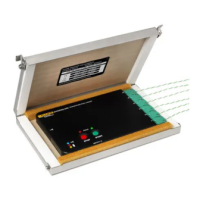







 To Next Page