28
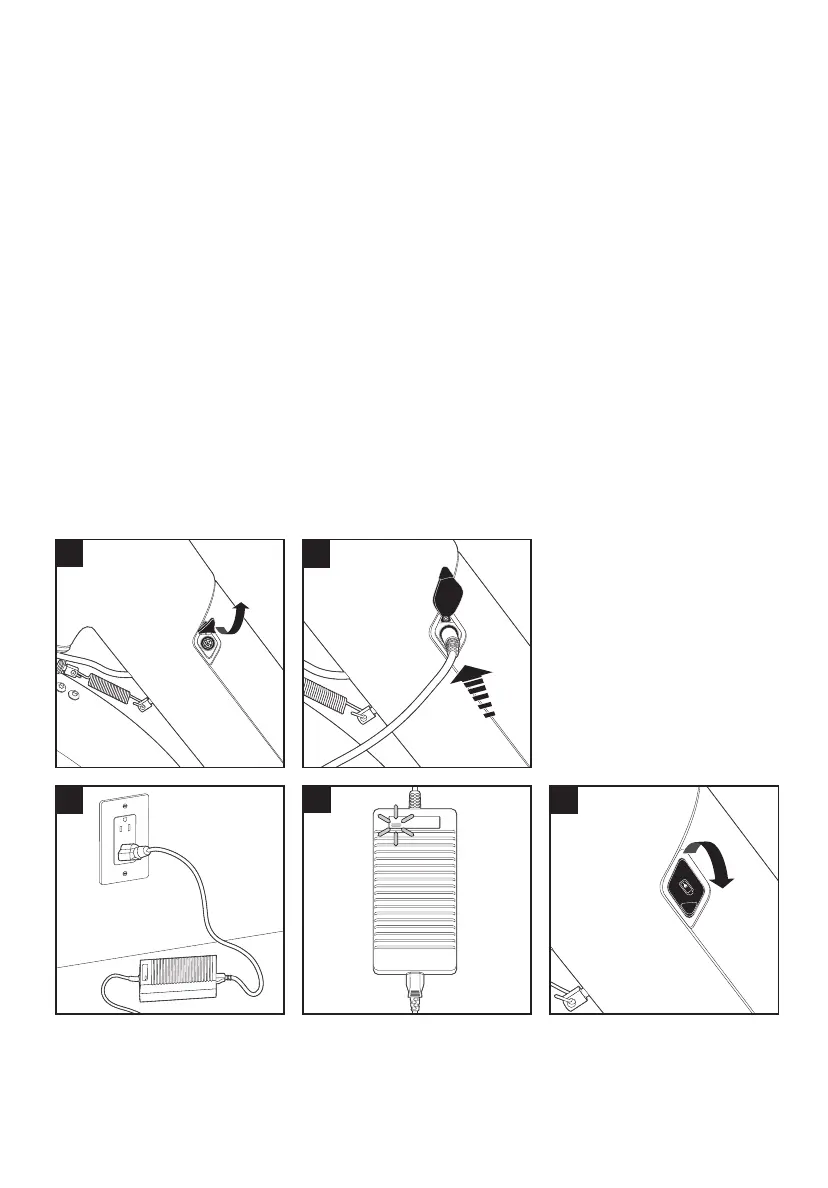
Charging the Battery
The Flight Speed
TM
battery can be charged while installed in the bike or when
removed from the bike frame.
A. Ensure the battery is o by powering o the display as described in the
“Handlebar Display” section above.
B. Remove the rubber cover to reveal the battery charging port
C. Plug the charger into the battery charging port, ensuring the terminals are
properly aligned with the port. Push the charger plug firmly into the charging port.
D. Plug the charger into a power outlet. Only connect your charger to an outlet with
a rated voltage of 110-220VAC. The LED in the charger housing will turn red to
indicate the charger is connected properly.
E. Once the charger LED turns green (indicating the battery is fully charged), unplug
the charger from the power outlet.
F. Unplug the charger plug from the charging port and replace the rubber cover.
B
D
C
E
F



 To Next Page