29
A
B C
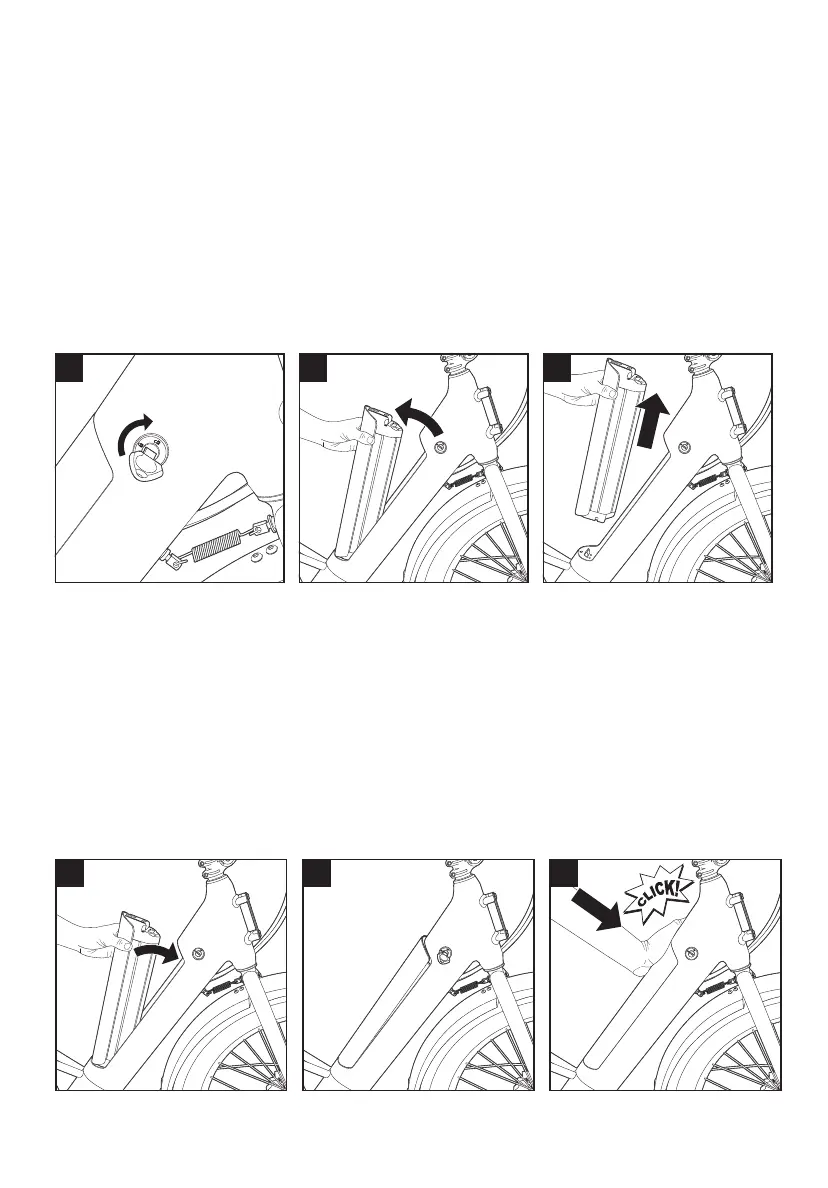
Removing the Battery
Note: The battery should only be removed when the bike is stationary and powered o.
Failure to do so could result in damage to the battery or electrical system of the bike.
A. Insert the provided key into the battery lock. If you own multiple Flyer™ bikes,
please ensure the 3-digit codes on the key and lock are matching.
B. Turn the key clockwise. The battery will automatically pop up approximately ¼”
indicating the lock was successfully released.
C. Remove the battery by rotating it towards the rear of the bike before lifting
away from the frame.
Installing the Battery
A. Insert the bottom edge of the battery housing ensuring the terminals are
aligned with the dock inside the frame.
B. Rotate the battery forward maintaining alignment with the opening in the
downtube.
C. Push down at the top of the battery to complete the installation. You will hear
an audible click when the battery is full installed.
A B
C



 To Next Page