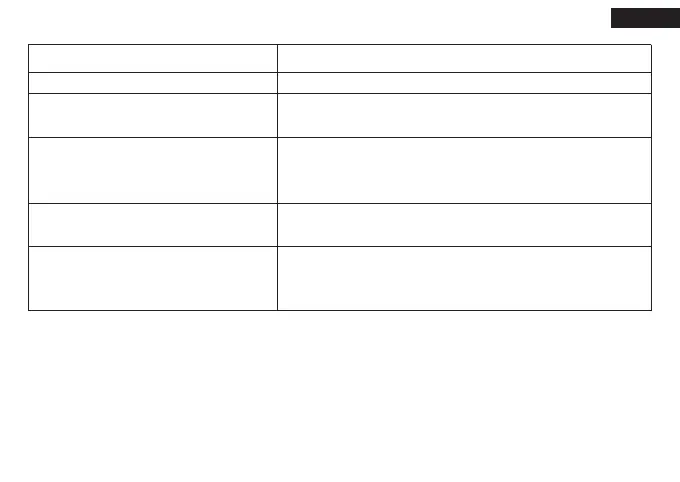
In any of the following situations, the smart clamp turns on protection mode:
Security Indication
1. Use the original smart clip to start the car.
2. DO NOT use this unit if any cable clamp or cord is damaged.
3. Start only for 12V vehicles,or it will cause serous damages to the unit.
4. Only jump start your car when 3 to 4 indicator lights are illuminated.
5. Do not connect two clamps together when the starter is powered on. And do not connect both cable clamps to the
same piece of metal.
6. If the engine does not start on the first try, disconnect it from the car battery and wait for at least 20 seconds before
reconnecting. Maximize three attempts in two minutes
English
Situations
ready to work
work status
1.Short circuit protection
2.Reverse protection
----Need to re-plug the clip to cancel the alarm status
Low voltage protection
----Need to re-plug the clip to cancel the alarm status
1.High temperature protection
2.Anti-charge protection
----Need to re-plug the clip to cancel the alarm status
LED Indicator
The red and green lights flicker alternately
The green light is always on and the buzzer
sounds once
The red LED is always on and the buzzer
keeps beeping
The green light flashes slowly
The red LED light is always on
01 02 03 04
05 06 07 08 09 10 11
12 13 14 15 16 17 18
19 20 21 22 23 24 25
26 27 28 29 30 31 32
33 34 35 36 37 38 39
40 41


 To Next Page