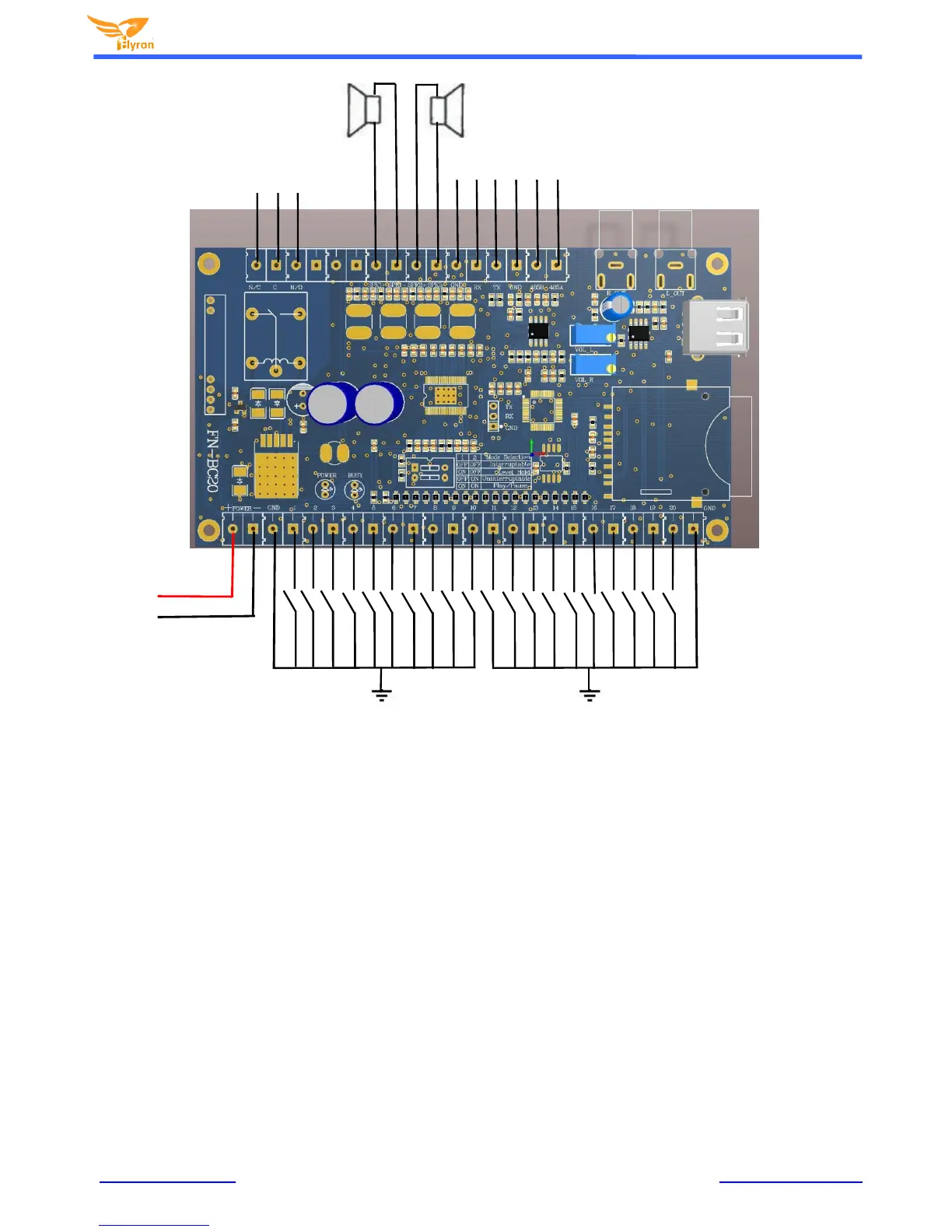
Speaker 1 Speaker 2
Left Channel Right Channel
Relay connectors
RS232 & RS485
Control Ports
RCA audio pre-amp
Outputs
DC12-24 V
Input
K1 K2 K3 K4 K5 K6 K7 K8 K9 K10 K11 K12 K13 K14 K15 K16 K17 K18 K19 K20
GND GND
3. Button Input Control Mode
In order to meet different needs, we added „one-on-one‟ folder triggering control except for the traditional „One-on-one‟ triggering
of sound files. „One-on-one‟ folder triggering control is used for random playback of the sound files in the associated folder. In
other words, each of 20 input triggers can play multiple sound files in the corresponding folders in random order. The traditional
„one-on-one‟ triggering control mode is that each of the 20 input triggers can only activate a single corresponding sound file.
Both of these two triggering control modes can‟t co-exist. Users can only choose one type to use. See more details as below on
how to use both of them.
3.1. ‘One-on-one’ folder triggering control (for random playback of the sound files in the
associated folder)
The SD/USB memory devices that will contain the audio files must be formatted to FAT32 before loading files and folders. After
formatting is complete, build 20 folders and rename them from “01” to “20” in the root directory of SD card or USB flash drive as
below. The input “K1” associates with folder “01”, the input “K2” associates with folder “02”...... the input “K20” associates with
folder “20”.


 To Next Page