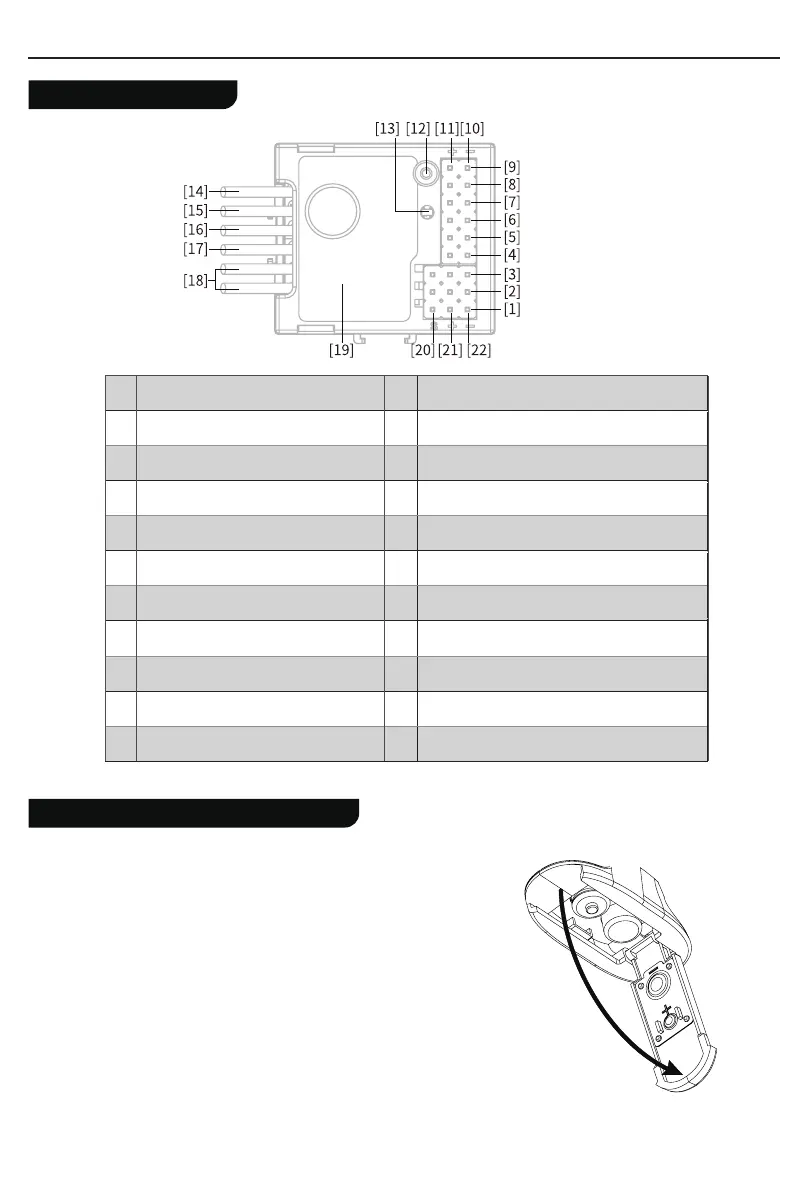
[1]
[2]
[3]
[12]
[4]
[13]
[5]
[14]
[6]
[15]
[7]
[16]
[8]
[17]
[9]
[18]
[10]
[19]
[11]
[20]
[21]
[22]
CH1
Antenna
CH3
LED
CH4
Battery line“-”
Left Light port
Battery line“+”
Right Light port
Motor line“M-”
Head Light port
Motor line “M+”
Tail Light port
Power switch line
Ambient Light port
Stickers
Roof Light port
Channel port “S ”
Light port“-”
Channel port“+”
Light port
“+”
Channel port“-”
Receiver Overview
Transmitter Battery Installation
Battery Type:AAA
Battery Installation:
1. Open the battery compartment cover.
2. Insert 4 fully-charged AAA batteries into the compartment. Make sure that the
battery makes good contact with the battery compartment's contacts.
3. Replace battery compartment cover.
Low battery alarm: When the battery is lower than 4.2v, the G.LED on the
panel will flash slowly.
Note: When installing the batteries, be careful to handle the positive and
negative poles. (As shown in the picture on the right)
EN
02



 To Next Page