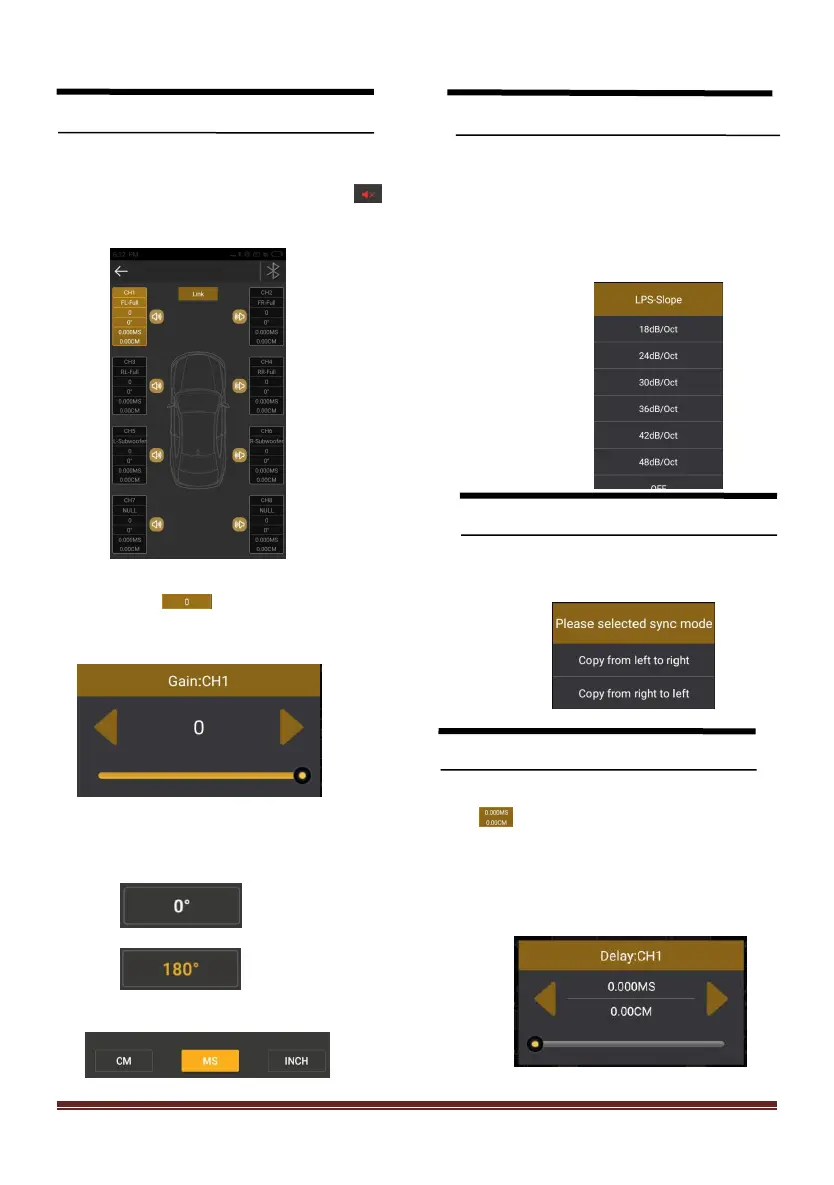
XQ-48DSP Special DSP amplifier
Channel settings
1.Choose from 8 channels to choose from
2.Output channel volume setting,Click 【 】
the speaker button to mute.
2、Click 【 】to adjust the volume by
sliding left and right.
2.Click phase for every output channel:
In Phase or Out Phase(0 ゜/180 ゜)
Crossover settings
1. Channel high-low-pass crossover setting
with high-low-pass independent filtering.
2. Frequency Range: 20Hz~20KHz. Slope
selection: 6 dB/Oct 、12dB/Oct 、18dB/Oct 、
24dB/Oct 、30dB/Oct 、36dB/Oct 、42dB/Oct 、
48dB/Oct 、OFF.
Output Signal Function
● Click [Link] to synchronize the data.
Delay setting
Click[Channel] to enter the delay interface.Then
click [ ] to enter the delay setting,Slide the
corresponding direction of the dot to the left and
right to set the delay. for the CH1 to CH8
speakers.
Default Value : [MS], can switch to [CM] or [INCH]


 To Next Page