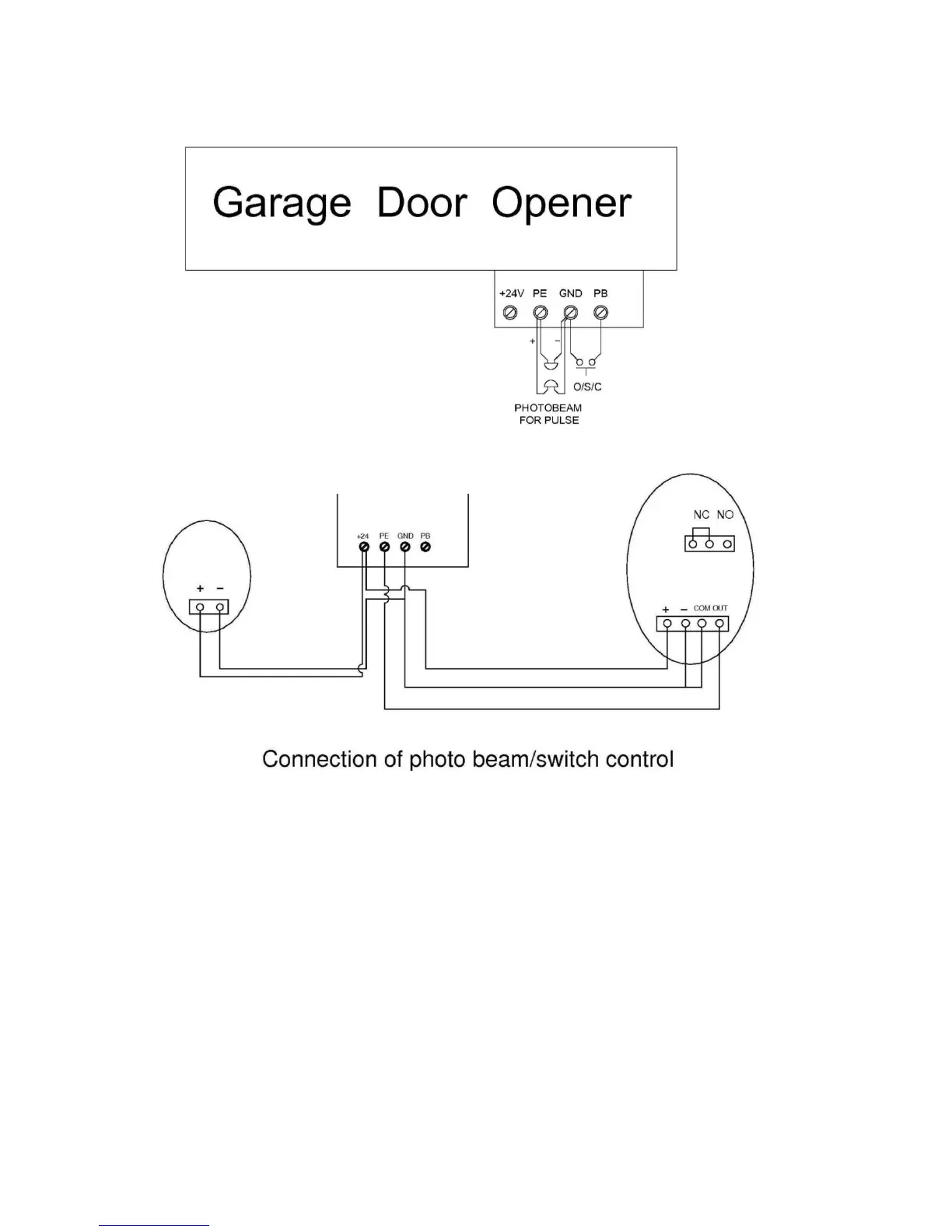
Photo beam connection (optional) – Fig.15,Fig.16
Switch control connection (optional) – Fig.15
Figure 15
Figure 16
Other terminal introduction and application
1.The O/S/C interfaces available. (Fig. 17, Fig. 18)
Add a new O/S/C button to open or close the door.
2. Flash light function. (Fig. 17, Fig. 18)
There are corresponding interfaces for this function and provide 24v-35v flash light voltage.
Connect the flash light with DC 24v-28v, current≤100mA. When use AC 220V power flash
lights, please match an adapter, and wiring as required
3. Pass door (SD) protection (Fig. 17, Fig. 18)
This function ensure that the door can’t be opened unless the small pass door is closed.
The door panel won’t be damaged.


 To Next Page