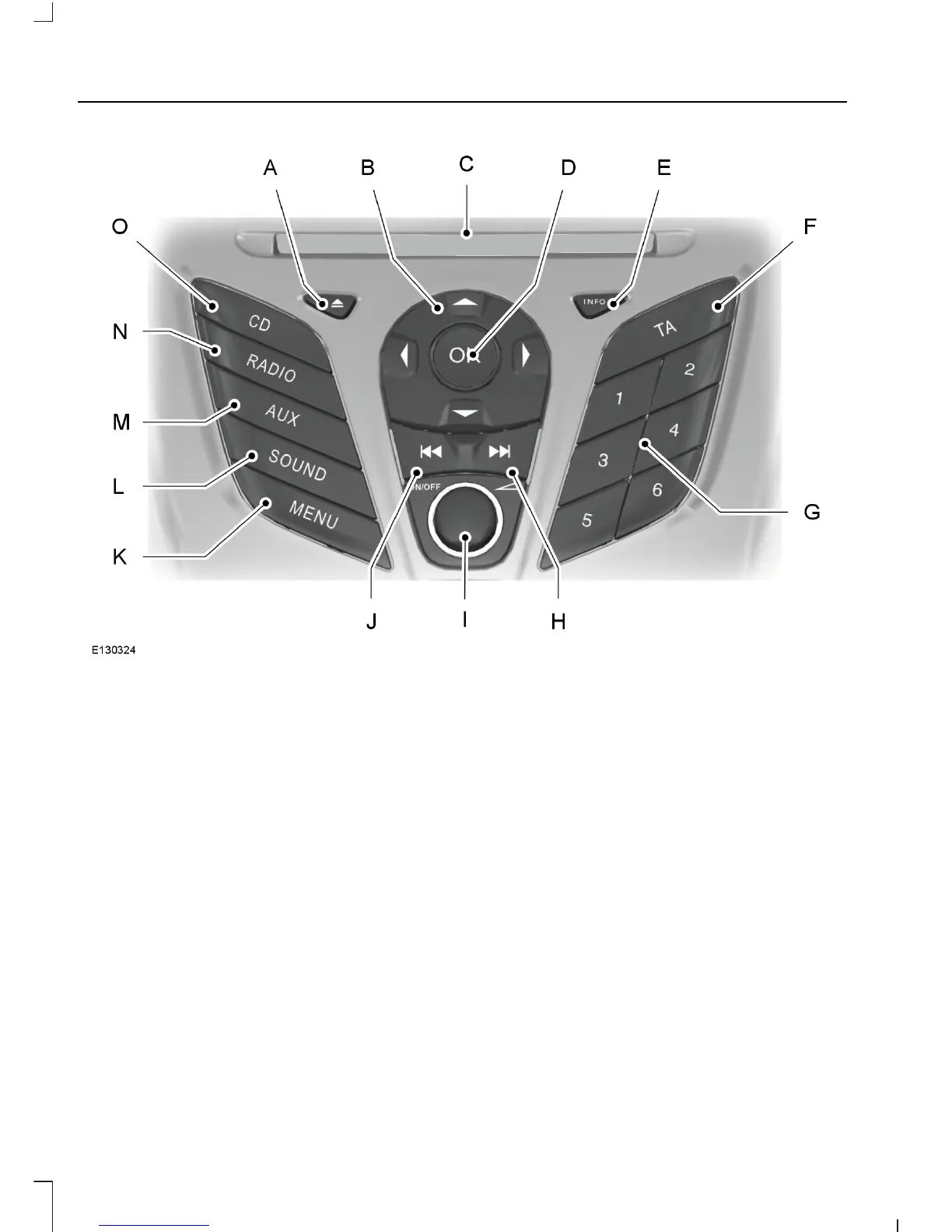
Eject: Press the button to eject a CD.A
Cursor arrows: Press a button to scroll through on-screen choices.B
CD slot: Where you insert a CD.C
OK: Press the button to confirm on-screen selections.D
INFO: Press the button to access radio, CD, USB and IPod information.E
TA: Press the button to turn traffic announcements on or off and cancels
announcements during an active announcement.
F
Numeric keypad: Press the button to recall a previously stored station. To
store a favorite station press and hold until the sound returns.
G
Seek up: Press the button to go to the next station up the radio frequency band
or the next track on a CD.
H
On, Off and Volume: Press the button to switch the audio system on or off.
Turn the dial to adjust the volume.
I
Seek down: Press the button to go to the next station down the radio frequency
band or the previous track on a CD.
J
192
B-MAX (CB2) Vehicles Built From: 25-06-2012, Vehicles Built Up To: 31-12-2013
Audio System











 To Next Page