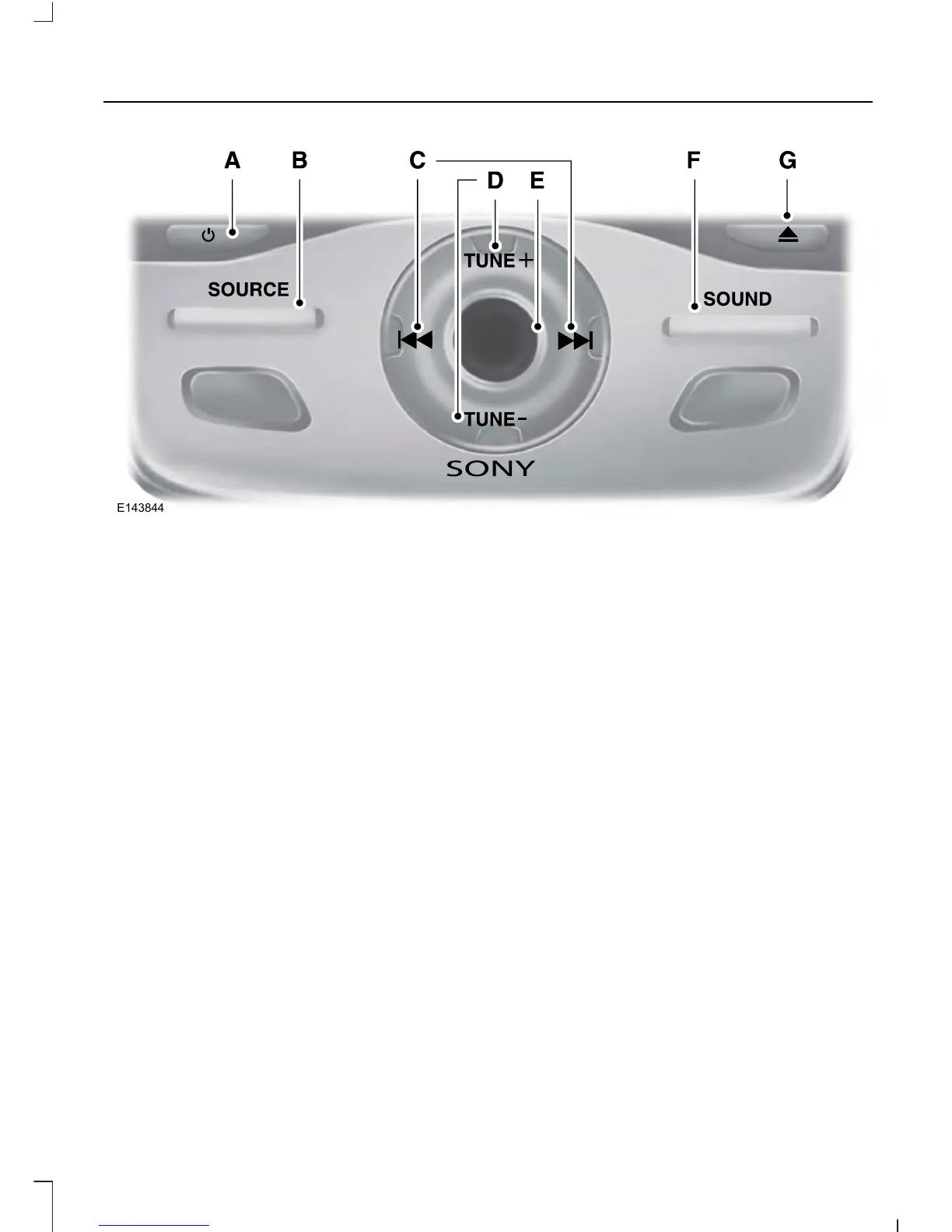
Power: Press to switch the system on and off.A
SOURCE: Press to access different audio modes, for example AM, FM and CD.B
Seek, Fast Forward and Reverse: In radio mode, select a frequency band
and press this button. The system stops at the first station it finds in that
direction. In SIRIUS mode, press to select the next or previous satellite radio
station. If a specific category is selected (such as jazz, rock or news), press to
find the next or previous in the selected category. In CD mode, press to select
the previous or next track. Press and hold to move quickly forward through the
current track.
C
TUNE: In radio mode, press to manually search through the radio frequency
band. In SIRIUS mode, press to find the previous or next available satellite radio
station.
D
Volume: Turn to adjust the volume.E
SOUND: Press to access settings for Treble, Midrange, Bass, Fade or Balance.F
Eject: Press to eject a CD.G
DIGITAL RADIO
Note: HD Radio broadcasts are not
available in all markets.
HD Radio technology is the digital
evolution of analog AM/FM radio. Your
system has a special receiver that allows
it to receive digital broadcasts (where
available) in addition to the analog
broadcasts, it already receives. Digital
broadcasts provide a better sound quality
321
Escape/Kuga (TM2), enUSA, First Printing
Audio System













 To Next Page