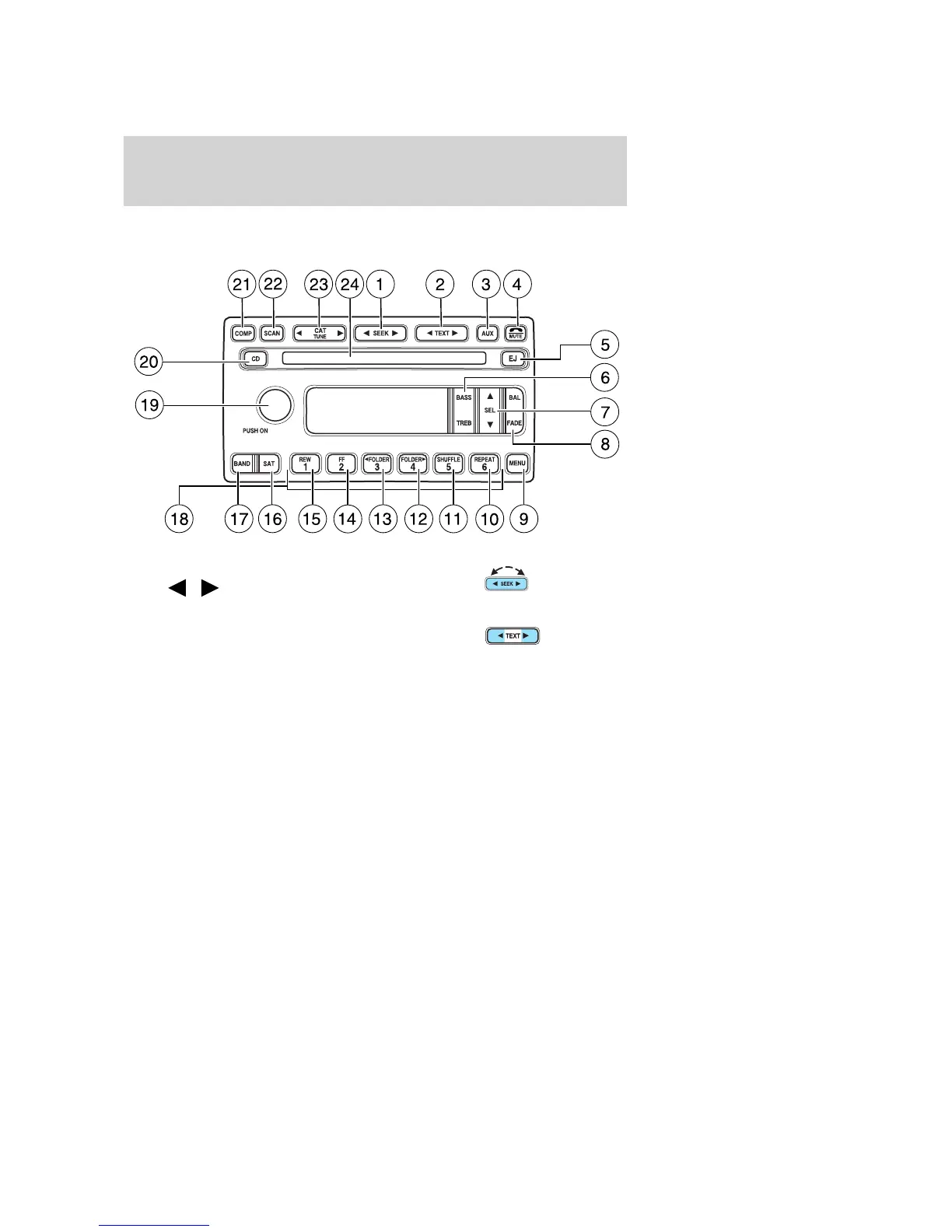
SATELLITE COMPATIBLE AM/FM STEREO IN-DASH SINGLE
CD/MP3 RADIO — LATE AVAILABILITY (IF EQUIPPED)
1. SEEK: Press and release
SEEK
/ for previous/next
strong station or track.
2. TEXT: The filename (Fi), song
title (So), artist text (Ar) or album
text (AL) may be viewed while
playing an MP3 selection. When MP3 selection text is shown on the
message display its corresponding text indicator (Fi, So, Ar, or AL) is
shown in the elapsed time display. Press TEXT to scroll through the text
fields. The display will scroll through all of the text in the current field
before changing to the next field. (TEXT must be pressed within 3
seconds of the previous press to proceed to the next/last text display.
The last text field shown on the display will become the new display
message default.
TEXT is also available when equipped with Satellite radio. Your radio
comes equipped with Satellite ready capability. The kit to enable Satellite
reception is available through your dealer. Detailed Satellite instructions
are included with the dealer installed kit. Dealer installed satellite kit
only available in the continental United States.
2005 Explorer (exp)
Owners Guide (post-2002-fmt)
USA (fus)
Entertainment Systems
30













 To Next Page