Seek, Next or Previous
Press the seek button to:
• Tune the radio to the next or previous
stored preset.
• Play the next or the previous track.
Press and hold the seek button to:
• Tune the radio to the next station up
or down the frequency band.
• Seek through a track.
AUDIO CONTROL - VEHICLES
WITH: TOUCHSCREEN
DISPLAY
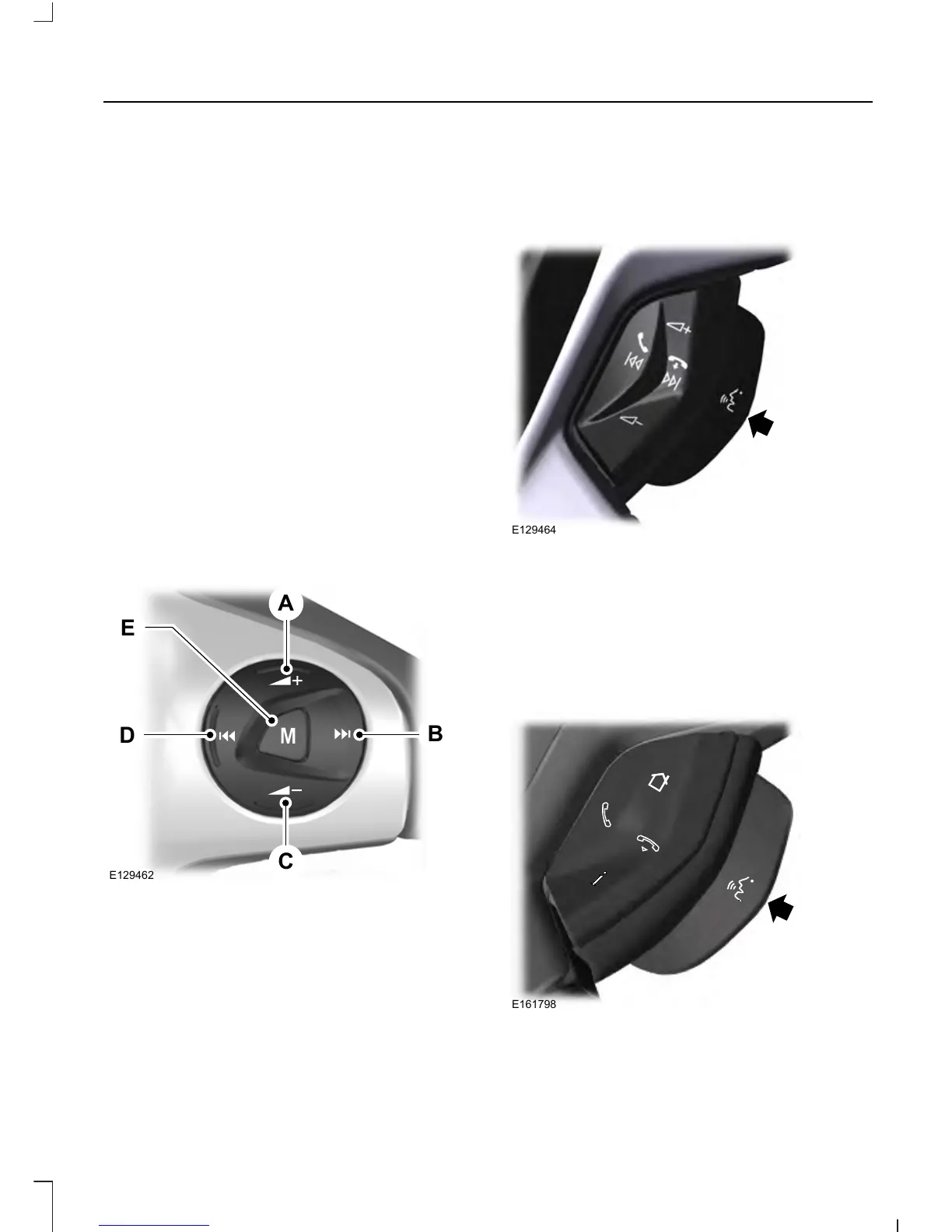
Select the required source on the audio
unit.
You can operate the following functions
with the control:
Volume upA
Seek up or nextB
Volume downC
Seek down or previousD
ModeE
Press M to select the audio source.
VOICE CONTROL - VEHICLES
WITHOUT: TOUCHSCREEN
DISPLAY
Pull the control to select or deselect voice
control. See SYNC™ (page 300).
VOICE CONTROL - VEHICLES
WITH: TOUCHSCREEN
DISPLAY
Pull the control to select or deselect voice
control. See MyFord Touch™ (page 348).
See MyFord Touch™ (page 348).
61
Transit (TTH) Canada/United States of America, enUSA, Edition date: 03/2014, Third Printing
Steering Wheel














 To Next Page