Need help?
Do you have a question about the Foreo BEAR 2 body and is the answer not in the manual?
Steps to download the app, register, and connect the device via Bluetooth.
Apply FOREO SUPERCHARGED™ Body Serum evenly to the treatment area.
Turn on device, adjust intensity via button or app, access Beginner/Pro modes.
Glide device upward on skin, using all four spheres for effective treatment.
Warnings for users with specific health conditions like epilepsy, pacemakers, or pregnancy.
Advice on consulting a doctor before use, especially with existing medical conditions or contraindications.
Areas and situations where the device should not be used, like the chest or while driving.
The FOREO BEAR™ 2 body is an advanced microcurrent body toning device designed to help tone and firm skin, smoothing away the appearance of dimples on areas like the thighs, buttocks, arms, and abs. It utilizes a combination of Advanced Microcurrent™, Sculpting Microcurrent™, and T-Sonic™ massage to leave skin smoother, tighter, and more sculpted.
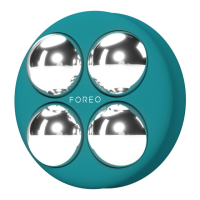
The device features microcurrent spheres that deliver advanced microcurrent directly to the skin, aiming for a more toned and sculpted figure. It incorporates FOREO's unique microcurrent technologies:
A key safety feature is the Anti-Shock System™, which scans the skin's resistance to electricity and automatically adjusts the microcurrent intensity for maximum safety and comfort during treatments.
To begin using the BEAR™ 2 body, users must first unlock and register the device via the FOREO For You mobile app. The app provides video-guided treatments and access to a wider range of intensity levels.
Before treatment, the skin and device should be clean and dry. Users are instructed to apply FOREO SUPERCHARGED™ Body Serum evenly across the treatment areas, leaving a thin, mask-like layer on the skin's surface to ensure smooth gliding and optimal conductivity. Shaving any excessive hair in the treatment area is recommended to prevent a tingling sensation.
The device is turned on by pressing the universal power button. This button also allows users to adjust the microcurrent intensity level by quick-pressing it again for each desired level. More settings, including access to 'Pro Mode' (intensity levels 6-10), are available through the FOREO app. The default setting is 'Beginner Mode' (intensity levels 1-5).
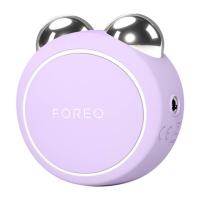
During treatment, all four metallic spheres of the device should be pressed to the skin with medium pressure. The device is then slowly glided upward over the desired areas, such as the legs, buttocks, abs, and arms. It is crucial that all four microcurrent spheres maintain contact with the skin throughout the treatment. The app offers guided treatment videos tailored for specific problem areas.
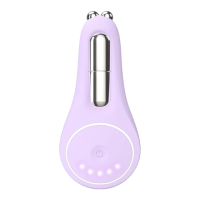
The device is designed with a smart Swedish design, making it lightweight and comfortable to hold for easy treatments. It features a Bluetooth indicator light that flashes when the device is in Bluetooth pairing mode or when it needs to be charged. Five intensity indicator lights illuminate to show the current microcurrent intensity level.
The BEAR™ 2 body is intended for body stimulation and over-the-counter cosmetic use. It is crucial to use the device with a conductive serum, such as FOREO SUPERCHARGED™ Body Serum, which is specifically developed for use with FOREO's microcurrent body devices. If treating multiple areas in one session, the serum can be applied to each area just before treatment.
The device is charged using a USB charging cable, providing up to 300 minutes of use per charge. The charging port is located on the device.
For cleaning, the BEAR™ 2 body should be thoroughly cleaned after each use. The metallic spheres and silicone surface should be washed with water and soap, then rinsed with warm water. After rinsing, pat the device dry with a lint-free, non-abrasive cloth or towel. For optimal results, FOREO recommends spraying the device with FOREO's Silicone Cleaning Spray and then rinsing with warm water. It is important never to use cleaning products containing alcohol, petrol, or acetone, as these can irritate the skin and damage the silicone material.
The device contains a non-replaceable lithium-ion battery. For disposal, the battery must be removed from the appliance. This process is irreversible and voids the warranty. Detailed visual instructions for battery removal are provided in the manual, emphasizing the use of gloves for safety and adherence to local environmental regulations for disposal.
Troubleshooting guidance is provided for common issues such as the device not activating (check battery, restart), not switching off or responding (microprocessor malfunction, restart), or not syncing to the FOREO For You app (toggle Bluetooth, close/reopen app, check for app updates).
The BEAR™ 2 body is designed for cosmetic use by individuals in good health. Users are advised to consult their doctor if they have any underlying health conditions or experience adverse reactions. The manual also lists several contraindications and precautions to ensure safe use, including warnings against use over certain body areas or in conjunction with specific medical conditions or equipment. It emphasizes that the device should only be used with the provided USB cable and a SELV power adapter, and that proper maintenance is essential to avoid voiding the warranty.
 Battery
| battery type | Li-ion 520mAh 3.7V |
|---|---|
| usage time | Up to 180 minutes per charge |
| standby time | 90 days |
 Operating Environment
| frequency | 185 Hz |
|---|---|
| max noise level | <50dB |
| interface | 1-button |
 Weight and Dimensions
| size | H78 x W78 x D35.5 mm |
|---|---|
| weight | 127g |

 To Next Page