FALCON QUICK START GUIDE
08
To Power Off:
1) To turn off the Falcon, press the POWER button on the back of the device with the grip end
of a golf club. The status bar should turn off completely. (Power button will remain illuminated
regardless of device state.)
To Reset:
1) To reset the Falcon, hold the POWER button for 5 seconds.
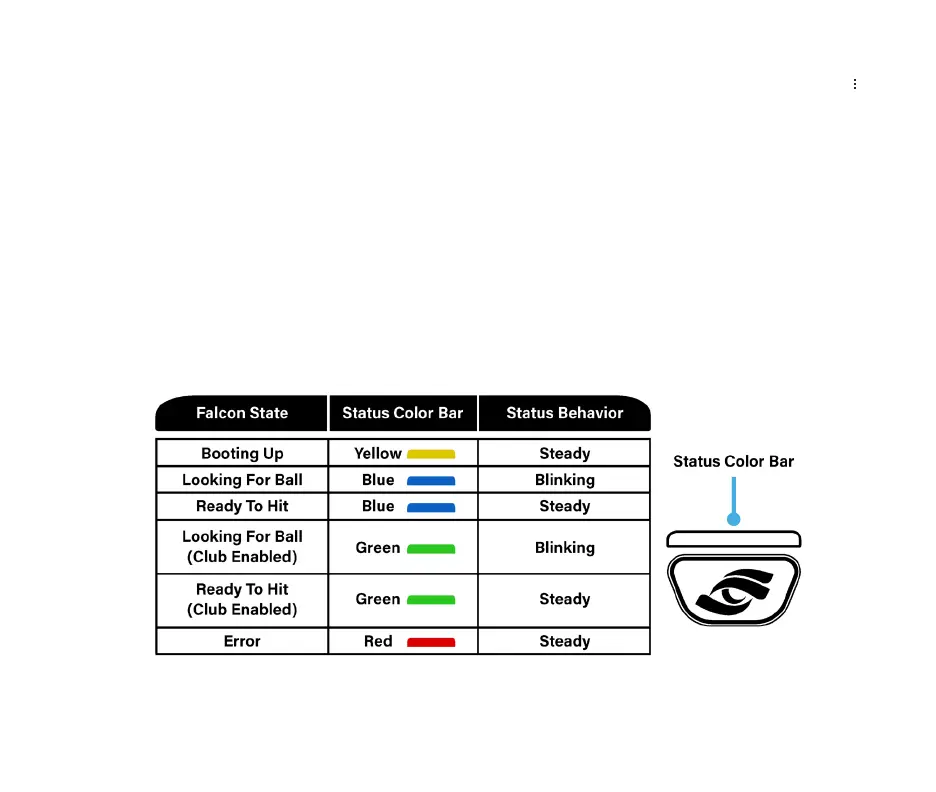
Status Bar
Falcon State Status Behavior Status Color Bar
Booting Up Yellow Steady
Looking For Ball
Green Blinking
Ready To Hit
Green Steady
Ready To Hit Blue Steady
Looking For Ball Blue Blinking
(Club Enabled)
(Club Enabled)
Error Red Steady



 To Next Page