Need help?
Do you have a question about the FORESIGHT GC2 and is the answer not in the manual?
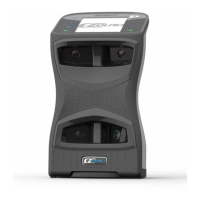
Identifies tracking cameras, flash module, speaker, line out, and LCD wire stand.
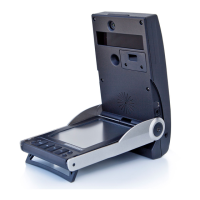
Details the foot stand and its functions for stability and securing the device.
Explains the controls including power button, display backlight, and audio volume.
Instructions to deploy the foot stand and open the top cover of the GC2.
Guide on raising the screen for improved viewing angles and reduced glare.
Procedure for powering the device on and off, including LED status indicators.
Steps to navigate the system options menu using the UP/DOWN arrow keys.
How to select and change settings like velocity unit, distance unit, and ball spin mode.
Instructions on placing the ball within the hitting zone for accurate tracking.
Steps for hitting a shot after correct ball placement and green LED indication.
Step-by-step guide on how to remove and replace the flash unit in the GC2.
Key safety advice covering environmental hazards, device integrity, power sources, and battery handling.
Guidelines for connecting power, accessory, or USB cables to the GC2 before powering on.
Instructions for recharging, including a monthly full discharge/recharge routine.
Recommendations for storing the GC2 powered off, closed, latched, and in its original box.
Resolving problems with the device not powering on or the ball placement aid not appearing.
Troubleshooting inaccurate data, failure to track ball flight, or 'ready to hit' display issues.
Instructions for handling on-screen messages requesting factory contact.
Details on technology, dimensions, weight, data interface, battery, and measured data.
Information on capture range limits and accuracy tolerance for various measurements.
 General
| Brand | FORESIGHT |
|---|---|
| Model | GC2 |
| Category | Video Gaming Accessories |
| Language | English |

 To Next Page