Selecting System Options
Once the GC2 is ON and has fully completed its boot-up sequence,
the player’s preferred SYSTEM OPTIONS can be changed.
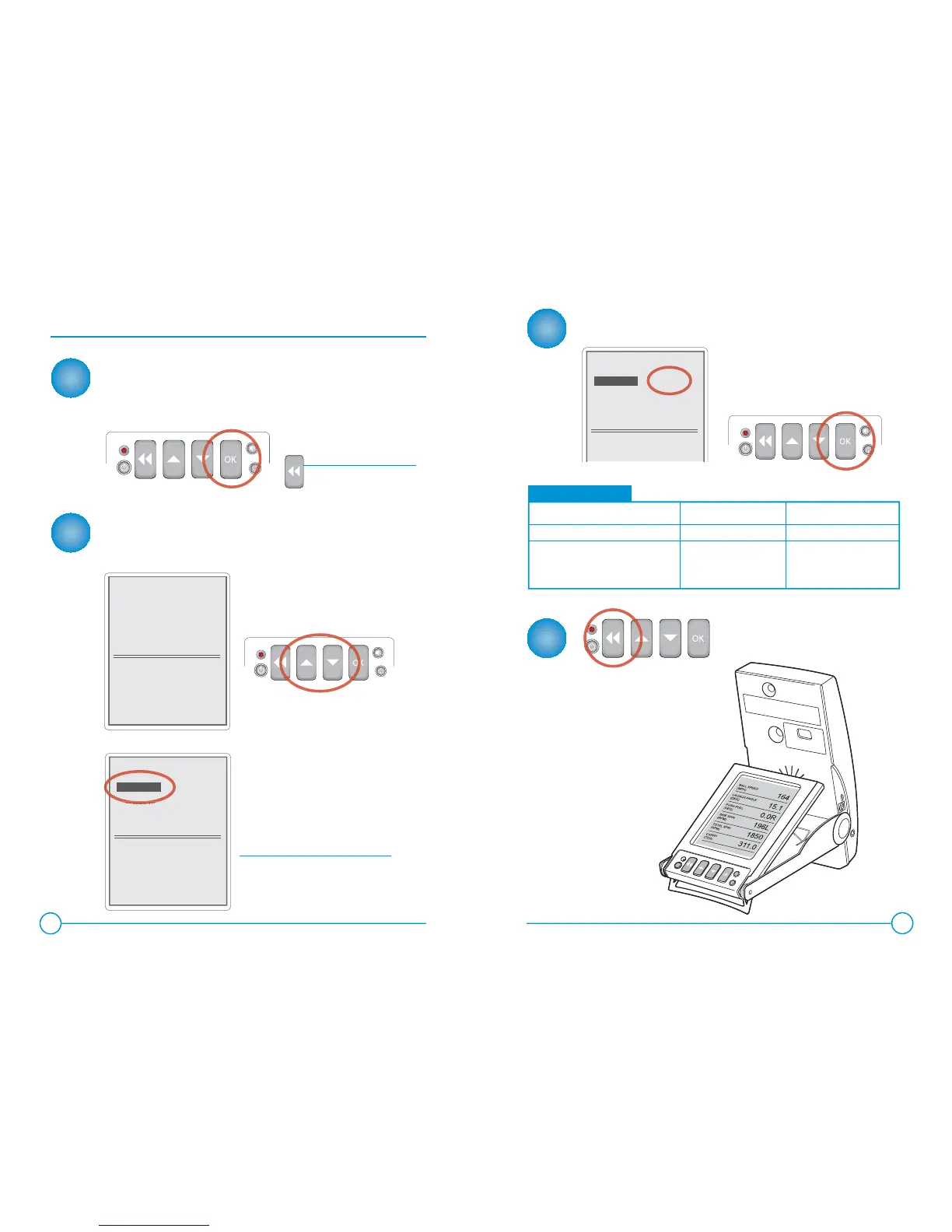
To begin, select the “OK” Button on the front LCD Panel.
NAVIGATING THE SYSTEM OPTIONS SCREEN
The system options menu should now appear on the LCD
screen.
NOTE:
CHANGING THE CURRENT SYSTEM SETTING
1
2
3
4
6
7
SYSTEM OPTIONS
Velocity Unit
Distance Unit
Ball Spin Mode
About...
MPH
YDS
TOTAL
To select an option, use the UP or
DOWN ARROW keys.
The selected option will be
highlighted as shown.
The “About” Option can be selected
to view the device’s fi rmware software
version and battery charge information.
To change the current setting of
the selected option, press the
OK key until the desired setting
appears.
With the desired settings selected,
simply select the BACK button to
return to the ball-fi nd/play mode.
VELOCITY UNIT
MPH (Miles per Hour)
M/S (Meters per Second)
KPH (Kilometers per Hour)
DISTANCE UNIT
YDS (Yards)
FT (Feet)
MTS (Meters
BALL SPIN MODE
Total
Back
SYSTEM OPTIONS
Velocity Unit
Distance Unit
Ball Spin Mode
About...
MPH
YDS
TOTAL
SYSTEM OPTIONS
Velocity Unit
Distance Unit
Ball Spin Mode
About...
MPH
YDS
TOTAL
OPTIONS CHART
Selecting the BACK button
will return you to ball-fi nd/
play mode at any time.
NOTE:
displays velocity in: displays distance in: displays spin values of:
Your new settings have
been saved and will now be
displayed during play.


 To Next Page