11
PL
5. Turn on / off the drone control interface
6. Drone emergency shutdown.
7. Change of speed mode 30%, 60%, 100%
8. Headless mode
9. Automatic calibration
10. 360 degrees stunts
11. Controlling the drone using a smartphone’s gyroscope
12. Flight plan mode.
13. Control up/down, rotation left/right
14. Control left/right/forward/backwards
15. Manual calibration forward/backwards
16. Manual calibration of left/right rotations
17. Manual calibration of left/right fl ight
18. Automatic start
19. Automatic landing.
Warning
– The device is intended for persons aged 14 and over. Adult supervision is recommended.
– The product contains small elements. Keep away from small children.
– Before starting, maintain a distance of minimum 5 m from the drone.
– Fold-up and use the drone in accordance with instructions included in the manual. Small ele-
ments should be folded-up by adults.
– The producer and the supplier will not be held responsible for damage caused by improper use.
– Take special care during operation of the propellers of the drone. Keep your hands, hair or loose
elements of clothing away from the propellers to avoid damage to the device or injury.
– Do not use the drone during a wind speed higher than 2.5 m/s or near water tanks.
– Do not leave a charging battery unattended.
– Do not charge the battery on a fl ammable surface.
– When cleaning, make sure that the drone is disconnected from a power supply.
– Do not let the drone to fall off from signifi cant heights – this may damage the device.
– The manual applies to several models, therefore, there may be slight diff erences in the de-
scription of functions and markings.
TelForceOne S.A. declares that the product is compatible with requirements and other relevant provi-
sions of the 2014/53/UE directive. You can download the declarationon of product on website https://
sklep.telforceone.pl/en-gb/
PL
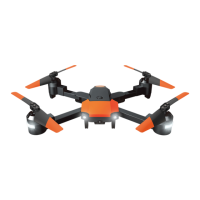
Dziękujemy za zakup drona Forever Flex o nowoczesnym designie ze składaną konstrukcją.
Wbudowana kamera Wi-Fi FPV umożliwia robienie zdjęć i nagrywanie fi lmów w rozdzielczości HD
720p. Zmodernizowany żyroskop i barometr umożliwiają stabilny lot na pożądanej wysokości i we
wszystkich kierunkach, jak również obroty o 360°. Flex zawiera wszystkie niezbędne do płynnego
lotu funkcje, jak zmiana czułości sterowania, Headless mode, Autostart/Auto-lądowanie. Dedy-
kowana aplikacja mobilna Forever Flex rozszerza możliwości drona Flex do transmisji obrazu z
kamery w czasie rzeczywistym na ekran smartfonu.
Przed użyciem zapoznaj się z instrukcją obsługi, dzięki której dowiesz się więcej o funkcjach i spo-
sobie użycia. Nie próbuj samodzielnie naprawiać, modyfi kować ani rozkręcać urządzenia. Mamy
nadzieję, że produkt marki FOREVER spełni Twoje oczekiwania.
5. Turn on / off the drone control interface
6. Drone emergency shutdown.
7. Change of speed mode 30%, 60%, 100%
11. Controlling the drone using a smartphone’s gyroscope
13. Control up/down, rotation left/right
14. Control left/right/forward/backwards
15. Manual calibration forward/backwards
16. Manual calibration of left/right rotations
17. Manual calibration of left/right fl ight
– The device is intended for persons aged 14 and over. Adult supervision is recommended.
– The product contains small elements. Keep away from small children.
– Before starting, maintain a distance of minimum 5 m from the drone.
– Fold-up and use the drone in accordance with instructions included in the manual. Small ele-
ments should be folded-up by adults.
– The producer and the supplier will not be held responsible for damage caused by improper use.
– Take special care during operation of the propellers of the drone. Keep your hands, hair or loose
elements of clothing away from the propellers to avoid damage to the device or injury.
– Do not use the drone during a wind speed higher than 2.5 m/s or near water tanks.
– Do not leave a charging battery unattended.
– Do not charge the battery on a fl ammable surface.
– When cleaning, make sure that the drone is disconnected from a power supply.
– Do not let the drone to fall off from signifi cant heights – this may damage the device.
– The manual applies to several models, therefore, there may be slight diff erences in the de-
scription of functions and markings.
TelForceOne S.A. declares that the product is compatible with requirements and other relevant provi-
sions of the 2014/53/UE directive. You can download the declarationon of product on website https://
sklep.telforceone.pl/en-gb/
Dziękujemy za zakup drona Forever Flex o nowoczesnym designie ze składaną konstrukcją.
Wbudowana kamera Wi-Fi FPV umożliwia robienie zdjęć i nagrywanie fi lmów w rozdzielczości HD
720p. Zmodernizowany żyroskop i barometr umożliwiają stabilny lot na pożądanej wysokości i we
wszystkich kierunkach, jak również obroty o 360°. Flex zawiera wszystkie niezbędne do płynnego
lotu funkcje, jak zmiana czułości sterowania, Headless mode, Autostart/Auto-lądowanie. Dedy-
kowana aplikacja mobilna Forever Flex rozszerza możliwości drona Flex do transmisji obrazu z
kamery w czasie rzeczywistym na ekran smartfonu.
Przed użyciem zapoznaj się z instrukcją obsługi, dzięki której dowiesz się więcej o funkcjach i spo-
sobie użycia. Nie próbuj samodzielnie naprawiać, modyfi kować ani rozkręcać urządzenia. Mamy
nadzieję, że produkt marki FOREVER spełni Twoje oczekiwania.


 To Previous Page
 Loading...