5
EN
– Do not charge the battery if it is installed in the drone.
– Connect the battery charger to USB power source of 5 V DC voltage. As a power source, you
may use a wall charger with USB output or USB port in a running computer. Connect the battery
to the charger.
– After fully charging, you may install the battery in the drone.
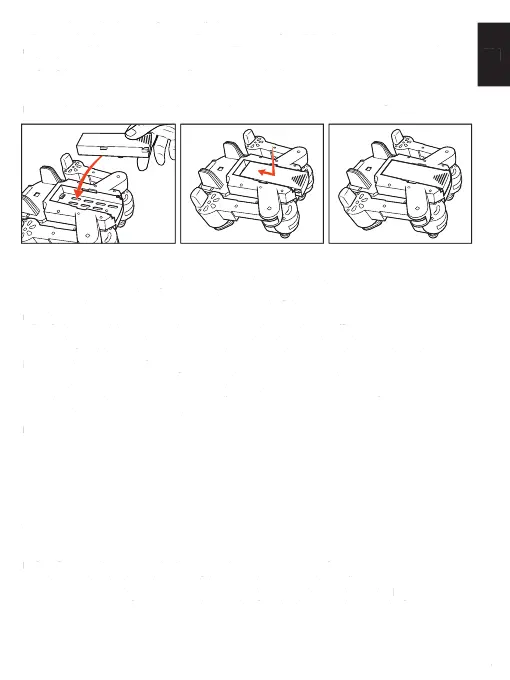
Installation of the battery in the drone
Insert a charged battery into the battery socket in the drone, as shown in the fi gure.
Drone battery
– Do not connect batteries other than the one included in the set.
– Do not short-circuit poles of the charger.
– Lithium and ion batteries may ignite spontaneously if they are not used according to recom-
mendations.
– The fl ight time will be shortened when the drone does not have suffi cient power supply.
– Do not leave lithium-ion batteries unattended when they are charged.
– In case of problems associated with the battery (overheating, swelling, mechanical damage),
immediately disconnect it from a charger.
– Do not throw the batteries into fi re. Protect batteries against overheating.
– Protect the batteries against mechanical damage.
– Hand over used batteries to batteries collection points. Do not dispose of batteries and elec-
tronics with municipal solid waste.
Insuffi cient power supply may also cause diffi culties with start, control or fl ight height
of the device.
Mounting a smartphone in the holder
1. Open up the smartphone holder
2. Separate the arms of the holder
3. Place a smartphone between the arms of the holder
4. Release the arms pressure, so they could reliably grip the phone.
Warning! The holder is compatible with mobile devices of maximum width of 93 mm.
Preparation for fl ight
Before fl ight, make sure that the drone and the remote are ready for use:
1. Make sure that the drone battery is fully charged and properly installed
2. Make sure that the batteries in the remote are charged and properly installed
3. Remove protections from the propellers and unfold the drone, as shown in the fi gure
– Do not charge the battery if it is installed in the drone.
– Connect the battery charger to USB power source of 5 V DC voltage. As a power source, you
may use a wall charger with USB output or USB port in a running computer. Connect the battery
– After fully charging, you may install the battery in the drone.
Installation of the battery in the droneInstallation of the battery in the drone
Insert a charged battery into the battery socket in the drone, as shown in the fi gure.
Drone batteryDrone battery
– Do not connect batteries other than the one included in the set.
– Do not short-circuit poles of the charger.
– Lithium and ion batteries may ignite spontaneously if they are not used according to recom-
– The fl ight time will be shortened when the drone does not have suffi cient power supply.
– Do not leave lithium-ion batteries unattended when they are charged.
– In case of problems associated with the battery (overheating, swelling, mechanical damage),
immediately disconnect it from a charger.
– Do not throw the batteries into fi re. Protect batteries against overheating.
– Protect the batteries against mechanical damage.
– Hand over used batteries to batteries collection points. Do not dispose of batteries and elec-
tronics with municipal solid waste.
Insuffi cient power supply may also cause diffi culties with start, control or fl ight height
Mounting a smartphone in the holderMounting a smartphone in the holder
1. Open up the smartphone holder
2. Separate the arms of the holder
3. Place a smartphone between the arms of the holder
4. Release the arms pressure, so they could reliably grip the phone.
Warning! The holder is compatible with mobile devices of maximum width of 93 mm.
Preparation for fl ightPreparation for fl ight
Before fl ight, make sure that the drone and the remote are ready for use:
1. Make sure that the drone battery is fully charged and properly installed
2. Make sure that the batteries in the remote are charged and properly installed
3. Remove protections from the propellers and unfold the drone, as shown in the fi gure


 To Next Page
 Loading...