6
EN
4. Check if weather conditions allow fl ight.
Warning! Do not use the drone in extremely hot, cold or rainy days! Do not use the drone during
wind with speed higher than 2.5 m/s, in urban areas, near parking lots and water tanks!
Drone start
Warning! The drone may be activated or calibrated only on a straight, fl at surface. Placing
the drone on an inclined surface may prevent correct calibration.
Activation of motors and start
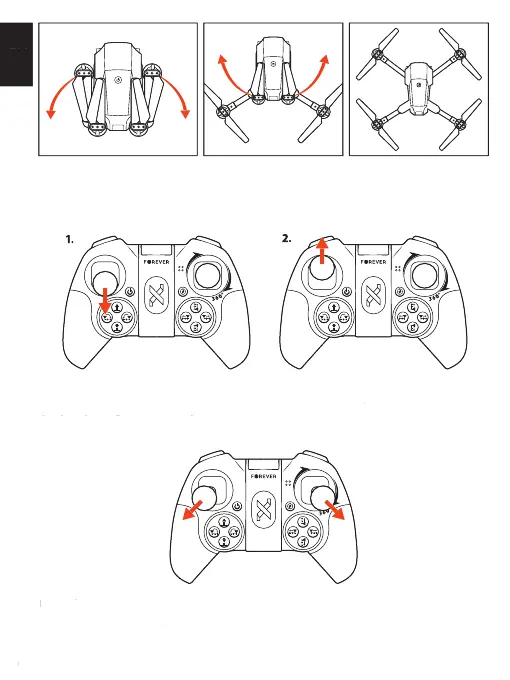
To activate the motors, move both levers on the remote as shown on the picture.
Manual start
1. Activate motors – press and hold joysticks for a moment as shown on the picture.
2. Move the height control lever up and hold it to start.
4. Check if weather conditions allow fl ight.
Warning! Do not use the drone in extremely hot, cold or rainy days! Do not use the drone during
wind with speed higher than 2.5 m/s, in urban areas, near parking lots and water tanks!
Warning! The drone may be activated or calibrated only on a straight, fl at surface. Placing
the drone on an inclined surface may prevent correct calibration.
Activation of motors and start Activation of motors and start
To activate the motors, move both levers on the remote as shown on the picture.
1. Activate motors – press and hold joysticks for a moment as shown on the picture.
2. Move the height control lever up and hold it to start.


 To Next Page