7
EN
Automatic start
1. Activate motors – press and hold joysticks for a moment as shown on the picture.
2. Click the auto-start button. The drone will start automatically and maintain an altitude of ap-
proximately one meter.
Regardless of the start method, the drone will automatically switch to altitude hold mode, there-
fore, there is no need to constantly control the throttle.
Drone control
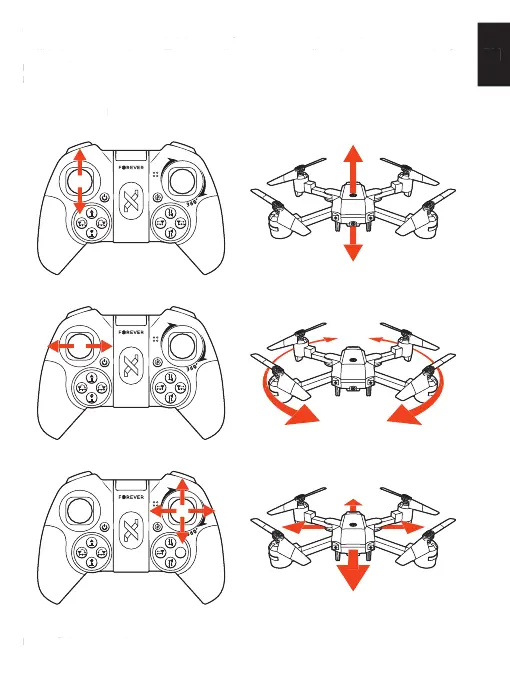
The left lever controls the drone’s fl ight altitude (up – down).
The left lever controls rotation of the drone (left – right).
The right lever controls fl ight forward – backwards, left – right.
Drone landing
During fl ight, the user has two landing options.
1. Activate motors – press and hold joysticks for a moment as shown on the picture.
2. Click the auto-start button. The drone will start automatically and maintain an altitude of ap-
Regardless of the start method, the drone will automatically switch to altitude hold mode, there-
fore, there is no need to constantly control the throttle.
Drone controlDrone control
The left lever controls the drone’s fl ight altitude (up – down).
The left lever controls rotation of the drone (left – right).
The right lever controls fl ight forward – backwards, left – right.
Drone landingDrone landing
During fl ight, the user has two landing options.


 To Next Page