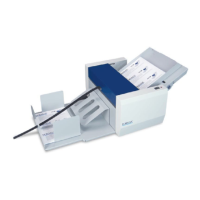
The Formax FD 90 / FD 95 Electric Rotary Perforators are designed to facilitate the easy separation of sheets through precise perforations. These devices utilize a friction feeding system, capable of perforating up to 113 sheets per minute for the FD 90 and up to 118 sheets per minute for the FD 95. They can create up to five parallel perforations in a single pass, with two perforating tools included as standard. The design incorporates a telescoping outfeed and an extendable infeed table, allowing for the processing of sheets up to 11" x 17". Adjustable side guides and fine-tuning knobs are provided to ensure precise positioning of sheets before perforation.
Technical Specifications:
- Paper Size: Letter, Half Sheet, Ledger.
- Recommended Paper Weight: 80 – 180 gsm. For 60 gsm paper, special guide strips (optional) are required.
- Speed: Up to 6,800 sheets/hour (FD 90), up to 7,080 sheets/hour (FD 95).
- Max. Feed Table Width: 13.8" (350mm).
- Feed Table Capacity: Max. sheet stacking height of 1.18" (30mm).
- Dimensions (Closed): 19.5" L x 14" W x 15" H.
- Dimensions (Fully Extended): 43" L x 14" W x 15" H.
- Shipping Dimensions: 21.5" L x 15.7" W x 16" H (545 x 400 x 405mm).
- Perforating Blade Capacity: Up to 5 tools (includes 2 perforating tools and 1 creasing wheel).
- Power: 110V / 60Hz (30W).
- Net Weight: 41 lbs (18.5 kg).
- Optional Equipment: Microperforation knife (17tpi), guide strips for 60 gsm paper.
Usage Features:
The installation process involves placing the perforator on a solid surface, sliding the infeed table into the machine, and securing it with screws. Power connection is made by connecting the male cable part to the female connector inside the left side cover, then plugging the power cord into an appropriate electrical outlet. It's crucial not to power on the machine until all initial adjustments have been made.
Infeed Table Adjustment: The feed tray can be pushed down until a lever locks it in the open position. Side guides are set to the paper width and secured with thumb screws. For small-sized sheets, paper should be aligned to the center of the table, ensuring contact with the rubber singulator pad. Fine adjustments to the side guides (± 5mm) are made using a screw adjustment knob. The squareness of the feed table to the infeed can be adjusted with a skew adjustment knob, aligning with a cross position mark for ideal centering. An extendable feed table extension supports large paper sheets. For sheets weighing 180 g/m² or more, manual single-sheet insertion is recommended.
Outfeed Table Adjustment: The output table slides outward to accommodate different sheet sizes. For larger sheets, an outfeed bridge and magnetic side guides can be attached to facilitate stacking and reduce paper jamming. It's important not to overload the table if it's not extended above the pad, to prevent damage.
Operation: The machine is started by pressing the power switch. The upper cover must be closed. Once paper is loaded correctly on the infeed table, the machine automatically begins feeding, and a red LED power indicator illuminates. If paper runs out or the upper cover is opened, the LED blinks. For the FD 95 model, speed can be adjusted using a variable speed knob to suit various paper weights. A counter displays processed sheets, which can be reset to zero using a dedicated button.
Replacing & Adjusting Perforating Tools or Creasing Wheels: Before any adjustments, the machine must be unplugged. The upper cover is opened, and an Allen wrench is used to loosen screws on the hubs of the blade guides. The shaft with blade guides is then removed. To adjust or remove tools, screws on their hubs are loosened, allowing them to move freely along the shafts. Once positioned, screws are tightened to secure the tools. The shaft with blade guides is then returned to its working position. The machine can accommodate up to five perforating tool sets, including the blade guide (two sets are included). Indented cutting tools should always be placed on the upper shaft. Tools are placed in a mirroring fashion from the center of the shaft. Guide pulleys must be on the outer edge of the document in a mirrored position. For 60 g/m² paper, optional guide strips, held in place by magnets on the upper and lower covers, must be used.
Removing Perforating and/or Creasing Wheels: To remove perforating or creasing wheels, first remove the shaft with the blade guides, then the shaft with the perforating wheels. The shaft is removed by holding the bearing, pulling it over the spring to the terminal position, then pushing the entire shaft back. The process is reversed for replacement.
Separator Pressure Adjustment: The pressure of the separator on the feed tire of the feeding shaft needs adjustment for accurate paper feeding. Turning the separator adjustment wheel clockwise increases pressure, while turning it counter-clockwise decreases pressure, which is recommended for thicker sheets.
Maintenance Features:
Removing Covers: Covers can only be removed after paper processing is complete and the machine is fully disconnected from the power supply. They must be reattached and secured before resuming work. Cover removal should only be performed by a trained technician, typically for service, belt replacement, or feed roller pressure adjustments.
Troubleshooting:
- Machine won't start, red LED on: Ensure the upper cover is closed and the optical sensor on the input feeding table is operating correctly.
- Paper gets crumpled: Open the upper cover, remove jammed paper, and ensure the feed roller turns freely and is in the proper position (refer to Figure A, pg 5).
- Several sheets fed simultaneously: Adjust the separator pressure using the adjustment wheel.
- Perforated cut is wide and frayed: Ensure blades are sharp and the clearance between tools is set correctly, with both tools touching on the external (non-beveled) side (refer to Figure A, pg 5).
- Machine jams: Check all mobile parts under the cover. Ensure blades are sharp and not crossed or misaligned.
General Maintenance: The machine should be cleaned once a month to remove dust and other impurities, with particular attention to the inside of the machine, especially near the electric motor.


 To Next Page
 General