6
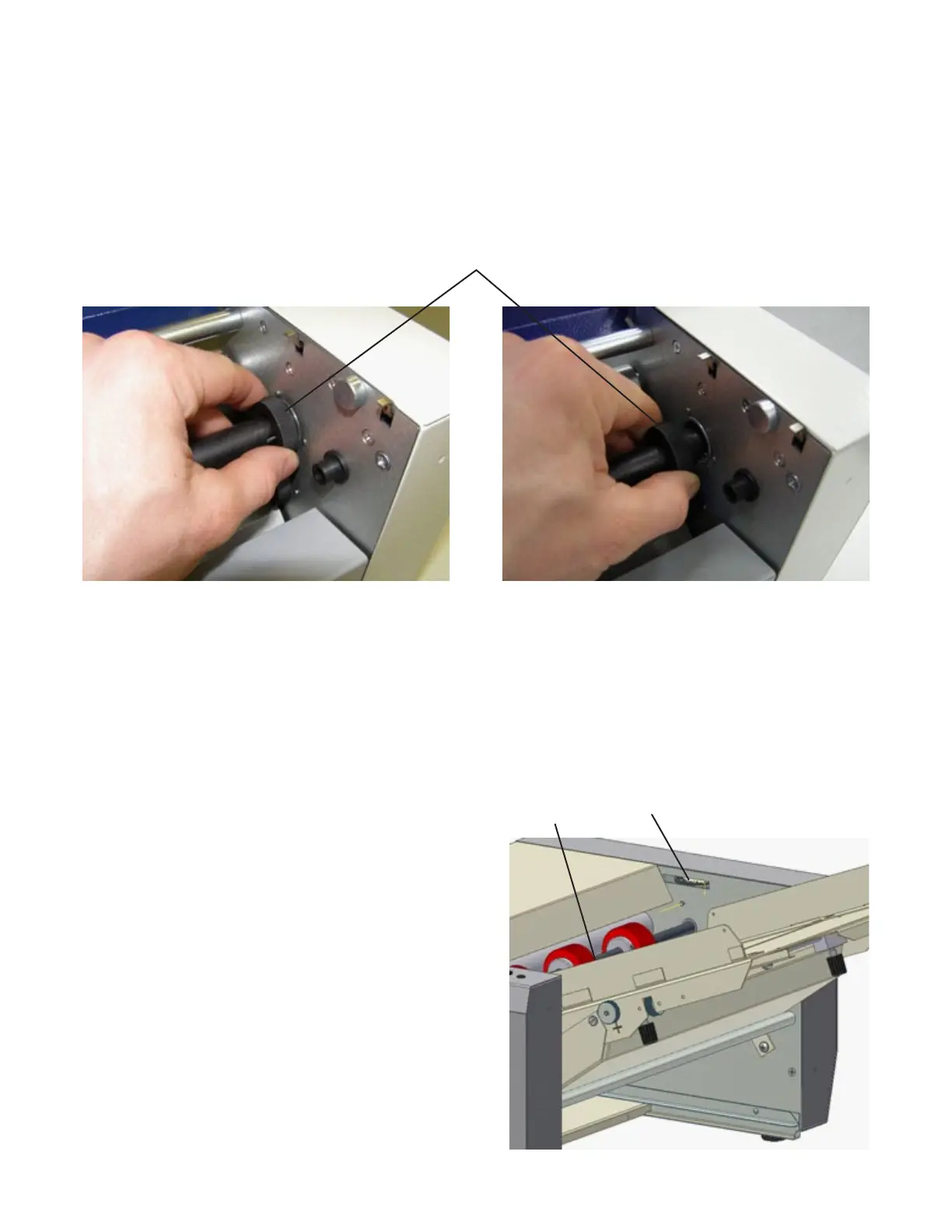
Toremovetheperforatingwheelsorthecreasingwheel,rstremovetheshaftwiththebladeguidesthenremovethe
shaft with the perforating wheels.
Removetheshaftbyholdingthebearing(29)andpullingitoverthespringintotheterminalposition.Thenpushthewhole
shaftbackincludingthebearing,andremovetheshaftfromthemachineasshownbelow.
Reversetheprocesstoreplacetheshaft.
Removing Perforating and/or Creasing Wheels
29
Coverscanberemovedafterpaperprocessinghasbeennishedandfullydisconnectedfromthepowersupply.Before
resumingwork,thecoversmustbereattachedandsecured.Thecoversshouldberemovedonlybyatrainedtechnician.
NOTE:Thecoversshouldberemovedonlywhenserviceinterference,beltreplacementorfeedrollerpressureisrequired.
Removing Covers
The pressure of the separator on the feed tire (30) of the
feeding shaft must be adjusted to accurately feed the paper
from the feeding table (1).
Turn the separator adjustment wheel (31) clockwise to
increase the pressure on the separator. If a thicker sheet
is fed into the feeding table, the pressure of the separator
should be decreased by turning the wheel counterclockwise.
Separator Pressure Adjustment
31
30


 To Next Page